
Screenshots
About this Mod
Recrafted
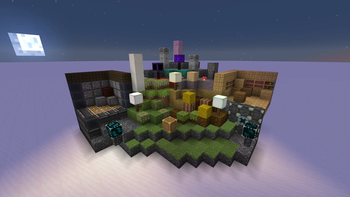
This mod makes the most of Minecraft by adding blocks for a variety of obscure or difficult-to-use textures that are already in-game. The textures are resource pack compatible as well. Some mods I recommend using along with this mod are Immersive Weathering by astralordana, and Framed Blocks by XFactHD. There are no plans for making a Fabric version of this mod in the future.
How to obtain non-craftable blocks:
Azalea and grass growths can be obtained by shearing grass blocks, azaleas, and azalea grass.
Path turf and farmland turf can be obtained by flattening and tilling regular turf. Right click a moist farmland turf with a water bottle to moisten it
Eroded deepslate can be obtained by scraping deepslate with a pickaxe. Inscribed stone can be obtained by scraping inset stone with a pickaxe.
Cracking ice can be obtained by right clicking ice with a pickaxe. Right clicking it multiple times will continue to crack it until it breaks, however when it is broken through cracking it will not leave water behind.
Raw mushroom can be obtained by scraping any vanilla mushroom block with an axe.
Oiled wood can be obtained by right clicking dark oak planks with an ink sac.
Polished wood and polished stone can be obtained by waxing birch planks and stone respectively.
Available Versions
How to Install Recrafted on Your Server
Order Server
Order a Minecraft Java server with at least 3 GB RAM (4 GB recommended).
Set forge Loader
In the panel under "Egg", select the forge loader and matching Minecraft version (1.19.4).
Install Mod
Open the mod browser in the dashboard and search for "Recrafted". Click "Install" – done! Alternatively, upload the .jar via SFTP to the /mods folder.
Compatibility
Mod Loaders
Minecraft Versions
1.19.4
Server-side
✓ RequiredRecommended RAM
4 GB(min. 3 GB)Frequently Asked Questions
Recrafted server crashes on startup – what to do?
Most common cause: wrong forge version or insufficient RAM. Check the server log (latest.log) for "OutOfMemoryError" or "Mixin" errors. With Mado Hosting: ensure at least 3 GB RAM is allocated and the loader matches the mod version (1.19.4). You can switch loaders with one click in the panel.
Is Recrafted compatible with forge?
Recrafted officially supports forge for Minecraft 1.19.4. The Mado dashboard automatically detects incompatible loader combinations.
Server lagging with Recrafted – how to optimize performance?
Recommended RAM: 4 GB (per 8 players). Use /spark profiler to check if Recrafted consumes the most tick time. Common fixes: reduce server view-distance to 8-10, install "performant" or "starlight" as supplementary mods on Forge. With Mado Hosting, your server runs on NVMe SSDs with dedicated CPU cores for minimal latency.
Similar Mods

![[ETF] Entity Texture Features](https://cdn.modrinth.com/data/BVzZfTc1/af683d206d50b05258d865b0d6e4aa2f2cee12f2_96.webp)
![[EMF] Entity Model Features](https://cdn.modrinth.com/data/4I1XuqiY/6e5bbd0d06b1741bfdab6c0cfab6de8fdaf0064c_96.webp)



Rent Modded Server
Install Recrafted with just one click on your server.