
Recycling Mod
A Simple mod to economize materials. Beta State
Screenshots


About this Mod
Recycling Mod
This mod allows people to recycle Items
This mod is the successor of the Recycling Mod
Made by the same author, but this one was Rewritten for Fabric, and now adds more mechanics, and it is now in Beta, no longer in alpha
Disclaimer
THIS MOD IS CURRENTLY IN BETA AND BUG/GLITCHES MAY OCCOUR
v1.0.0-beta WAS MADE FOR Minecraft 1.21.4, OTHER Minecraft VERSIONS MAY NOT BE SUPPORTED
How to Recycle Items
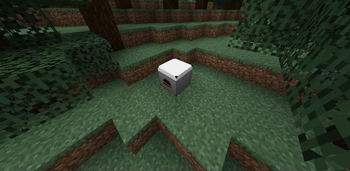
To recycle them you use an Powder Recycler
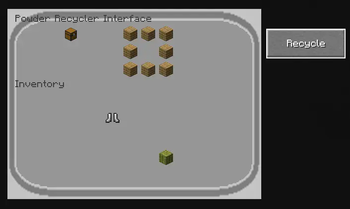
To recycle items open the GUI and put the items you want to recycle, and click the recycle button:
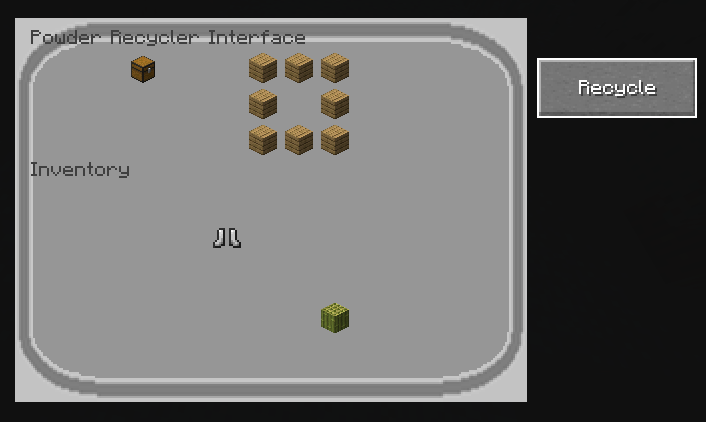
In the image above the Chest is the input item, and the other 8 planks are inside the output slots;
In the GUI we have 9 output slots, 1 input slot and 1 modifer slot;
Modifiers
Modifiers modify the output of the recipe, they are inserted in the modifier slot
Currently we have only one modifer, which is the Diamond Modifier(Also Known As Diamontifier)
Modifiers are registered using Java code
Diamontifier
This modifier changes some of the output items to Diamonds.
The Diamontifier has 32 of Durability, and everytime the recipe is modified one durability is consumed;
new PowderRecyclerModifer() {

        @Override
        public ItemStack[] modifyOutput(ItemStack modifierStack, ItemStack[] outputs) {
          double d = RND.nextDouble();
          if (d > 0.4) {
            return outputs;
          }
          boolean mod = false;
          for (int i = 0; i < outputs.length; i++) {
            ItemStack output = outputs[i].copy();
            if (output.getItem() == Registries.ITEM.get(Identifier.ofVanilla("diamond"))
                || output.getItem() == Registries.ITEM.get(Identifier.ofVanilla("air")))
              continue;
            d = RND.nextDouble();
            if (d < (0.5d / Math.pow(1.5, output.getCount()))) {
              outputs[i] = new ItemStack(Registries.ITEM.getEntry(Identifier.ofVanilla("diamond")).get(),
                  output.getCount(), output.getComponentChanges());
              if (mod == false) {
                mod = true;
              }
              LOGGER.info("Modified stack(" + output.getItem().toString() + ")");
            }
          }
          if (mod == true) {
            LOGGER.info("Modifer got damaged");
            modifierStack.setDamage(modifierStack.getDamage() + 1);
          }
          return outputs;

        }

      }
As seen in the code above, we see that the chance of Replacing one item slot with an Diamond is:
0.5 / (1.5 ^ count)
count is the item count
And that the chance of attemping to modify the slot is: 0.4
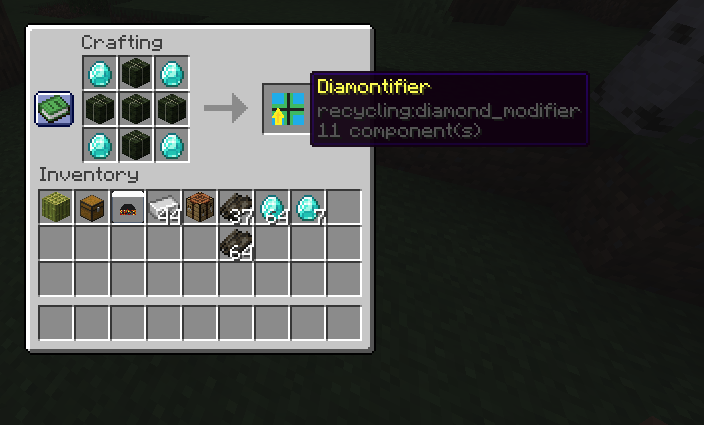
To craft a Diamontifier you need to use the following Recipe:
Why Recycling?
Recycling is a mod that allows you to define custom recipes for recycling, and allows you to re-use items.
Available Versions
How to Install Recycling Mod on Your Server
Order Server
Order a Minecraft Java server with at least 3 GB RAM (4 GB recommended).
Set fabric Loader
In the panel under "Egg", select the fabric loader and matching Minecraft version (1.21.7).
Install Mod
Open the mod browser in the dashboard and search for "Recycling Mod". Click "Install" – done! Alternatively, upload the .jar via SFTP to the /mods folder.
Compatibility
Mod Loaders
Minecraft Versions
1.21.7, 1.21.6, 1.21.5 (+1 more)
Server-side
✓ RequiredRecommended RAM
4 GB(min. 3 GB)Frequently Asked Questions
Recycling Mod server crashes on startup – what to do?
Most common cause: wrong fabric version or insufficient RAM. Check the server log (latest.log) for "OutOfMemoryError" or "Mixin" errors. With Mado Hosting: ensure at least 3 GB RAM is allocated and the loader matches the mod version (1.21.7). You can switch loaders with one click in the panel.
Is Recycling Mod compatible with fabric?
Recycling Mod officially supports fabric for Minecraft 1.21.7, 1.21.6, 1.21.5. The Mado dashboard automatically detects incompatible loader combinations.
Server lagging with Recycling Mod – how to optimize performance?
Recommended RAM: 4 GB (per 8 players). Use /spark profiler to check if Recycling Mod consumes the most tick time. Common fixes: reduce server view-distance to 8-10, install "performant" or "starlight" as supplementary mods on Forge. With Mado Hosting, your server runs on NVMe SSDs with dedicated CPU cores for minimal latency.
Similar Mods




Rent Modded Server
Install Recycling Mod with just one click on your server.