
Screenshots
About this Mod
RedCheck
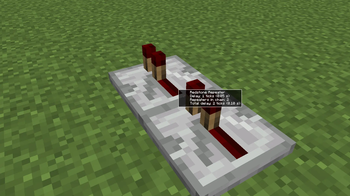
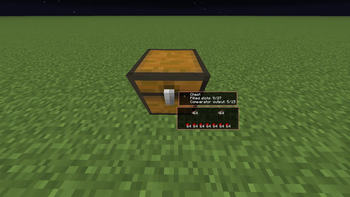
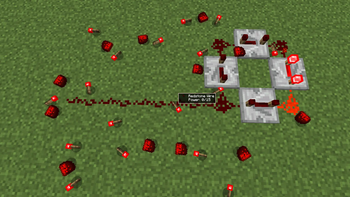
RedCheck is a client-side Fabric mod that displays useful redstone information directly in your HUD when you look at redstone-related blocks.
It is designed for players who build, debug, test, or learn redstone contraptions and want fast visual feedback without opening F3, guessing comparator output, or manually checking every block.
Client-side only
RedCheck works entirely on the client.
- No server installation required
- Uses only data already visible to the Minecraft client
- Can cache container contents after you open them once
Features
When looking at supported blocks, RedCheck can show information such as:
- Redstone power
- Repeater delay
- Repeater chain length and total delay
- Comparator mode
- Container fill level
- Estimated comparator output from containers
- Powered / lit / open state
- Note block note and instrument
- Sculk sensor phase and calibrated filter
- Lectern book presence
- Daylight detector mode and signal
- Composter level
- Cauldron fill level
- Target block signal
- Weighted pressure plate output
- Approximate TNT cluster estimate
Configurable HUD
The HUD is highly configurable:
- Enable / disable the HUD by default
- Auto-enable HUD while holding or wearing specific items
- Toggle 3D item preview
- Show container panel while holding Shift
- Enable local container cache
- Configure repeater scan length
- Enable or disable specific HUD lines individually
You can customize which types of information are shown, so the HUD stays clean and useful.
Container cache
Because this mod is client-side only, some container information is only available after the client has seen it.
RedCheck can cache container contents locally after you open a container once, allowing the HUD to show approximate comparator output and fill level later in the world.
Available Versions
How to Install RedCheck on Your Server
Order Server
Order a Minecraft Java server with at least 3 GB RAM (4 GB recommended).
Set fabric Loader
In the panel under "Egg", select the fabric loader and matching Minecraft version (1.21.11).
Install Mod
Open the mod browser in the dashboard and search for "RedCheck". Click "Install" – done! Alternatively, upload the .jar via SFTP to the /mods folder.
Compatibility
Mod Loaders
Minecraft Versions
1.21.11, 1.21.10
Server-side
✗ UnsupportedRecommended RAM
4 GB(min. 3 GB)Frequently Asked Questions
RedCheck server crashes on startup – what to do?
Most common cause: wrong fabric version or insufficient RAM. Check the server log (latest.log) for "OutOfMemoryError" or "Mixin" errors. With Mado Hosting: ensure at least 3 GB RAM is allocated and the loader matches the mod version (1.21.11). You can switch loaders with one click in the panel.
Is RedCheck compatible with fabric?
RedCheck officially supports fabric for Minecraft 1.21.11, 1.21.10. The Mado dashboard automatically detects incompatible loader combinations.
Server lagging with RedCheck – how to optimize performance?
Recommended RAM: 4 GB (per 8 players). Use /spark profiler to check if RedCheck consumes the most tick time. Common fixes: reduce server view-distance to 8-10, install "performant" or "starlight" as supplementary mods on Forge. With Mado Hosting, your server runs on NVMe SSDs with dedicated CPU cores for minimal latency.
Similar Mods




![[ETF] Entity Texture Features](https://cdn.modrinth.com/data/BVzZfTc1/af683d206d50b05258d865b0d6e4aa2f2cee12f2_96.webp)
![[EMF] Entity Model Features](https://cdn.modrinth.com/data/4I1XuqiY/6e5bbd0d06b1741bfdab6c0cfab6de8fdaf0064c_96.webp)
Rent Modded Server
Install RedCheck with just one click on your server.