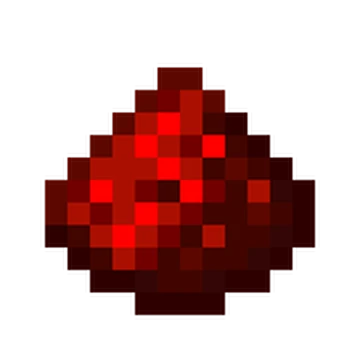
Redstone Equipment
Add a balanced new armor and tool set inspired by the power of Redstone to your Minecraft adventure!
Screenshots
About this Mod
Русское описание
🪓✨ Редстоуновая экипировка — добавь в свой мир Майнкрафта новый сбалансированный сет брони и инструментов, вдохновлённых силой редстоуна!
🛡️ Прочность и защита между железом и алмазом, отличная зачаровываемость и классные бонусы — редстоуновая броня и инструменты подойдут для любого приключения.
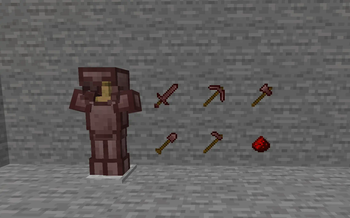
🔧 В комплекте: шлем, нагрудник, поножи, ботинки, меч, кирка, топор, лопата и мотыга — всё с уникальными параметрами, подходящими для честной игры.
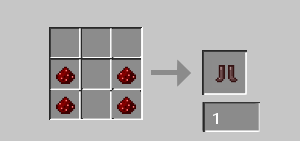
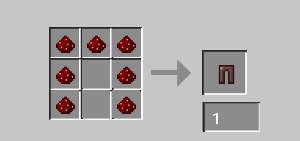
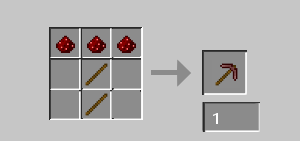
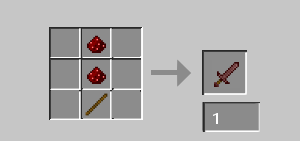
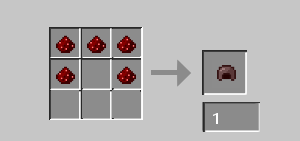
📖 Все рецепты доступны в галерее рецептов.
⚖️ Мод сбалансирован для ванильного выживания и не ломает игровой баланс.
👀 Обязательно загляните в мой профиль — у меня есть и другие классные моды!
💬 Если у вас есть баги или вопросы — заходите на мой Discord-сервер.
🔔 Подписывайтесь на обновления, чтобы ничего не пропустить!
English Description
🪓✨ Redstone Gear — bring a balanced new armor and tool set to your Minecraft world, inspired by the power of Redstone!
🛡️ Durability and protection between iron and diamond, great enchantability, and unique stats — redstone armor and tools fit perfectly into any adventure.
🔧 Includes helmet, chestplate, leggings, boots, sword, pickaxe, axe, shovel, and hoe — all with custom, balanced stats for fair play.
📖 All crafting recipes are available in the recipe gallery.
⚖️ The mod is balanced for vanilla survival and doesn’t break the game.
👀 Check out my profile for more cool mods!
💬 Join my Discord if you have any bugs or questions.
🔔 Follow for updates so you don’t miss anything!
Available Versions
How to Install Redstone Equipment on Your Server
Order Server
Order a Minecraft Java server with at least 3 GB RAM (4 GB recommended).
Set forge Loader
In the panel under "Egg", select the forge loader and matching Minecraft version (1.21.4).
Install Mod
Open the mod browser in the dashboard and search for "Redstone Equipment". Click "Install" – done! Alternatively, upload the .jar via SFTP to the /mods folder.
Compatibility
Mod Loaders
Minecraft Versions
1.21.4, 1.21.1, 1.20.1 (+3 more)
Server-side
✓ RequiredRecommended RAM
4 GB(min. 3 GB)Frequently Asked Questions
Redstone Equipment server crashes on startup – what to do?
Most common cause: wrong forge version or insufficient RAM. Check the server log (latest.log) for "OutOfMemoryError" or "Mixin" errors. With Mado Hosting: ensure at least 3 GB RAM is allocated and the loader matches the mod version (1.21.4). You can switch loaders with one click in the panel.
Is Redstone Equipment compatible with forge and neoforge?
Redstone Equipment officially supports forge, neoforge for Minecraft 1.21.4, 1.21.1, 1.20.1. The Mado dashboard automatically detects incompatible loader combinations.
Server lagging with Redstone Equipment – how to optimize performance?
Recommended RAM: 4 GB (per 8 players). Use /spark profiler to check if Redstone Equipment consumes the most tick time. Common fixes: reduce server view-distance to 8-10, install "performant" or "starlight" as supplementary mods on Forge. With Mado Hosting, your server runs on NVMe SSDs with dedicated CPU cores for minimal latency.
Similar Mods

![[ETF] Entity Texture Features](https://cdn.modrinth.com/data/BVzZfTc1/af683d206d50b05258d865b0d6e4aa2f2cee12f2_96.webp)
![[EMF] Entity Model Features](https://cdn.modrinth.com/data/4I1XuqiY/6e5bbd0d06b1741bfdab6c0cfab6de8fdaf0064c_96.webp)



Rent Modded Server
Install Redstone Equipment with just one click on your server.
Details
- License
- Creative Commons Attribution Non Commercial No Derivatives 4.0 International
- Server-side
- Required