
Redstone Frequencies
Wireless Redstone with a clean and simple Frequency method
Screenshots
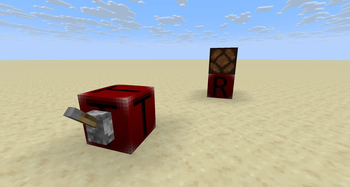
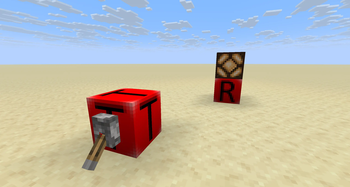

About this Mod
Redstone Frequencies
Introduction
Tired of messy Redstone dust and limitations on signal transmission? Redstone Frequencies is a powerful, intuitive, and server-friendly solution for all your wireless Redstone needs. Designed to feel like a natural extension of the vanilla game, this mod allows you to transmit Redstone signals wirelessly over any distance, making your contraptions cleaner, more compact, and more capable than ever before. Whether you're a technical Redstone engineer or just want to open a door from far away, this mod is for you!
Features
Wireless Redstone: Transmit signals instantly with the Redstone Transmitter and Redstone Receiver. No more complicated wiring!
Full Analog Signal Strength: This mod transmits the full Redstone signal strength from 0 to 15. It's not just on/off, allowing for complex analog contraptions to work wirelessly.
Frequency Channels: Set a numerical frequency on your blocks to create independent channels. Run multiple wireless networks in the same area without any interference.
User-Friendly GUI: Right-click a block with an empty hand to open a clean and simple interface. Type in the exact frequency you want, no more tedious clicking!
Private Frequencies (Server-Friendly!): Protect your creations on a multiplayer server! With a simple toggle in the GUI, you can set your frequency to "Private." Only blocks placed by you will be able to communicate on that channel.
Admin Override: Server operators with permission level 2 or higher can access and modify any block, regardless of its private status, making server management a breeze.
Owner Display: The GUI clearly shows the name of the player who placed the block, providing full transparency on servers.
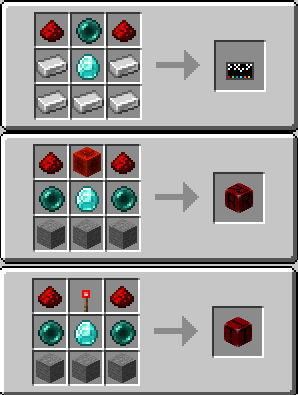
The Linking Tool: Craft the Redstone Linking Tool to instantly copy and paste a block's full configuration (Frequency and Private Status) from one block to another. Perfect for setting up large networks quickly and without errors.
Tool Reset: Clear the settings stored on your Linking Tool by simply Shift + Right-Clicking in the air.
Visual & Audio Feedback: Blocks change their texture to a glowing "on" state when active. Additionally, helpful sound effects provide satisfying feedback for every interaction.
REI Compatible: Compatible with REI to see crafting recipes. Recipes can be found in the gallery.
Pictures
(Textures are WIP I think.. I'm not good in creating textures. They will be replaced in a future version)
Spoiler


Usage, Issues and Modpacks
You can use this Mod in all your Modpacks. Found any problems, issues or just have a good idea? Contact me or post your issue on GitHub. :)
Available Versions
How to Install Redstone Frequencies on Your Server
Order Server
Order a Minecraft Java server with at least 3 GB RAM (4 GB recommended).
Set fabric Loader
In the panel under "Egg", select the fabric loader and matching Minecraft version (1.21.9).
Install Mod
Open the mod browser in the dashboard and search for "Redstone Frequencies". Click "Install" – done! Alternatively, upload the .jar via SFTP to the /mods folder.
Compatibility
Mod Loaders
Minecraft Versions
1.21.9, 1.21.8
Server-side
✓ RequiredRecommended RAM
4 GB(min. 3 GB)Frequently Asked Questions
Redstone Frequencies server crashes on startup – what to do?
Most common cause: wrong fabric version or insufficient RAM. Check the server log (latest.log) for "OutOfMemoryError" or "Mixin" errors. With Mado Hosting: ensure at least 3 GB RAM is allocated and the loader matches the mod version (1.21.9). You can switch loaders with one click in the panel.
Is Redstone Frequencies compatible with fabric?
Redstone Frequencies officially supports fabric for Minecraft 1.21.9, 1.21.8. The Mado dashboard automatically detects incompatible loader combinations.
Server lagging with Redstone Frequencies – how to optimize performance?
Recommended RAM: 4 GB (per 8 players). Use /spark profiler to check if Redstone Frequencies consumes the most tick time. Common fixes: reduce server view-distance to 8-10, install "performant" or "starlight" as supplementary mods on Forge. With Mado Hosting, your server runs on NVMe SSDs with dedicated CPU cores for minimal latency.
Similar Mods




Rent Modded Server
Install Redstone Frequencies with just one click on your server.