
Redstone Essentials
A mod that aims to improve the redstone experience when working with complex computational builds
Screenshots

About this Mod

Mod information
Redstone Essentials is a server and client-side mod that adds a lot of quality of life features, enhancements, and debugging features to the game.
All features are made to fully work in multiplayer!!!
Why does this mod exist?
I reeaaaaallly love the mod Redstone Tools by Mattbatwings. (Seriously, its amazing check it out here)
There were however a few issues i had with the mod, which i will list here:
- As of now it does not support multiplayer
- It is centered around worldedit, whereas i prefer axiom
- I wanted some more debugging features
So i decided to make my own redstone utility mod, which has:
- Full multiplayer support
- Adds features to axiom (WIP)
- Has a lot of features used for debugging redstone (WIP)
Here are some of the most significant features as of version 1.0.6
Dust Place
This works by pressing a keybind to toggle the ability. When the ability is toggled on, placing any full block will place a redstone dust on top, as shown below.
Dust Place Demonstration

Swap Block
This is another ability that works by swapping the block in your hand with another. The default mode is concrete mode, so if you are holding white concrete and press the keybind, it will swap to white stained glass. Pressing the keybind again will swap it back to white concrete. When wool mode is enabled, having white concrete will swap to white stained glass, and then when pressing the keybind again, it will swap to white wool. Now it will swap between wool and glass when pressing the keybind. This behaviour is demonstrated below.
Swap Block Demonstration

Dynamic keys
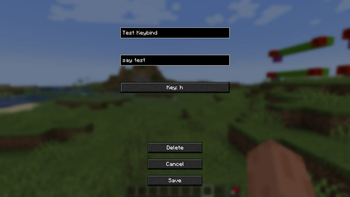
This feature allows you to add custom keybinds to the game that allow you to run commands with modifiers like run intervals and much more. The full documentation for this can be found on the wiki.
Pings
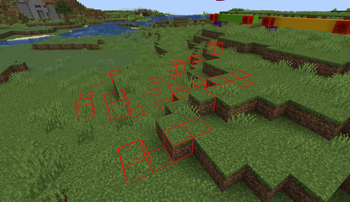
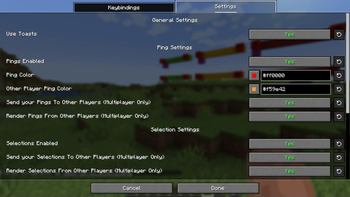
The ping system allows you to highlight blocks with a keybind, and give different ping colors to different players. This can be useful for keeping track of certain areas, or drawing attention to certain blocks. Pings render beyond render distance, so it can also be used for locating builds you previously highlighted. Pings do not render through blocks. The documentation for the ping system can be found on its wiki page. The ping system is demonstrated below.
Ping System Demo

Realtime Byte Output
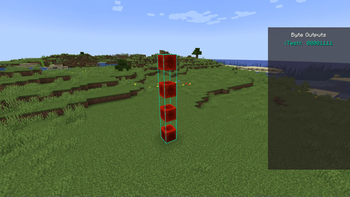
Realtime byte output, or RTBO for short allows you to make a selection with a label, which will read a binary value from that area and display it on your hud as seen in the demonstration below. This is really usefull for debugging multiple binary inputs and outputs, especially in compact builds. You can also configure the output base for the display. The full RTBO documentation van be found here.
Realtime Byte Output

Bitmap Printer
This feature has a niche usecase, but can be adapted for other uses as well. It supports printing out bitmap images as x and y coordinates, and is intended for use on screens with frame buffers. This could also be usefull for encoding binary values on the x, and their adresses on the y to quickly write to a ram for example. This feature is really complex and is better explained on the wiki.
Singal Strength Giver
This is another ability with two keybinds that allows you to get a barrel or shulkerbox containing any signal strength. For example, if you hold the barrel keybind and press 5, you will get a barrel with signal strength 5. If you press the shulker keybind, hold shift and press 3, you will get a shulkerbox containing signal strength 13.
An example of this working can be seen below.
Signal Strength Giver

And much more...
The mod has more features and a lot more in the works, but i cant document them all here. If you want to have an up to date list of features, you can get it here.
Sessions
All pings, selecions and other persistent data related features are stored in a file when you disconnect from a world. These are stored locally for each server individually (including singleplayer worlds), so you could have some selections on one server, and have different selections on another and they would load accordingly.
Sessions do not contain multiplayer selections, but instead the session manager request multiplayer selections from all online players when you join and will load those in accordingly.
More information on sessions can be found on its corresponding wiki page.
Dependencies
Required
The mod only requires fabric api to be installed alongside it. You can find the minimum required version in the other files list for each release version.
Optional
The mod has optional support for these mods:
- Midnightconfig, for a really clean and easy to use config
- Modmenu, to be able to edit the config in-game
- Axiom, to be able to use the axiom extensions
The minimum required versions of the above mentioned mods can also be found in the other files list for your release version of choise.
Final Note
This mod is still in active development.
If you find any issues while using the mod, or have a feature in mind you would like to get added, make sure to post them at the projects issue page.
If you have any questions about how a feature works, make sure you check the wiki, before asking in the discord server.
Finally, if you are curious about what is coming, or what im working on currently, you can check out the public roadmap.
Thanks for checking out this mod!
Available Versions
How to Install Redstone Essentials on Your Server
Order Server
Order a Minecraft Java server with at least 3 GB RAM (4 GB recommended).
Set fabric Loader
In the panel under "Egg", select the fabric loader and matching Minecraft version (1.21.7).
Install Mod
Open the mod browser in the dashboard and search for "Redstone Essentials". Click "Install" – done! Alternatively, upload the .jar via SFTP to the /mods folder.
Compatibility
Mod Loaders
Minecraft Versions
1.21.7, 1.21.4, 1.21.3 (+3 more)
Server-side
~ OptionalRecommended RAM
4 GB(min. 3 GB)Frequently Asked Questions
Redstone Essentials server crashes on startup – what to do?
Most common cause: wrong fabric version or insufficient RAM. Check the server log (latest.log) for "OutOfMemoryError" or "Mixin" errors. With Mado Hosting: ensure at least 3 GB RAM is allocated and the loader matches the mod version (1.21.7). You can switch loaders with one click in the panel.
Is Redstone Essentials compatible with fabric?
Redstone Essentials officially supports fabric for Minecraft 1.21.7, 1.21.4, 1.21.3. The Mado dashboard automatically detects incompatible loader combinations.
Server lagging with Redstone Essentials – how to optimize performance?
Recommended RAM: 4 GB (per 8 players). Use /spark profiler to check if Redstone Essentials consumes the most tick time. Common fixes: reduce server view-distance to 8-10, install "performant" or "starlight" as supplementary mods on Forge. With Mado Hosting, your server runs on NVMe SSDs with dedicated CPU cores for minimal latency.
Similar Mods




Rent Modded Server
Install Redstone Essentials with just one click on your server.