
Redstone Signal Visualizer
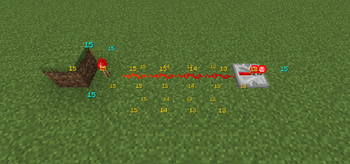
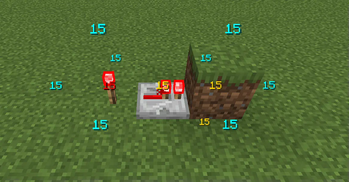
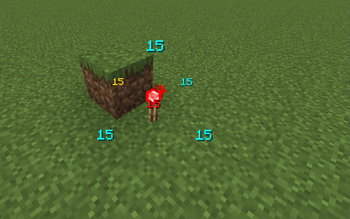
A mod that lets you visualize redstone signals with neat numbers.
Screenshots
About this Mod
Redstone Signal Visualizer
See every redstone signal at a glance — debug, optimize, and design with confidence.
Overview
Redstone Signal Visualizer overlays real-time redstone signal strengths in-world so builders, redstone engineers, and server admins can inspect and debug circuits quickly without changing mechanics.
This mod splits responsibilities between server and client: the server performs authoritative sampling of redstone state (including comparator outputs and other values the client is not allowed to access), ensuring visualizations reflect the true world state. The client focuses on rendering overlays, handling input, and per-player customization. In singleplayer or when the server-side component is absent, the client can perform a best-effort local inspection, but it may lack comparator-level accuracy.
Features
- Real-time visualization of redstone signal strength and propagation
- Server-side sampling with optional client fallback for correctness
- Per-player client rendering: colors, opacity, and visualization modes
- Configurable update delay and radius to control performance overhead
- Keybinding support for toggle, hold-to-show, cycle modes, and freeze
- In-game config UI plus editable
config/redstone_visualizer.json
How it works — Server vs Client
Server-side (authoritative): The server samples block updates and redstone propagation to compute authoritative signal strengths. This ensures visualizations reflect the true world state (good for multiplayer and server-based debugging).
Client-side (rendering & local fallback): The client receives updates from the server and renders overlays (lines, gradients, labels, and animations). When the server-side component is absent (or for quick singleplayer mode), the client can locally inspect blocks for a best-effort visualization.
Interaction: The server sends either periodic updates or responds to client requests (depending on configuration). Clients control what they render (radius, mode, colors) so multiple players can visualize independently without forcing server-side rendering for everyone.
Performance & Player Control
- Update delay: Adjustable refresh interval (ms). Increase the delay to reduce CPU/network usage, or decrease it for snappier updates.
- Radius: Limits how far from the player signals are visualized. Lower radius reduces overhead on busy servers and lower-end clients.
- Per-player limits: Players can set their own radius and refresh rate to limit client-side cost and avoid overloading servers.
Tip: On high-population servers increase the update delay and reduce radius for best performance.
Settings & Customization
Settings are available via the in-game UI (Controls / Mods / Config) and via config/redstone_visualizer.json.
You can customize:
- Enable/disable the mod globally or per-player
- Display toggles: turn on/off
showEmits,showReceives, andshowComparatorsto control which signal types are rendered - Colors & opacity for default/obstructed/emitter/comparator signals
- Radius & update delay: control how far and how often updates are performed to trade responsiveness for performance
- Behavior: request frequency, server push vs client poll, and how much data is sent
Note: The client currently registers a single keybinding (default o) to open the mod's options screen.
Installation
- Drop the mod JAR into your
mods/folder (Fabric loader supported). Restart the client and/or server. - Server admins: install the server component on the server for authoritative visuals in multiplayer.
Usage Scenarios & Examples
- Quickly locate signal leaks or unintended clocks
- Measure propagation delay visually across repeaters and comparators
- Educate players by showing signal strength gradients during tutorials
- Debug server-side redstone issues without hosing performance
Available Versions
How to Install Redstone Signal Visualizer on Your Server
Order Server
Order a Minecraft Java server with at least 3 GB RAM (4 GB recommended).
Set fabric Loader
In the panel under "Egg", select the fabric loader and matching Minecraft version (1.21.11).
Install Mod
Open the mod browser in the dashboard and search for "Redstone Signal Visualizer". Click "Install" – done! Alternatively, upload the .jar via SFTP to the /mods folder.
Compatibility
Mod Loaders
Minecraft Versions
1.21.11, 1.21.10, 1.21.8 (+11 more)
Server-side
~ OptionalRecommended RAM
4 GB(min. 3 GB)Frequently Asked Questions
Redstone Signal Visualizer server crashes on startup – what to do?
Most common cause: wrong fabric version or insufficient RAM. Check the server log (latest.log) for "OutOfMemoryError" or "Mixin" errors. With Mado Hosting: ensure at least 3 GB RAM is allocated and the loader matches the mod version (1.21.11). You can switch loaders with one click in the panel.
Is Redstone Signal Visualizer compatible with fabric?
Redstone Signal Visualizer officially supports fabric for Minecraft 1.21.11, 1.21.10, 1.21.8. The Mado dashboard automatically detects incompatible loader combinations.
Server lagging with Redstone Signal Visualizer – how to optimize performance?
Recommended RAM: 4 GB (per 8 players). Use /spark profiler to check if Redstone Signal Visualizer consumes the most tick time. Common fixes: reduce server view-distance to 8-10, install "performant" or "starlight" as supplementary mods on Forge. With Mado Hosting, your server runs on NVMe SSDs with dedicated CPU cores for minimal latency.
Similar Mods




![[ETF] Entity Texture Features](https://cdn.modrinth.com/data/BVzZfTc1/af683d206d50b05258d865b0d6e4aa2f2cee12f2_96.webp)
![[EMF] Entity Model Features](https://cdn.modrinth.com/data/4I1XuqiY/6e5bbd0d06b1741bfdab6c0cfab6de8fdaf0064c_96.webp)
Rent Modded Server
Install Redstone Signal Visualizer with just one click on your server.