RedstoneHud
Look at a redstone repeater or comparator to reveal its hidden state: repeater delay and lock, or comparator mode and output.
Screenshots
About this Mod
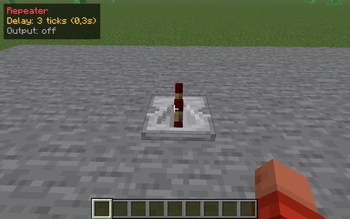
RedstoneHud is a clean look-at info layer for redstone builders. Point your crosshair at a repeater or comparator and a small readout appears in the top-left of your screen.
Repeater
- Delay: X ticks (Y.Zs) - the configured tick delay (1-4) and its real time in seconds
- Locked - shown when the repeater is currently locked by a side repeater/comparator
- Output: on / off - whether it is passing a signal
Comparator
- Mode: Compare / Subtract - which mode the comparator is in
- Output: on / off - whether it is outputting a signal
Why
Vanilla gives you no way to read a repeater's delay setting or a comparator's mode at a glance - you have to break the block or right-click and count the steps, which is slow and easy to get wrong on a tight circuit. RedstoneHud just tells you, the moment you look at it. No more guessing whether that repeater is on 2 or 3 ticks, or whether the comparator is in subtract mode.
Details
- Pure client-side info HUD - reads only vanilla block state (
delay,locked,mode,powered). No mixins, no block entities, no gameplay changes. - Reads properties generically by their stable names, so it stays accurate across versions even as mappings change.
- Toggle the HUD on/off with G.
- Works on Minecraft 1.21.8 - 1.21.11 (Fabric).
Available Versions
How to Install RedstoneHud on Your Server
Order Server
Order a Minecraft Java server with at least 3 GB RAM (4 GB recommended).
Set fabric Loader
In the panel under "Egg", select the fabric loader and matching Minecraft version (1.21.11).
Install Mod
Open the mod browser in the dashboard and search for "RedstoneHud". Click "Install" – done! Alternatively, upload the .jar via SFTP to the /mods folder.
Compatibility
Mod Loaders
Minecraft Versions
1.21.11, 1.21.10, 1.21.9 (+1 more)
Server-side
✗ UnsupportedRecommended RAM
4 GB(min. 3 GB)Frequently Asked Questions
RedstoneHud server crashes on startup – what to do?
Most common cause: wrong fabric version or insufficient RAM. Check the server log (latest.log) for "OutOfMemoryError" or "Mixin" errors. With Mado Hosting: ensure at least 3 GB RAM is allocated and the loader matches the mod version (1.21.11). You can switch loaders with one click in the panel.
Is RedstoneHud compatible with fabric?
RedstoneHud officially supports fabric for Minecraft 1.21.11, 1.21.10, 1.21.9. The Mado dashboard automatically detects incompatible loader combinations.
Server lagging with RedstoneHud – how to optimize performance?
Recommended RAM: 4 GB (per 8 players). Use /spark profiler to check if RedstoneHud consumes the most tick time. Common fixes: reduce server view-distance to 8-10, install "performant" or "starlight" as supplementary mods on Forge. With Mado Hosting, your server runs on NVMe SSDs with dedicated CPU cores for minimal latency.
Similar Mods




![[ETF] Entity Texture Features](https://cdn.modrinth.com/data/BVzZfTc1/af683d206d50b05258d865b0d6e4aa2f2cee12f2_96.webp)
![[EMF] Entity Model Features](https://cdn.modrinth.com/data/4I1XuqiY/6e5bbd0d06b1741bfdab6c0cfab6de8fdaf0064c_96.webp)
Rent Modded Server
Install RedstoneHud with just one click on your server.