
Reflex
Reflex brings modern FPS-style combat feedback to Minecraft, directional damage indicators, near-miss warnings, and hit effects that make every fight more readable and intense. Pure client-side, works on any server, no mods required on the other end.
Screenshots
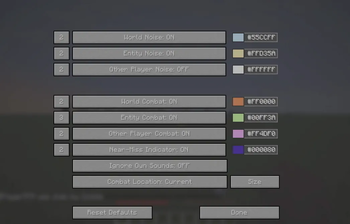
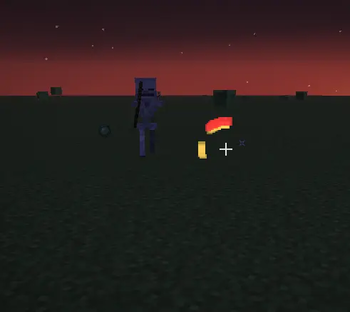
About this Mod
Reflex
Reflex is a lightweight directional awareness mod for Minecraft (26.1.x) on Fabric, Forge, and NeoForge.
It shows short arc indicators around your crosshair so you can quickly tell where danger or important nearby events are coming from.
Core Features
- Damage Direction: Shows where attacks came from.
- Near-Miss Warnings: Shows direction when projectiles fly close but miss.
- Noise Awareness: Shows direction for configured sound categories.
- Per-Category Colors: Customize indicator colors for each configured category.
- Cross-Loader Support: Shared behavior across Fabric, Forge, and NeoForge.
Indicator Categories
Reflex supports category-based toggles for both noise and combat:
WorldEntityOther Player
You can enable/disable each category independently and set custom colors.
Near-Miss Options
Near-miss indicators are configurable with dedicated controls:
- Near-Miss Indicator: Turn near-miss arcs on/off.
- Near-Miss Color: Set a separate color just for near-miss arcs.
- Near-Miss Source:
Projectile: Arc points from projectile position.Shooter: Arc points from the projectile owner (if available).
Combat Position Mode
Choose how combat indicators track attackers:
Past: Uses the attacker position at the moment of hit.Current: Tracks attacker current position while indicator is active.
Size and Visual Tuning
Reflex includes visual scaling controls:
- Indicator Width
- Indicator Length
Defaults are 100% and can be adjusted in the size settings screen.
Menu / Configuration
Open the configuration menu with the client command:
/reflex
The menu includes:
- Category toggles for noise/combat
- Per-category color buttons
- Near-miss toggle and color
- Ignore own sounds toggle
- Combat location mode
- Size settings entry
- Reset defaults
Loader Notes
- Fabric, Forge, and NeoForge builds are supported.
- Configuration is stored in the mod config directory as a JSON file.
Version Scope
This setup targets Minecraft 26.1.x with the versions defined in gradle.properties.
Available Versions
How to Install Reflex on Your Server
Order Server
Order a Minecraft Java server with at least 3 GB RAM (4 GB recommended).
Set fabric Loader
In the panel under "Egg", select the fabric loader and matching Minecraft version (26.1.2).
Install Mod
Open the mod browser in the dashboard and search for "Reflex". Click "Install" – done! Alternatively, upload the .jar via SFTP to the /mods folder.
Compatibility
Mod Loaders
Minecraft Versions
26.1.2, 26.1.1, 26.1
Server-side
✗ UnsupportedRecommended RAM
4 GB(min. 3 GB)Frequently Asked Questions
Reflex server crashes on startup – what to do?
Most common cause: wrong fabric version or insufficient RAM. Check the server log (latest.log) for "OutOfMemoryError" or "Mixin" errors. With Mado Hosting: ensure at least 3 GB RAM is allocated and the loader matches the mod version (26.1.2). You can switch loaders with one click in the panel.
Is Reflex compatible with fabric and forge and neoforge?
Reflex officially supports fabric, forge, neoforge for Minecraft 26.1.2, 26.1.1, 26.1. Note: Forge and Fabric mods are NOT cross-compatible – pick one loader and stick with it. The Mado dashboard automatically detects incompatible loader combinations.
Server lagging with Reflex – how to optimize performance?
Recommended RAM: 4 GB (per 8 players). Use /spark profiler to check if Reflex consumes the most tick time. Common fixes: reduce server view-distance to 8-10, install "performant" or "starlight" as supplementary mods on Forge. With Mado Hosting, your server runs on NVMe SSDs with dedicated CPU cores for minimal latency.
Similar Mods




Rent Modded Server
Install Reflex with just one click on your server.
Details
- License
- Creative Commons Attribution Non Commercial No Derivatives 4.0 International
- Server-side
- Unsupported