
RegenChoiceMod
This project is a Fabric Minecraft mod that lets you manage health regeneration mode, either natural regeneration or no regeneration.
Screenshots
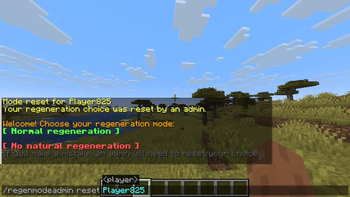
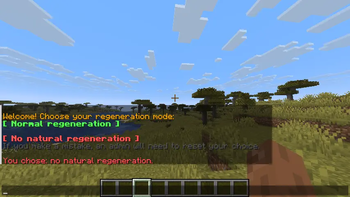
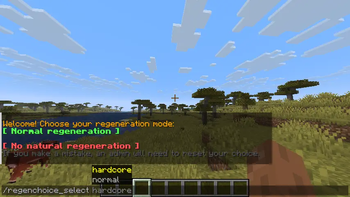
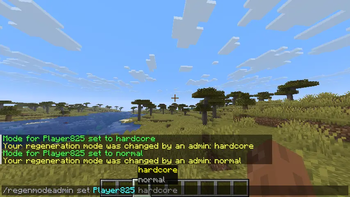
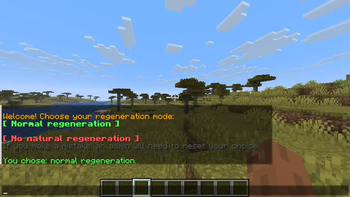
About this Mod
Regen Choice
Regen Choice is a Fabric mod that lets each player choose their own health regeneration mode when joining a world for the first time.
When a new player joins, they receive a message in chat with buttons allowing them to choose between two modes:
- Natural Regeneration — the player keeps normal Minecraft health regeneration.
- No Regeneration — natural health regeneration is disabled for that player.
This is useful for survival worlds, multiplayer servers, challenges, hardcore-style gameplay, or any world where players should be able to choose their own difficulty style.
Features
- Per-player regeneration mode selection
- Chat buttons for an easy first-time setup
- Command fallback if chat buttons do not work correctly
- Admin/OP commands to reset or force a player’s choice
- Choices are saved per world
- French translation included
- English used as the default language for all other languages
How it works
When a player joins a world for the first time, the mod sends them a choice prompt in chat.
The player can choose:
- Normal mode: keeps natural health regeneration enabled
- Hardcore mode: disables natural health regeneration for that player
Once a player has chosen their regeneration mode, they cannot change it themselves.
Only an OP player on a server, or a player with commands enabled in Singleplayer or LAN, can change a player’s mode afterward.
Commands
Player command
If the chat buttons do not work correctly, players can choose their mode manually with:
/regenchoice_select [normal/hardcore]
Examples:
/regenchoice_select normal
/regenchoice_select hardcore
Admin / OP commands
These commands can only be used by OP players on a server, or by players with commands enabled in Singleplayer or LAN worlds.
Reset a player’s choice
This command sends the choice prompt back to the selected player:
/regenmodeadmin reset [PLAYER]
Example:
/regenmodeadmin reset Steve
Force a player’s mode
This command forces a regeneration mode for a selected player:
/regenmodeadmin set [normal/hardcore] [PLAYER]
Examples:
/regenmodeadmin set normal Steve
/regenmodeadmin set hardcore Steve
Permissions
After a player has made their choice, only the following users can change it:
- OP players on a server
- Players with commands enabled in Singleplayer
- Players with commands enabled in LAN worlds
Regular players cannot change their regeneration mode after choosing it.
Data storage
The mod stores each player’s UUID and regeneration choice in a .txt file inside the world’s config folder.
This means regeneration choices are saved per world/map.
Languages
This mod is translated into:
- English
- French
All other languages use English by default.
Compatibility
This mod is made for Fabric.
Notes
The regeneration choice is permanent for regular players once selected.
Admins and OP players can still reset or force a player’s mode at any time using the admin commands.
Have fun!
Available Versions
How to Install RegenChoiceMod on Your Server
Order Server
Order a Minecraft Java server with at least 3 GB RAM (4 GB recommended).
Set fabric Loader
In the panel under "Egg", select the fabric loader and matching Minecraft version (26.1.2).
Install Mod
Open the mod browser in the dashboard and search for "RegenChoiceMod". Click "Install" – done! Alternatively, upload the .jar via SFTP to the /mods folder.
Compatibility
Mod Loaders
Minecraft Versions
26.1.2
Server-side
✓ RequiredRecommended RAM
4 GB(min. 3 GB)Frequently Asked Questions
RegenChoiceMod server crashes on startup – what to do?
Most common cause: wrong fabric version or insufficient RAM. Check the server log (latest.log) for "OutOfMemoryError" or "Mixin" errors. With Mado Hosting: ensure at least 3 GB RAM is allocated and the loader matches the mod version (26.1.2). You can switch loaders with one click in the panel.
Is RegenChoiceMod compatible with fabric?
RegenChoiceMod officially supports fabric for Minecraft 26.1.2. The Mado dashboard automatically detects incompatible loader combinations.
Server lagging with RegenChoiceMod – how to optimize performance?
Recommended RAM: 4 GB (per 8 players). Use /spark profiler to check if RegenChoiceMod consumes the most tick time. Common fixes: reduce server view-distance to 8-10, install "performant" or "starlight" as supplementary mods on Forge. With Mado Hosting, your server runs on NVMe SSDs with dedicated CPU cores for minimal latency.
Similar Mods




Rent Modded Server
Install RegenChoiceMod with just one click on your server.