
REI Clean Overlay
Hides selected REI overlay buttons and hint popups.
Screenshots
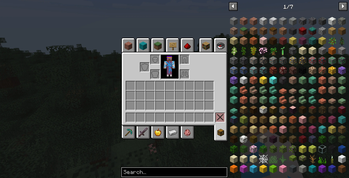
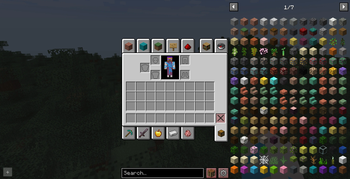
About this Mod
It hides selected REI interface elements, such as overlay buttons and hint popups, so the inventory screen looks cleaner and more polished. The hidden elements are not removed permanently: they can be temporarily restored at any time with a configurable keybind in the game’s Controls settings.
By default, the interface buttons are hidden and no key is assigned. If you want to bring the hidden buttons back temporarily, open the Controls menu and assign a keybind for REI Clean Overlay.
This is especially useful for modpacks where REI is already configured by the pack author and players do not need quick access to every REI overlay button during normal gameplay.
Notes
By default, the selected REI interface buttons are hidden and the restore keybind is not assigned.
This mod does not change recipes, item entries, or REI functionality itself. It only adjusts selected interface elements in the REI overlay.
Requirements
Available Versions
How to Install REI Clean Overlay on Your Server
Order Server
Order a Minecraft Java server with at least 3 GB RAM (4 GB recommended).
Set forge Loader
In the panel under "Egg", select the forge loader and matching Minecraft version (1.20.1).
Install Mod
Open the mod browser in the dashboard and search for "REI Clean Overlay". Click "Install" – done! Alternatively, upload the .jar via SFTP to the /mods folder.
Compatibility
Mod Loaders
Minecraft Versions
1.20.1
Server-side
✗ UnsupportedRecommended RAM
4 GB(min. 3 GB)Frequently Asked Questions
REI Clean Overlay server crashes on startup – what to do?
Most common cause: wrong forge version or insufficient RAM. Check the server log (latest.log) for "OutOfMemoryError" or "Mixin" errors. With Mado Hosting: ensure at least 3 GB RAM is allocated and the loader matches the mod version (1.20.1). You can switch loaders with one click in the panel.
Is REI Clean Overlay compatible with forge?
REI Clean Overlay officially supports forge for Minecraft 1.20.1. The Mado dashboard automatically detects incompatible loader combinations.
Server lagging with REI Clean Overlay – how to optimize performance?
Recommended RAM: 4 GB (per 8 players). Use /spark profiler to check if REI Clean Overlay consumes the most tick time. Common fixes: reduce server view-distance to 8-10, install "performant" or "starlight" as supplementary mods on Forge. With Mado Hosting, your server runs on NVMe SSDs with dedicated CPU cores for minimal latency.
Similar Mods




![[ETF] Entity Texture Features](https://cdn.modrinth.com/data/BVzZfTc1/af683d206d50b05258d865b0d6e4aa2f2cee12f2_96.webp)

Rent Modded Server
Install REI Clean Overlay with just one click on your server.