
Reimagined World Menu
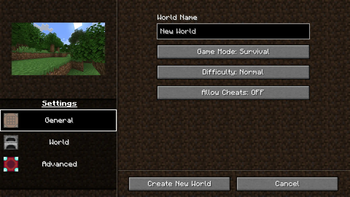
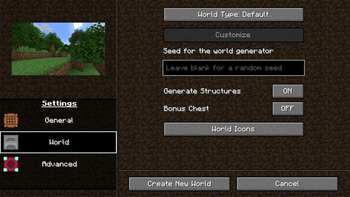
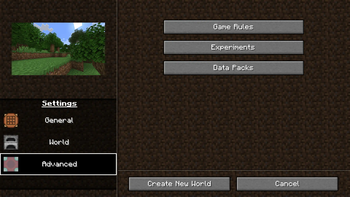
Completely re-design the Create World menu.
Screenshots
About this Mod
Reimagined World Menu
Completely Re-designs the Create World menu, as well as making some changes to the world list.
Features
Complete menu overhaul
Customizable image that represents each world type (default, flat, amplified, etc.)
Ability to add a custom icon to your world upon creation.
Increased resolution for world icons.
Translations for:
- Italian

- Spanish

- Japanese

- Portuguese

- Polish

- Russian

- German

- Serbian

- Bulgarian

- Czech

- Tatar

- Chinese

- Dutch

- Flemish
Resource packs
This mod allows you to customize two things with resource packs:
World type image
Tab icons
If you need exaples of what the pack should look like, then you can take a look in the source code's resource folder,
Everything here has been used in the mod's source.
World preset images
To add custom world preset images, you must first create a resource pack, and in the folder reimaginedmenus/textures/misc,
you must have an image with the name of the world preset identifier, for example,
an amplified world would need an image titled amplified.
Tab Icons
To add custom world preset images, in your resource pack, and in the folder reimaginedmenus/textures/misc,
create a json file titled tabicons.json, and in that file, put:
{
  "general_settings_icon": "modid:path/to/texture",
  "world_settings_icon": "modid:path/to/texture",
  "advanced_settings_icon": "modid:path/to/texture"
}
You can choose whatever texture you want, it can be vannila, modded, or a custom texture.
If you want a custom texture, then just the identifier should look like this: reimaginedmenus:path/to/texture,
then you just provide the textures in your resource pack.
Feedback
I'm entirely open to design changes and will consider adding your suggestion.
I'm also open to adding and/or editing translations for your language, you will have two options:
- Translate the text yourself

- Or have me use Google Translate (Which is prone to inaccuracy, but can be quicker)
Available Versions
How to Install Reimagined World Menu on Your Server
Order Server
Order a Minecraft Java server with at least 3 GB RAM (4 GB recommended).
Set fabric Loader
In the panel under "Egg", select the fabric loader and matching Minecraft version (1.21.1).
Install Mod
Open the mod browser in the dashboard and search for "Reimagined World Menu". Click "Install" – done! Alternatively, upload the .jar via SFTP to the /mods folder.
Compatibility
Mod Loaders
Minecraft Versions
1.21.1, 1.21, 1.20.6 (+7 more)
Server-side
✗ UnsupportedRecommended RAM
4 GB(min. 3 GB)Frequently Asked Questions
Reimagined World Menu server crashes on startup – what to do?
Most common cause: wrong fabric version or insufficient RAM. Check the server log (latest.log) for "OutOfMemoryError" or "Mixin" errors. With Mado Hosting: ensure at least 3 GB RAM is allocated and the loader matches the mod version (1.21.1). You can switch loaders with one click in the panel.
Is Reimagined World Menu compatible with fabric?
Reimagined World Menu officially supports fabric for Minecraft 1.21.1, 1.21, 1.20.6. The Mado dashboard automatically detects incompatible loader combinations.
Server lagging with Reimagined World Menu – how to optimize performance?
Recommended RAM: 4 GB (per 8 players). Use /spark profiler to check if Reimagined World Menu consumes the most tick time. Common fixes: reduce server view-distance to 8-10, install "performant" or "starlight" as supplementary mods on Forge. With Mado Hosting, your server runs on NVMe SSDs with dedicated CPU cores for minimal latency.
Similar Mods

![[ETF] Entity Texture Features](https://cdn.modrinth.com/data/BVzZfTc1/af683d206d50b05258d865b0d6e4aa2f2cee12f2_96.webp)
![[EMF] Entity Model Features](https://cdn.modrinth.com/data/4I1XuqiY/6e5bbd0d06b1741bfdab6c0cfab6de8fdaf0064c_96.webp)



Rent Modded Server
Install Reimagined World Menu with just one click on your server.