
Remote Access
Switch between nearby workstations instantly without closing your current crafting interface.
Screenshots
About this Mod
Side Access
Stop reopening workstations one by one.
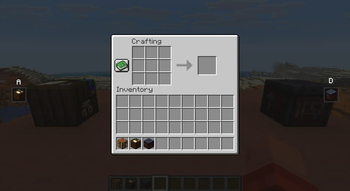
Side Access lets you seamlessly switch between nearby functional blocks directly from inside your current interface. Open a crafting table, then cycle to nearby anvils, enchanting tables, cartography tables, looms, smithing tables, stonecutters, and more without ever closing the screen.
When compatible workstations are detected nearby, small navigation icons appear on the left and right sides of your inventory screen. Press your configured keys to instantly move to the previous or next workstation in range.
Perfect for:
- compact workshop builds
- multiplayer bases
- technical crafting rooms
- builders with dense utility setups
Features
- Seamless workstation switching
- Minimal vanilla-style UI
- Configurable detection radius
- Configurable keybinds
- Supports multiple vanilla functional blocks
- Lightweight and performance-friendly
- Client-side quality of life improvement
Supported Workstations
- Crafting Table
- Anvil variants
- Enchanting Table
- Cartography Table
- Loom
- Stonecutter
- Smithing Table
- Grindstone
- Furnaces
- Blast Furnaces
- Smokers
- Brewing Stands
- More planned
Configuration
The mod includes configurable:
- workstation detection radius
- navigation keybinds
- icon size
- supported block behavior
Default detection radius:
radius = 5
Designed to feel like a natural extension of Minecraft’s inventory system rather than a separate modded interface.
Available Versions
How to Install Remote Access on Your Server
Order Server
Order a Minecraft Java server with at least 3 GB RAM (4 GB recommended).
Set fabric Loader
In the panel under "Egg", select the fabric loader and matching Minecraft version (26.1.2).
Install Mod
Open the mod browser in the dashboard and search for "Remote Access". Click "Install" – done! Alternatively, upload the .jar via SFTP to the /mods folder.
Compatibility
Mod Loaders
Minecraft Versions
26.1.2, 1.21.11, 1.21.1
Server-side
✗ UnsupportedRecommended RAM
4 GB(min. 3 GB)Frequently Asked Questions
Remote Access server crashes on startup – what to do?
Most common cause: wrong fabric version or insufficient RAM. Check the server log (latest.log) for "OutOfMemoryError" or "Mixin" errors. With Mado Hosting: ensure at least 3 GB RAM is allocated and the loader matches the mod version (26.1.2). You can switch loaders with one click in the panel.
Is Remote Access compatible with fabric and neoforge?
Remote Access officially supports fabric, neoforge for Minecraft 26.1.2, 1.21.11, 1.21.1. The Mado dashboard automatically detects incompatible loader combinations.
Server lagging with Remote Access – how to optimize performance?
Recommended RAM: 4 GB (per 8 players). Use /spark profiler to check if Remote Access consumes the most tick time. Common fixes: reduce server view-distance to 8-10, install "performant" or "starlight" as supplementary mods on Forge. With Mado Hosting, your server runs on NVMe SSDs with dedicated CPU cores for minimal latency.
Similar Mods




Rent Modded Server
Install Remote Access with just one click on your server.