
Rendersnap
A Minecraft mod for snapshots that optimizes vanilla rendering. Simple, modular, and compatible!
Screenshots
About this Mod
Rendersnap
The mod, in it's name, improves on the current (inadequate) rendering engine, by applying aggressive (but subtle) optimizations to cut down the amount of things to render, without causing incompatibility issues.

Highlights
It's simple!
Only simple (yet useful) optimizations are applied, mostly cutting out things you can't see, including:
- Multi-render - Renders chunks efficiently by keeping chunk rebuilds on the worker queue instead of forcing nearby rebuilds on the render thread.
- Section occlusion - Uses the section visibility graph to skip rendering terrain hidden behind other terrains.
- Block face culling - Skips rendering faces between full solid blocks.
- Distance entity culling - Non-player entities will not be rendered behind the player or beyond the fog.
- And more!
Other, visual features are also added, including zooming and not rendering some details.
It's modular!
All can be controlled, enabled or disabled, aggressive or conservative, through vanilla settings.
It's compatible!
Fix, not change, so vanilla renderer features such as vanilla shaders are completely supported. Any compatibility issues with vanilla or other mods will be fixed.
Installation
Download
Fabric API(it is a required dependency) and the mod from the latest snapshot available. (You may ignore the Minecraft version for both mods, as snapshot versions from the same update usually do not break compatibility.)Install the mod as you normally would in your launcher. If your launcher does not have a mod installer, manually move the downloaded
.jarfile into themodsfolder of your instance.
Benchmarks
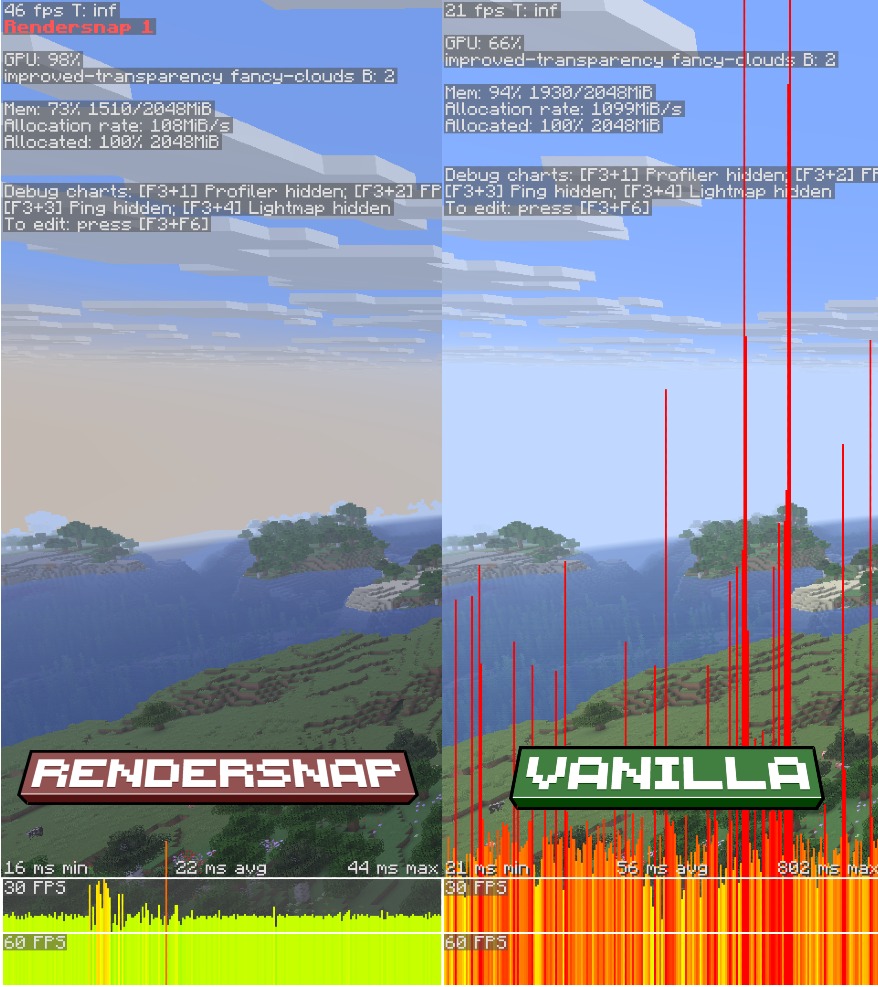
Hardware configuration:
- CPU: Intel Core i5 1035G1
- GPU: Nvidia MX330
- RAM: 8GB DDR4 RAM
- Storage: 1TB NVMe SSD

Software configuration:
- Minecraft 26.1.2
- Fabric API 0.149.1
- Rendersnap 1.0

Settings configuration: Fabulous preset (32 chunks render distance, 12 chunks simulation distance)

World configuration:
- Seed: -4562913757330550907
- Location: -203.83 142.01 647.58 179.26 9.14
Extras
It is recommended to use complementary mods like ModernFix and Ixeris. The mod only fills the gaps that are left by those mods.
This mod is not a one-size-fits-all renderer, and it benefits most on integrated GPUs that cannot take advantage of complex optimizations. Consider other renderer mods that work best on your hardware.
License
Rendersnap is currently licensed under the Star-end License.
Available Versions
How to Install Rendersnap on Your Server
Order Server
Order a Minecraft Java server with at least 3 GB RAM (4 GB recommended).
Set fabric Loader
In the panel under "Egg", select the fabric loader and matching Minecraft version (26.2-pre-3).
Install Mod
Open the mod browser in the dashboard and search for "Rendersnap". Click "Install" – done! Alternatively, upload the .jar via SFTP to the /mods folder.
Compatibility
Mod Loaders
Minecraft Versions
26.2-pre-3, 26.2-pre-2, 26.2-pre-1 (+10 more)
Server-side
✗ UnsupportedRecommended RAM
4 GB(min. 3 GB)Frequently Asked Questions
Rendersnap server crashes on startup – what to do?
Most common cause: wrong fabric version or insufficient RAM. Check the server log (latest.log) for "OutOfMemoryError" or "Mixin" errors. With Mado Hosting: ensure at least 3 GB RAM is allocated and the loader matches the mod version (26.2-pre-3). You can switch loaders with one click in the panel.
Is Rendersnap compatible with fabric?
Rendersnap officially supports fabric for Minecraft 26.2-pre-3, 26.2-pre-2, 26.2-pre-1. The Mado dashboard automatically detects incompatible loader combinations.
Server lagging with Rendersnap – how to optimize performance?
Recommended RAM: 4 GB (per 8 players). Use /spark profiler to check if Rendersnap consumes the most tick time. Common fixes: reduce server view-distance to 8-10, install "performant" or "starlight" as supplementary mods on Forge. With Mado Hosting, your server runs on NVMe SSDs with dedicated CPU cores for minimal latency.
Similar Mods


Rent Modded Server
Install Rendersnap with just one click on your server.