
Rentities
A mod that rewrites Minecraft's entity rendering
Screenshots
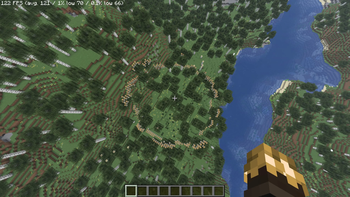
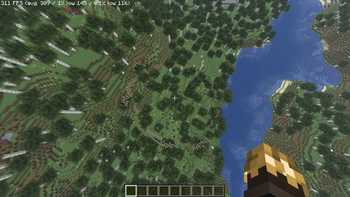
About this Mod
Rentities — GPU Instanced Entity Rendering
Minecraft 1.21.11 | Fabric | Requires Sodium
⚠️ Alpha — Proof of Concept Release
This is the first public release. The core rendering system works and delivers real performance gains, but several visual issues are known and will be fixed in future updates. Do not use on important worlds without backups.
What it does
Vanilla Minecraft issues a separate draw call to the GPU for every entity on screen. 500 cows means 500 draw calls. Rentities intercepts the entity render loop and batches all entities of the same type into one instanced GPU draw call, uploading positions, rotations, and animation state via a Shader Storage Buffer Object (SSBO). All per-bone animation is computed in a custom GLSL vertex shader — the CPU does no animation work at all.
Benchmarks
RTX 5070 · Minecraft 1.21.11 · Sodium 0.8.6 · Lithium · Render distance 20 · ~3000 entities in view
| Setup | Avg FPS | 1% Low |
|---|---|---|
| Sodium + Lithium | 122 | 70 |
| Sodium + Lithium + Rentities | 311 | 145 |
+155% average FPS. +107% improvement in 1% lows.
Rentities and Lithium are complementary — Lithium reduces CPU server tick cost, Rentities reduces GPU draw call overhead. Together they compound.
Requirements
- NVIDIA GPU (GTX 10 series or newer)
- Fabric Loader 0.17.2+
- Sodium 0.8.6
- Minecraft 1.21.11
Works standalone. Does not require Nvidium, though both mods are compatible and stack together.
In-Game Settings
Sodium → Video Settings → Rentities
| Option | What it does |
|---|---|
| GPU Entity Batching | Master on/off toggle. Takes effect immediately without rejoining |
| Entity Scan Mode | ON = extract and save meshes to disk. OFF = load from saved cache. Rejoin world after changing |
| Mesh Cache | Shows whether a cache file exists on disk |
| Delete Mesh Cache | Clears the cache so it gets rebuilt on next world load |
Known Issues — Will Be Fixed
This is a proof of concept release. The following are known and actively being worked on:
Armor stand rendering
Armor stands always render facing one fixed direction regardless of how they were placed or rotated in the world. Pose data set via /data commands (angled arms, bent legs, custom poses) is completely ignored — they always display in the default standing position. This is a known limitation of the current pose extraction system.
Entity facing direction
Some entities appear to face the wrong direction compared to where they are actually looking in the world. When you disable Rentities and use vanilla rendering, the same entity may be facing a different direction. This is a yaw/rotation calculation bug being investigated.
Animations are approximate
Walk cycles, idle animations, and limb movement work but are not 1:1 with vanilla. Some entities move their limbs in ways that look slightly off compared to the vanilla renderer. Full vanilla animation accuracy is a planned future improvement.
Texture facing issues
On some entity types, textures appear mirrored, flipped, or applied to the wrong side of a model part. This is a UV coordinate issue in the mesh extraction pipeline.
Head offset
The head on some entity types appears slightly rotated or offset from where it should be relative to the body.
Unscanned entities show as magenta cubes
Any entity type that was not present when the mesh cache was built will appear as a spinning magenta placeholder cube. Enable Scan Mode and rejoin a world containing those entities to fix it.
No Iris/shader support
Entities rendered by Rentities appear unlit and flat when shader mods like Iris are active. Disable Rentities when using shaders for now.
AMD and Intel GPUs not yet supported
The mod detects NVIDIA and disables itself on other vendors. AMD/Intel support is planned.
Planned
- Fix armor stand pose reading
- Fix entity facing direction
- Vanilla-accurate animations
- Fix texture UV orientation issues
- Indirect draw calls with GPU-side frustum culling
- Skip vanilla render state allocation for batched entities entirely
- Player skin rendering
- AMD and Intel support
- Iris compatibility
FAQ
Does this work without Nvidium?
Yes, completely standalone.
Does this work with Nvidium?
Yes, they are compatible. Nvidium handles terrain, Rentities handles entities.
Why does toggling batching off/on in settings work instantly?
The renderer is created and destroyed at runtime without requiring a world reload.
Why NVIDIA only right now?
AMD/Intel support is coming. The rendering code itself uses standard OpenGL 4.5 — the restriction is temporary while stability is confirmed.
Consider Supporting
Rentities is free and open source. If it helped your performance and you want to support continued development:
No obligation — enjoying it and sharing it is already more than enough.
Fun Fact
The name Rentities comes from Re + Entities — a nod to the fact that the entire entity rendering pipeline was rewritten from the ground up. It also sounds like "re-entities", which is exactly what this mod does: takes vanilla entities and gives them a fundamentally different rendering path.
The core vertex shader that handles all 21 animation categories is 500+ lines of GLSL and runs entirely on your GPU. Your CPU has no idea how any of those zombies are moving.
MIT License · BalancingLight · Minecraft 1.21.11
Available Versions
How to Install Rentities on Your Server
Order Server
Order a Minecraft Java server with at least 3 GB RAM (4 GB recommended).
Set fabric Loader
In the panel under "Egg", select the fabric loader and matching Minecraft version (1.21.11).
Install Mod
Open the mod browser in the dashboard and search for "Rentities". Click "Install" – done! Alternatively, upload the .jar via SFTP to the /mods folder.
Compatibility
Mod Loaders
Minecraft Versions
1.21.11
Server-side
✗ UnsupportedRecommended RAM
4 GB(min. 3 GB)Frequently Asked Questions
Rentities server crashes on startup – what to do?
Most common cause: wrong fabric version or insufficient RAM. Check the server log (latest.log) for "OutOfMemoryError" or "Mixin" errors. With Mado Hosting: ensure at least 3 GB RAM is allocated and the loader matches the mod version (1.21.11). You can switch loaders with one click in the panel.
Is Rentities compatible with fabric?
Rentities officially supports fabric for Minecraft 1.21.11. The Mado dashboard automatically detects incompatible loader combinations.
Server lagging with Rentities – how to optimize performance?
Recommended RAM: 4 GB (per 8 players). Use /spark profiler to check if Rentities consumes the most tick time. Common fixes: reduce server view-distance to 8-10, install "performant" or "starlight" as supplementary mods on Forge. With Mado Hosting, your server runs on NVMe SSDs with dedicated CPU cores for minimal latency.
Similar Mods


Rent Modded Server
Install Rentities with just one click on your server.