
ReplayMod AutoMarker
Automatically places markers on ReplayMod recordings when in-game events happen
Screenshots
About this Mod
ReplayMod AutoMarker
Ever lost a great moment because you forgot to note the timestamp? AutoMarker handles that automatically.
The mod watches for deaths, advancements, and chat keywords while you play, and drops a named marker on your ReplayMod timeline each time one fires. Open the replay later and every highlight is already waiting for you.
What gets marked
- Deaths —
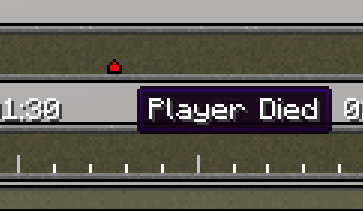
Player Diedmarker every time you die. Useful for speedrun resets, highlight reels, or just figuring out what killed you. - Advancements —
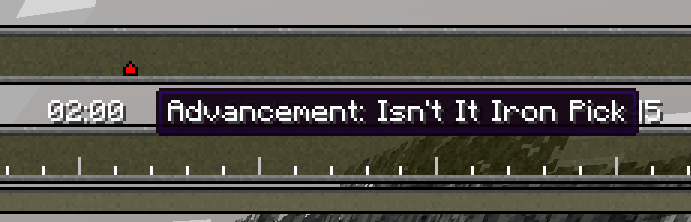
Advancement: [Name]when you complete one. No more guessing where the good stuff happened. - Chat keywords — you pick the words; the mod watches for them and drops a
Chat: [Keyword]marker when one shows up. Works well for stream alerts, manual bookmarks via chat, or specific server messages you care about.
Configuration
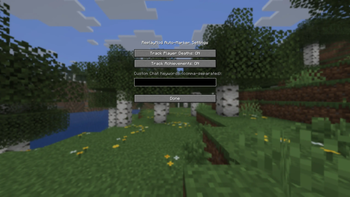
Press K in-game to open the config screen, or go through Mod Menu → AutoMarker → Configure.
You can toggle each marker type on or off and set your chat keywords as a comma-separated list (e.g. marker, highlight, raid).
Settings are saved to .minecraft/config/replaymod_auto_markers.json if you prefer to edit them directly.
Available Versions
How to Install ReplayMod AutoMarker on Your Server
Order Server
Order a Minecraft Java server with at least 3 GB RAM (4 GB recommended).
Set fabric Loader
In the panel under "Egg", select the fabric loader and matching Minecraft version (26.1.2).
Install Mod
Open the mod browser in the dashboard and search for "ReplayMod AutoMarker". Click "Install" – done! Alternatively, upload the .jar via SFTP to the /mods folder.
Compatibility
Mod Loaders
Minecraft Versions
26.1.2, 26.1.1, 26.1 (+19 more)
Server-side
✗ UnsupportedRecommended RAM
4 GB(min. 3 GB)Frequently Asked Questions
ReplayMod AutoMarker server crashes on startup – what to do?
Most common cause: wrong fabric version or insufficient RAM. Check the server log (latest.log) for "OutOfMemoryError" or "Mixin" errors. With Mado Hosting: ensure at least 3 GB RAM is allocated and the loader matches the mod version (26.1.2). You can switch loaders with one click in the panel.
Is ReplayMod AutoMarker compatible with fabric?
ReplayMod AutoMarker officially supports fabric for Minecraft 26.1.2, 26.1.1, 26.1. The Mado dashboard automatically detects incompatible loader combinations.
Server lagging with ReplayMod AutoMarker – how to optimize performance?
Recommended RAM: 4 GB (per 8 players). Use /spark profiler to check if ReplayMod AutoMarker consumes the most tick time. Common fixes: reduce server view-distance to 8-10, install "performant" or "starlight" as supplementary mods on Forge. With Mado Hosting, your server runs on NVMe SSDs with dedicated CPU cores for minimal latency.
Similar Mods




![[ETF] Entity Texture Features](https://cdn.modrinth.com/data/BVzZfTc1/af683d206d50b05258d865b0d6e4aa2f2cee12f2_96.webp)
![[EMF] Entity Model Features](https://cdn.modrinth.com/data/4I1XuqiY/6e5bbd0d06b1741bfdab6c0cfab6de8fdaf0064c_96.webp)
Rent Modded Server
Install ReplayMod AutoMarker with just one click on your server.