
ResBundler
A simple mod to sort through your resource packs. Inspired by 'recursive resources" and this was made over a weekend and using ai. Works well!
Screenshots


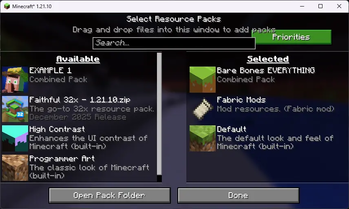
About this Mod
ResBundler
Organize your resource packs into folders and manage their load order with granular precision!
ResBundler is a quality-of-life mod designed for players who love customizing their game but hate the clutter of having dozens of individual packs in their list. This mod allows you to group multiple resource packs into subfolders within your standard resourcepacks directory, treating each folder as a single, unified entry in the Minecraft resource pack selection screen.
✨ Key Features
📂 Folder-Based Organization
Clean up your resource pack menu! Simply create a subfolder inside your .minecraft/resourcepacks/ directory (e.g., resourcepacks/PvP_Bundle/ or resourcepacks/Skyblock_Addons/) and drop your resource pack ZIPs or folders inside it. The mod automatically detects these subfolders and presents them as a single pack to the game.
🔢 Advanced Priority System
Stop renaming files to "!!a_pack" just to get them to load first. We provide a dedicated Priority Configuration Screen (accessible via Mod Menu) that gives you full control over the load order of packs within your bundles.
- Lower Number = Higher Priority: Want a specific UI tweak to override everything else? Give it a low number (e.g.,
1,10, or even negative numbers). - 0 = Lowest Priority (Default): All packs default to priority
0. In our system,0is treated as the lowest possible priority, placing these packs at the very bottom of the stack (sorted alphabetically). This ensures that any pack you explicitly prioritize will always override the defaults. - Duplicate Prevention: The intelligent UI prevents you from assigning the same non-zero priority number to multiple packs, ensuring a conflict-free and deterministic load order.
🛠️ User-Friendly Interface
- Collapsible Categories: The configuration menu groups your packs by their parent folder. You can expand or collapse these folders to easily manage huge collections without endless scrolling.
- Instant Reload: No need to restart! A built-in "Reload Resources" button in the config menu saves your changes and refreshes the game's resources immediately, so you can see your changes in real-time.
📦 Requirements & Installation
This mod requires the following dependencies to function:
- Fabric Loader (Latest version recommended)
- Fabric API
- Cloth Config API (Required for the configuration screen)
To Install:
- Download the
.jarfile. - Make sure you have Fabric API and Cloth Config API installed in your
modsfolder. - Drop
ResBundler-x.x.x.jarinto yourmodsfolder. - Launch Minecraft and start organizing!
💡 Why use this?
If you use many small "tweak" packs—like a custom crosshair, a dark mode UI, and a specific sound pack—your resource pack list can quickly become unmanageable. With Combined Resource Packs, you can bundle all those tweaks into a single "Tweaks" folder. They stay separate on your disk (making them easy to update individually) but act as one unit in-game. Plus, with the priority system, you ensure your dark mode always overlays correctly without manually merging zip files!
🤖 Development Note
This mod was developed over a weekend using Trae (an AI-assisted IDE). Every line of code has been manually reviewed, tested, and debugged to ensure it meets Minecraft's performance standards and functions as described.
Available Versions
How to Install ResBundler on Your Server
Order Server
Order a Minecraft Java server with at least 3 GB RAM (4 GB recommended).
Set fabric Loader
In the panel under "Egg", select the fabric loader and matching Minecraft version (1.21.11).
Install Mod
Open the mod browser in the dashboard and search for "ResBundler". Click "Install" – done! Alternatively, upload the .jar via SFTP to the /mods folder.
Compatibility
Mod Loaders
Minecraft Versions
1.21.11, 1.21.10
Server-side
✗ UnsupportedRecommended RAM
4 GB(min. 3 GB)Frequently Asked Questions
ResBundler server crashes on startup – what to do?
Most common cause: wrong fabric version or insufficient RAM. Check the server log (latest.log) for "OutOfMemoryError" or "Mixin" errors. With Mado Hosting: ensure at least 3 GB RAM is allocated and the loader matches the mod version (1.21.11). You can switch loaders with one click in the panel.
Is ResBundler compatible with fabric?
ResBundler officially supports fabric for Minecraft 1.21.11, 1.21.10. The Mado dashboard automatically detects incompatible loader combinations.
Server lagging with ResBundler – how to optimize performance?
Recommended RAM: 4 GB (per 8 players). Use /spark profiler to check if ResBundler consumes the most tick time. Common fixes: reduce server view-distance to 8-10, install "performant" or "starlight" as supplementary mods on Forge. With Mado Hosting, your server runs on NVMe SSDs with dedicated CPU cores for minimal latency.
Similar Mods




![[ETF] Entity Texture Features](https://cdn.modrinth.com/data/BVzZfTc1/af683d206d50b05258d865b0d6e4aa2f2cee12f2_96.webp)
![[EMF] Entity Model Features](https://cdn.modrinth.com/data/4I1XuqiY/6e5bbd0d06b1741bfdab6c0cfab6de8fdaf0064c_96.webp)
Rent Modded Server
Install ResBundler with just one click on your server.