
Resource Pack Organizer
Enhances the Resource Pack menu by adding folder support for easier pack organization, ability to search packs by name or description, new sorting options, and quick refresh button directly in the GUI. Supports Forge & Fabric.
Screenshots
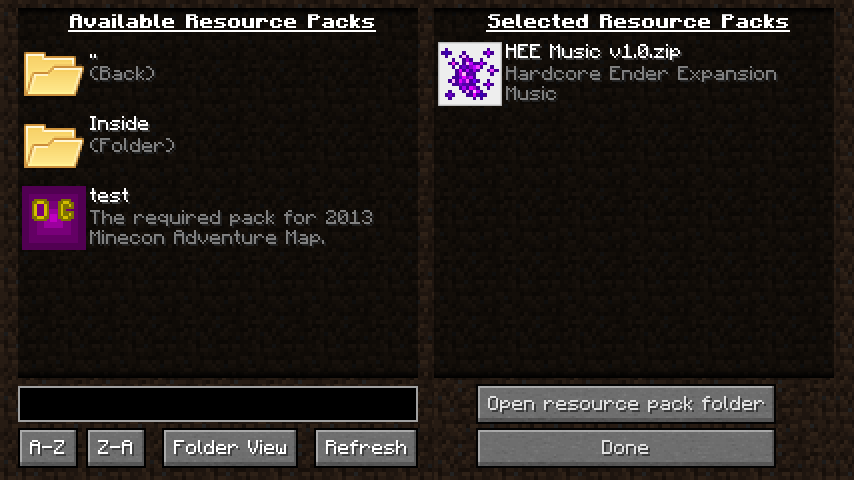
About this Mod
Resource Pack Organizer overhauls the Resource Pack screen to give you finer control and a couple new quality-of-life features. It supports the Forge and Fabric mod loaders.
- Organize resource pack into folders that you can navigate from within the game
- Choose between folder view (navigate in and out of folders) and flat view (packs from all folders shown in a single list)
- Search pack names and description (supports the * wildcard)
- Sort packs and folders alphabetically A-Z or Z-A
- Option to display a list of active packs on your screen (configurable position and color; Forge only)
- Hold Alt when clicking 'Resource Packs...' button to show the vanilla screen instead (it will still show packs from all folders like with flat view)
- Stop Minecraft from removing incompatible packs after each restart
Follow @chylexmc for development news and updates.
Installation
The mod supports both Forge and Fabric since Minecraft 1.15.2. Any older versions only support Forge.
Forge
Download and install Forge.
Download the mod file for your version, and place it into .minecraft/mods.
Fabric
Download and install Fabric Loader 0.6.4 or newer (you do not need to install the Fabric API).
Download the mod file for your version, and place it into .minecraft/mods.
License
The mod is licensed under MPL 2.0, which allows you to use it in modpacks.
The mod uses a folder icon by FatCow under the CC BY 3.0 US license: http://fatcow.com/free-icons
Screenshot
Available Versions
How to Install Resource Pack Organizer on Your Server
Order Server
Order a Minecraft Java server with at least 3 GB RAM (4 GB recommended).
Set fabric Loader
In the panel under "Egg", select the fabric loader and matching Minecraft version (1.16.3).
Install Mod
Open the mod browser in the dashboard and search for "Resource Pack Organizer". Click "Install" – done! Alternatively, upload the .jar via SFTP to the /mods folder.
Compatibility
Mod Loaders
Minecraft Versions
1.16.3, 1.16.2, 1.16.1 (+12 more)
Server-side
✗ UnsupportedRecommended RAM
4 GB(min. 3 GB)Frequently Asked Questions
Resource Pack Organizer server crashes on startup – what to do?
Most common cause: wrong fabric version or insufficient RAM. Check the server log (latest.log) for "OutOfMemoryError" or "Mixin" errors. With Mado Hosting: ensure at least 3 GB RAM is allocated and the loader matches the mod version (1.16.3). You can switch loaders with one click in the panel.
Is Resource Pack Organizer compatible with fabric and forge?
Resource Pack Organizer officially supports fabric, forge for Minecraft 1.16.3, 1.16.2, 1.16.1. Note: Forge and Fabric mods are NOT cross-compatible – pick one loader and stick with it. The Mado dashboard automatically detects incompatible loader combinations.
Server lagging with Resource Pack Organizer – how to optimize performance?
Recommended RAM: 4 GB (per 8 players). Use /spark profiler to check if Resource Pack Organizer consumes the most tick time. Common fixes: reduce server view-distance to 8-10, install "performant" or "starlight" as supplementary mods on Forge. With Mado Hosting, your server runs on NVMe SSDs with dedicated CPU cores for minimal latency.
Similar Mods




![[ETF] Entity Texture Features](https://cdn.modrinth.com/data/BVzZfTc1/af683d206d50b05258d865b0d6e4aa2f2cee12f2_96.webp)
![[EMF] Entity Model Features](https://cdn.modrinth.com/data/4I1XuqiY/6e5bbd0d06b1741bfdab6c0cfab6de8fdaf0064c_96.webp)
Rent Modded Server
Install Resource Pack Organizer with just one click on your server.