
Respawn Backoff
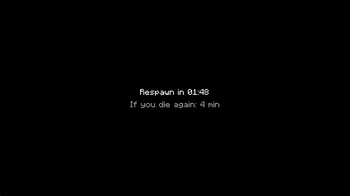
After you die, you wait out a real-time cooldown before you respawn. The wait length doubles with each death in a streak.
Screenshots
About this Mod
This project was tailor-made for a server I ran for a friend group, so we can have something hardcore-ish, but without bleeding players. I'm open to suggestions and bug reports, but don't expect much in terms of support.
I recommend having a keepinventory/grave mod, sice sometimes the wait time will exceed the despawn time.
How it plays
When you respawn after a death, you are put in spectator at the place you died, with a full-screen blackout and a countdown. You cannot leave that spot: the server keeps you locked there until the timer ends. Then you return to survival at your normal respawn point (bed or world spawn). If you disconnect mid-penalty, the timer keeps ticking.
Scaling
Each death in a row makes the next wait longer on a doubling curve, clamped between a minimum and maximum number of minutes the server sets. The death streak resets once per calendar day so the next death starts from the short wait again.
Operators
Commands are under /respawnbackoff and require permission level 2: config show / config min <minutes> / config max <minutes>, reset (clear streak for the next death only; does not cancel an active timer), and skip (end the active penalty immediately). Targets can be specified for reset and skip.
Requirements
Fabric Loader, Fabric API, and Java 21 (see the published file’s metadata for the supported Minecraft versions).
Known issues
- The black overlay can be peered through some UI elements, like the chat for example.
- When using Simple Voice Chat, the dead player can hear the alive players talking near his death location.
Available Versions
How to Install Respawn Backoff on Your Server
Order Server
Order a Minecraft Java server with at least 3 GB RAM (4 GB recommended).
Set fabric Loader
In the panel under "Egg", select the fabric loader and matching Minecraft version (1.21.1).
Install Mod
Open the mod browser in the dashboard and search for "Respawn Backoff". Click "Install" – done! Alternatively, upload the .jar via SFTP to the /mods folder.
Compatibility
Mod Loaders
Minecraft Versions
1.21.1
Server-side
✓ RequiredRecommended RAM
4 GB(min. 3 GB)Frequently Asked Questions
Respawn Backoff server crashes on startup – what to do?
Most common cause: wrong fabric version or insufficient RAM. Check the server log (latest.log) for "OutOfMemoryError" or "Mixin" errors. With Mado Hosting: ensure at least 3 GB RAM is allocated and the loader matches the mod version (1.21.1). You can switch loaders with one click in the panel.
Is Respawn Backoff compatible with fabric?
Respawn Backoff officially supports fabric for Minecraft 1.21.1. The Mado dashboard automatically detects incompatible loader combinations.
Server lagging with Respawn Backoff – how to optimize performance?
Recommended RAM: 4 GB (per 8 players). Use /spark profiler to check if Respawn Backoff consumes the most tick time. Common fixes: reduce server view-distance to 8-10, install "performant" or "starlight" as supplementary mods on Forge. With Mado Hosting, your server runs on NVMe SSDs with dedicated CPU cores for minimal latency.
Similar Mods




Rent Modded Server
Install Respawn Backoff with just one click on your server.