
Restricted Inventory
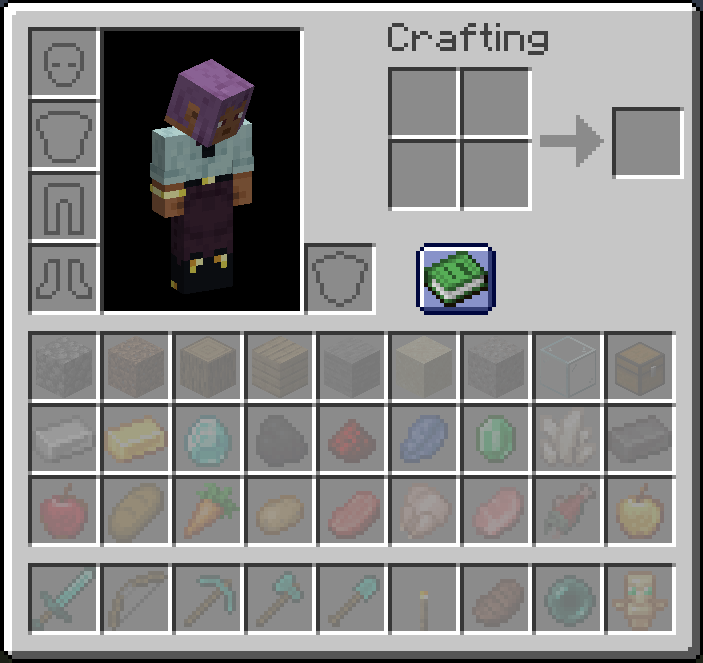
Restrict player inventory slots to specific items or item tags. Configure which slots accept which items via JSON config — server-wide or per-client. Restricted slots display a visual preview of what belongs there.
Screenshots
About this Mod
Restricted Inventory
Lock player inventory slots to specific items or item tags.
Ever wanted to keep a dedicated slot for your sword, always have slot 0 as your torch, or enforce item organization across your server? Restricted Inventory lets you do exactly that — configure any inventory slot (0–35) to only accept a specific item or item tag, server-wide or per player.
Features
- Slot restrictions — Lock any hotbar or inventory slot to a specific item (e.g.
minecraft:torch) or an entire item tag (e.g.#minecraft:swords) - Server or per-client mode — Apply the same rules to all players from the server config, or let each player define their own restrictions in their client config
- Visual feedback — Restricted slots display a ghost preview of the required item so players always know what goes where
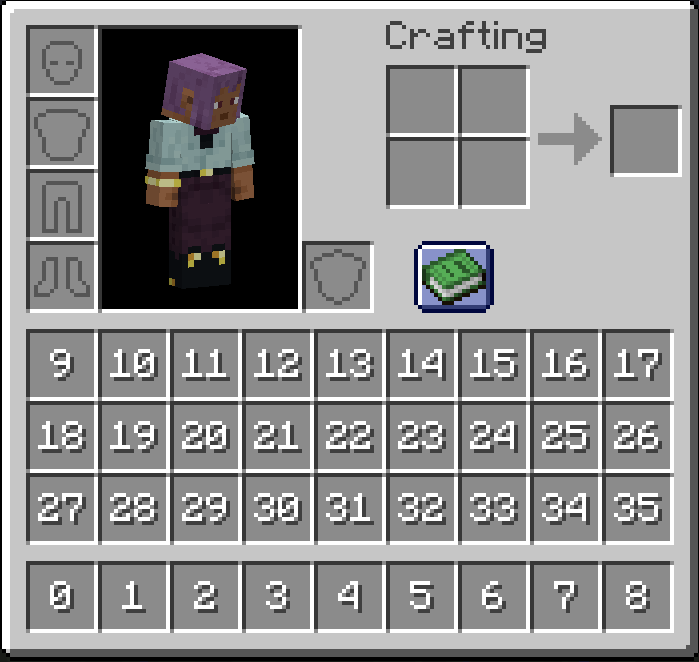
- Slot index overlay — Hold Tab in any inventory screen to reveal each slot's index number, making config setup a breeze
- Smart item routing — Picked-up items automatically go to their designated slots first before filling unrestricted ones
Configuration
Restrictions are defined in a simple JSON config file. Both specific items and item tags are supported.
{
  "useClientRestriction": false,
  "restrictedSlots": {
    "0": "minecraft:torch",
    "1": "#minecraft:swords",
    "8": "minecraft:totem_of_undying"
  }
}
| Slot range | Location |
|---|---|
| 0–8 | Hotbar (survival mode only) |
| 9–35 | Main inventory |
Note: Slot indices 0–8 correspond to the hotbar in survival mode. In creative mode, the hotbar uses a different inventory layout and slot restrictions will not apply there.
Compatibility Note
This mod hooks into vanilla's slot placement and item pickup logic via Mixin. Mods or block entities that insert items directly into the player inventory (bypassing standard slot logic) may not respect the restrictions. Mods that also modify Slot, Inventory, or AbstractContainerScreen may conflict.
Available Versions
How to Install Restricted Inventory on Your Server
Order Server
Order a Minecraft Java server with at least 3 GB RAM (4 GB recommended).
Set fabric Loader
In the panel under "Egg", select the fabric loader and matching Minecraft version (26.1.2).
Install Mod
Open the mod browser in the dashboard and search for "Restricted Inventory". Click "Install" – done! Alternatively, upload the .jar via SFTP to the /mods folder.
Compatibility
Mod Loaders
Minecraft Versions
26.1.2, 1.21.1, 1.20.1
Server-side
✗ UnsupportedRecommended RAM
4 GB(min. 3 GB)Frequently Asked Questions
Restricted Inventory server crashes on startup – what to do?
Most common cause: wrong fabric version or insufficient RAM. Check the server log (latest.log) for "OutOfMemoryError" or "Mixin" errors. With Mado Hosting: ensure at least 3 GB RAM is allocated and the loader matches the mod version (26.1.2). You can switch loaders with one click in the panel.
Is Restricted Inventory compatible with fabric and forge and neoforge?
Restricted Inventory officially supports fabric, forge, neoforge for Minecraft 26.1.2, 1.21.1, 1.20.1. Note: Forge and Fabric mods are NOT cross-compatible – pick one loader and stick with it. The Mado dashboard automatically detects incompatible loader combinations.
Server lagging with Restricted Inventory – how to optimize performance?
Recommended RAM: 4 GB (per 8 players). Use /spark profiler to check if Restricted Inventory consumes the most tick time. Common fixes: reduce server view-distance to 8-10, install "performant" or "starlight" as supplementary mods on Forge. With Mado Hosting, your server runs on NVMe SSDs with dedicated CPU cores for minimal latency.
Similar Mods




Rent Modded Server
Install Restricted Inventory with just one click on your server.