
Re vault
Allows vaults to be reopened after a configurable cooldown.
Screenshots
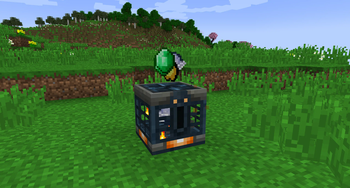
About this Mod
Revault is a datapack that makes vaults and ominous vaults restock after some time. Normally once a vault is opened, it can't be opened again by that player, but Revault lets that player open it again, after some time has passed.
- Works in both singleplayer and multiplayer, with any number of players.
- Each player starts a timer in the vault when they open it. Once a timer finishes, the player who started that timer will be allowed to open that vault again.
- Timers are linked to gametime, so vaults will restock even in unloaded chunks (but not if the world/server is paused).
- Vaults will display smoke particles on top (similar to a trial spawner on cooldown) that are ONLY visible to players that are on cooldown.
- By default, a normal vault takes 1 hour to restock, and an ominous vault takes 5 hours. (For reference, a trial spawner takes 30 minutes)
Configuration
You can change gamerules in a world by clicking on chat after running /function revault:gamerules
Setting a reset time to -1 means the vault type will never reset.
For Modpack Makers
Since this is a datapack, it does not have a config.
You can change gamerules in every world by modifying/overwriting the function
"revault:default_gamerules"
I recommend watching the tutorial.
Advanced information about customizing gamerules here.
Installing and Uninstalling
Will work automatically when installed with world creation
- When first installed into an existing world, Repair Mode will activate, which causes all previously opened vaults to be reset.
- When updating Revault from an older version to 1.3, if your world has any vaults that were opened before you installed Revault, you should enable Repair Mode manually: /scoreboard players set RepairMode revault.time 1
- When Uninstalled, all vault-markers will stay.
- When Reinstalled, all vaults that would have unlocked already, will unlock.
Free to be used in any modpack, on any platform.
Available Versions
How to Install Re vault on Your Server
Order Server
Order a Minecraft Java server with at least 3 GB RAM (4 GB recommended).
Set datapack Loader
In the panel under "Egg", select the datapack loader and matching Minecraft version (26.1.2).
Install Mod
Open the mod browser in the dashboard and search for "Re vault". Click "Install" – done! Alternatively, upload the .jar via SFTP to the /mods folder.
Compatibility
Mod Loaders
Minecraft Versions
26.1.2, 26.1.1, 26.1 (+12 more)
Server-side
✓ RequiredRecommended RAM
4 GB(min. 3 GB)Frequently Asked Questions
Re vault server crashes on startup – what to do?
Most common cause: wrong datapack version or insufficient RAM. Check the server log (latest.log) for "OutOfMemoryError" or "Mixin" errors. With Mado Hosting: ensure at least 3 GB RAM is allocated and the loader matches the mod version (26.1.2). You can switch loaders with one click in the panel.
Is Re vault compatible with datapack and fabric and forge and neoforge and quilt?
Re vault officially supports datapack, fabric, forge, neoforge, quilt for Minecraft 26.1.2, 26.1.1, 26.1. Note: Forge and Fabric mods are NOT cross-compatible – pick one loader and stick with it. The Mado dashboard automatically detects incompatible loader combinations.
Server lagging with Re vault – how to optimize performance?
Recommended RAM: 4 GB (per 8 players). Use /spark profiler to check if Re vault consumes the most tick time. Common fixes: reduce server view-distance to 8-10, install "performant" or "starlight" as supplementary mods on Forge. With Mado Hosting, your server runs on NVMe SSDs with dedicated CPU cores for minimal latency.
Similar Mods




Rent Modded Server
Install Re vault with just one click on your server.