Reverse Crafting
recycle your unwanted or worn-out tools, armor, slabs, stairs, and utility blocks back into their primary constituent materials
Screenshots
About this Mod
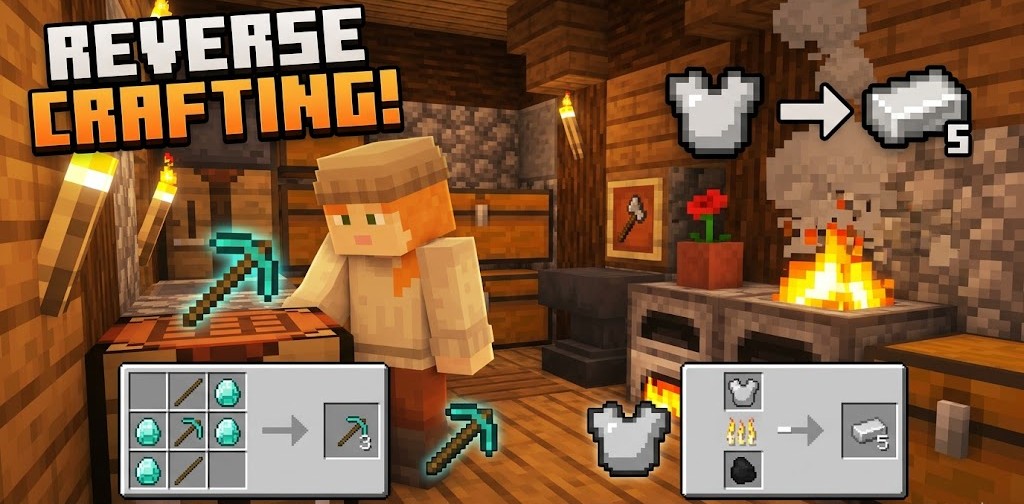
⚡ Recycle Your Gear. Reclaim Your Materials.
Reverse Crafting is a highly balanced, lightweight, and modern Minecraft datapack that lets you recycle your unwanted or worn-out tools, armor, slabs, stairs, and utility blocks back into their primary constituent materials—completely exploit-free!
Designed specifically for Minecraft 26.1 (Datapack Format 101), this pack integrates seamlessly into survival mode using vanilla mechanics like smelting, blasting, stonecutting, and shapeless uncrafting.
🛠️ Key Features
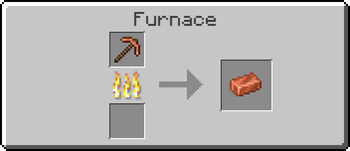
- 🔥 Metal Recycling (Smelting & Blasting): Toss copper, iron, gold, netherite, and chainmail items into a furnace or blast furnace to recover exactly 1 base ingot (or 1 iron block for anvils).
- 📦 Stairs to Blocks (Stonecutter): Slice any of the 40+ stair variants in the stonecutter to convert them back into 1 full block.
- 🧩 Slabs to Blocks (Shapeless): Put 2 matching slabs in any crafting grid to get 1 full block back.
- 💎 Luxury & Utility Uncrafting: Safely reclaim diamonds from jukeboxes/enchanting tables, or wood from chest/crafting tables.
- 🛡️ 100% Exploit-Free: Carefully designed conversion ratios ensure players cannot duplicate resources or infinitely refresh tool durability. Highly recommended for multiplayer and survival servers!
📖 How It Works
1. Smelting & Blasting
Recycle your metal weapons, armor, and utility items instantly. Blasting is twice as fast!
| Input | Process | Output |
|---|---|---|
| Any Iron Equipment, Shears, Shield, Bucket, Compass, Cauldron, Minecart, Flint & Steel | Smelting / Blasting | 1x Iron Ingot |
| Any Gold Equipment, Clock | Smelting / Blasting | 1x Gold Ingot |
| Any Copper Equipment, Spyglass, Lightning Rod | Smelting / Blasting | 1x Copper Ingot |
| Any Netherite Equipment | Smelting / Blasting | 1x Netherite Ingot |
| Any Chainmail Armor piece | Smelting / Blasting | 1x Iron Ingot |
All smelting and blasting recipes have been set to instant smelting/blasting (0 seconds) for premium quality of life!
2. Shapeless Uncrafting
Place these items in any standard crafting grid to extract their key ingredients:
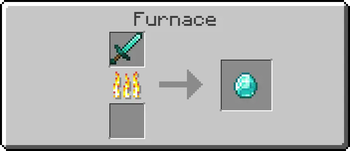
- Diamond Gear: 1x Diamond Tool/Armor ➡️ 1x Diamond
- Leather Armor: 1x Leather Armor piece ➡️ 1x Leather
- Stone Tools: 1x Stone Tool ➡️ 1x Cobblestone
- Wooden Tools: 1x Wood Tool ➡️ 1x Oak Planks
- Luxury Utilities:
Jukebox➡️ 1x DiamondEnchanting Table➡️ 1x DiamondAnvil/Chipped/Damaged➡️ 1x Iron BlockHopper➡️ 1x ChestCauldron/Minecart➡️ 3x Iron IngotsBrewing Stand➡️ 1x Blaze RodChest➡️ 8x Oak PlanksCrafting Table➡️ 4x Oak Planks
3. Slabs & Block De-compression
- Slab Merging: Place 2 matching slabs of any type (planks, stones, quartz, copper, etc.) into a crafting grid to get 1 full block.
- Block De-compression: Return compact blocks back into their raw components:
Amethyst Block➡️ 4x Amethyst ShardQuartz Block➡️ 4x QuartzGlowstone Block➡️ 4x Glowstone DustClay Block➡️ 4x Clay BallBricks/Nether Bricks➡️ 4x Brick / Nether BrickHoneycomb Block➡️ 4x HoneycombPrismarine➡️ 4x Prismarine Shard
4. Stair Recutter
Put any stair block into a Stonecutter to safely slice it down into its base block form (1:1 conversion). Supported for all 40+ vanilla wood and stone stairs!
🔒 Anti-Exploit Design
Why is this pack safe for survival servers?
Standard uncrafting packs usually return all materials used to craft an item. This introduces heavy duplication loops: players craft a pickaxe, use it until it has 1 durability left, and uncraft it to get all materials back, gaining infinite tools.
Reverse Crafting avoids this by returning exactly 1 constituent item (the primary material) and discarding sticks/handles. Players are heavily penalized for uncrafting, making recycling useful only for unwanted loot or miscrafts, maintaining Minecraft's survival economy.
🚀 Installation Guide
- Download the datapack folder/ZIP file.
- In Minecraft, select your world, click Edit, and select Open World Folder.
- Open the
datapacksdirectory and drop themysterious-curiefolder (or ZIP) inside. - Open the world (or type
/reloadif you are already in the world) to load the recipes!
Available Versions
How to Install Reverse Crafting on Your Server
Order Server
Order a Minecraft Java server with at least 3 GB RAM (4 GB recommended).
Set datapack Loader
In the panel under "Egg", select the datapack loader and matching Minecraft version (26.1.2).
Install Mod
Open the mod browser in the dashboard and search for "Reverse Crafting". Click "Install" – done! Alternatively, upload the .jar via SFTP to the /mods folder.
Compatibility
Mod Loaders
Minecraft Versions
26.1.2, 26.1.1, 26.1 (+12 more)
Server-side
✓ RequiredRecommended RAM
4 GB(min. 3 GB)Frequently Asked Questions
Reverse Crafting server crashes on startup – what to do?
Most common cause: wrong datapack version or insufficient RAM. Check the server log (latest.log) for "OutOfMemoryError" or "Mixin" errors. With Mado Hosting: ensure at least 3 GB RAM is allocated and the loader matches the mod version (26.1.2). You can switch loaders with one click in the panel.
Is Reverse Crafting compatible with datapack and fabric and forge and neoforge and quilt?
Reverse Crafting officially supports datapack, fabric, forge, neoforge, quilt for Minecraft 26.1.2, 26.1.1, 26.1. Note: Forge and Fabric mods are NOT cross-compatible – pick one loader and stick with it. The Mado dashboard automatically detects incompatible loader combinations.
Server lagging with Reverse Crafting – how to optimize performance?
Recommended RAM: 4 GB (per 8 players). Use /spark profiler to check if Reverse Crafting consumes the most tick time. Common fixes: reduce server view-distance to 8-10, install "performant" or "starlight" as supplementary mods on Forge. With Mado Hosting, your server runs on NVMe SSDs with dedicated CPU cores for minimal latency.
Similar Mods




Rent Modded Server
Install Reverse Crafting with just one click on your server.