
Locator Bar
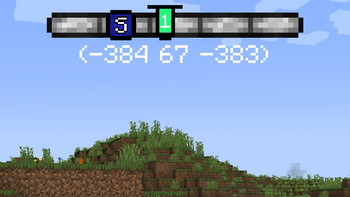
Recreated concept of a player locator bar for Minecraft. Simple, clean bar at the top of your screen.
Screenshots
About this Mod

Locator Bar implements the reworked concept of a player locator bar for Minecraft. Simple, clean bar at the top of your screen.

How to install?
- Ensure you are using a correct version of the mod loader.
- Download the correct jar for your loader:
*-fabric-*.jaror*-neoforge-*.jar. - Drop the downloaded mod into your
modsfolder. - Launch the game. The mod is now installed, and you can config it in Minecraft options.
Features
🧭 Locator Bar
The mod adds a locator bar that helps you read a direction at a glance.
You can also show coordinates and in-game day counter under the bar.
World direction markers (N, S, E, W) can be shown directly on the bar.
There are multiple bar styles:
- Reworked style (custom top HUD style)
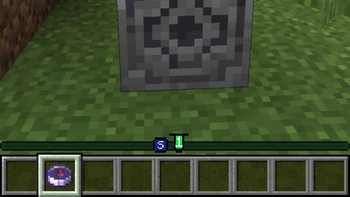
- Classic style (vanilla-like style near the XP bar).
😀 Players
Other players are shown as head markers on the locator bar, so you can quickly see where they are.
A player marker is hidden when:
- the player is crouching
- the player wears a carved pumpkin
- the player wears a mob head
📍 Waypoints
The waypoint system is based on paired lodestone compasses in your inventory.
These compasses create waypoint markers on the locator bar and point you toward their target location.
This gives you a simple navigation system without opening maps or extra screens.
Credits
- This project is an implementation of TIDZIMI idea for locator bar.
License
This project is distributed under the GPL-3.0 license.
Available Versions
How to Install Locator Bar on Your Server
Order Server
Order a Minecraft Java server with at least 3 GB RAM (4 GB recommended).
Set fabric Loader
In the panel under "Egg", select the fabric loader and matching Minecraft version (26.1.2).
Install Mod
Open the mod browser in the dashboard and search for "Locator Bar". Click "Install" – done! Alternatively, upload the .jar via SFTP to the /mods folder.
Compatibility
Mod Loaders
Minecraft Versions
26.1.2, 26.1.1, 26.1 (+4 more)
Server-side
~ OptionalRecommended RAM
4 GB(min. 3 GB)Frequently Asked Questions
Locator Bar server crashes on startup – what to do?
Most common cause: wrong fabric version or insufficient RAM. Check the server log (latest.log) for "OutOfMemoryError" or "Mixin" errors. With Mado Hosting: ensure at least 3 GB RAM is allocated and the loader matches the mod version (26.1.2). You can switch loaders with one click in the panel.
Is Locator Bar compatible with fabric and neoforge?
Locator Bar officially supports fabric, neoforge for Minecraft 26.1.2, 26.1.1, 26.1. The Mado dashboard automatically detects incompatible loader combinations.
Server lagging with Locator Bar – how to optimize performance?
Recommended RAM: 4 GB (per 8 players). Use /spark profiler to check if Locator Bar consumes the most tick time. Common fixes: reduce server view-distance to 8-10, install "performant" or "starlight" as supplementary mods on Forge. With Mado Hosting, your server runs on NVMe SSDs with dedicated CPU cores for minimal latency.
Similar Mods




Rent Modded Server
Install Locator Bar with just one click on your server.