
Ripples of the Past: Hermit Purple + Emperor Addon
A mod that adds Hermito Purple and Emperor stands to Ripples of the Past mod
Screenshots





About this Mod

Hermit Purple arrives to Ripples of the Past
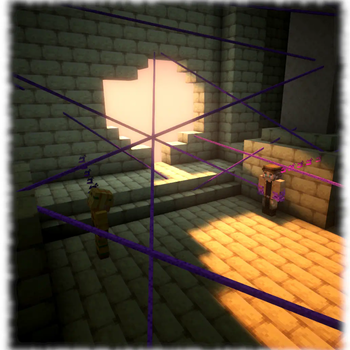
A Minecraft mod that adds the non humanoid stands Hermit Purple and the Emperor to Ripples of the Past Mod obtainable through Stand Arrow or in Hermit Purple case with hamon training if you enable it in the configs
1.16.5
Hermit Purple
Attacks
 Vine attack (Shift variation
  Vine binding attack)
 Grab entity (With Sunlight Yellow Overdrive it can be followed by
  OverDrive grabbed entity)
Abilities
 Position divination: creates a map with the target's position, to get more zoom just shift
 Target selection: chose the target (entity, player or structure) you want to know it's position
 Vine: throw a vine to move towards a block (Shift variation Vine grapple: throw a vine to catch an entity )
 Barrier: place up to 5 hamon charged vines (unlockable with Rope Trap)
 Thorns block: Use Hermit Purple to block physical damage excluding projectiles
 Breath
Fast Guide
Emperor
This stand has the capability to shoot bullets within 30 block radius that follows the target, the bullets power starts to decay at 12 blocks
Abilities
 Select the type of random entities that the bullet would track within a 20 horizontal block range
 Make the entity you are looking at the target of your bullets within a range of 12 blocks
1.21.1

Comming soon
Available Versions
How to Install Ripples of the Past: Hermit Purple + Emperor Addon on Your Server
Order Server
Order a Minecraft Java server with at least 3 GB RAM (4 GB recommended).
Set forge Loader
In the panel under "Egg", select the forge loader and matching Minecraft version (1.16.5).
Install Mod
Open the mod browser in the dashboard and search for "Ripples of the Past: Hermit Purple + Emperor Addon". Click "Install" – done! Alternatively, upload the .jar via SFTP to the /mods folder.
Compatibility
Mod Loaders
Minecraft Versions
1.16.5
Server-side
✓ RequiredRecommended RAM
4 GB(min. 3 GB)Frequently Asked Questions
Ripples of the Past: Hermit Purple + Emperor Addon server crashes on startup – what to do?
Most common cause: wrong forge version or insufficient RAM. Check the server log (latest.log) for "OutOfMemoryError" or "Mixin" errors. With Mado Hosting: ensure at least 3 GB RAM is allocated and the loader matches the mod version (1.16.5). You can switch loaders with one click in the panel.
Is Ripples of the Past: Hermit Purple + Emperor Addon compatible with forge?
Ripples of the Past: Hermit Purple + Emperor Addon officially supports forge for Minecraft 1.16.5. The Mado dashboard automatically detects incompatible loader combinations.
Server lagging with Ripples of the Past: Hermit Purple + Emperor Addon – how to optimize performance?
Recommended RAM: 4 GB (per 8 players). Use /spark profiler to check if Ripples of the Past: Hermit Purple + Emperor Addon consumes the most tick time. Common fixes: reduce server view-distance to 8-10, install "performant" or "starlight" as supplementary mods on Forge. With Mado Hosting, your server runs on NVMe SSDs with dedicated CPU cores for minimal latency.
Similar Mods




Rent Modded Server
Install Ripples of the Past: Hermit Purple + Emperor Addon with just one click on your server.