Road Stuff
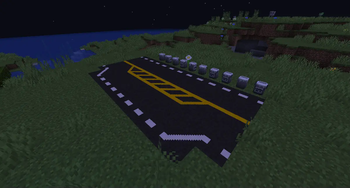
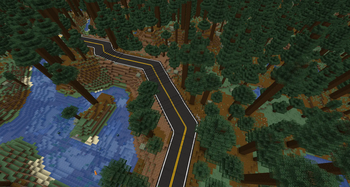
Road Stuff adds road blocks and items to let you build roads in your worlds!
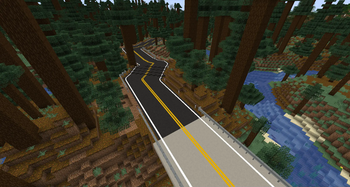
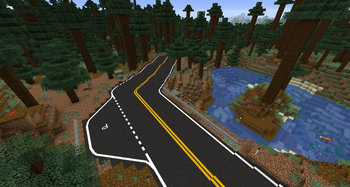
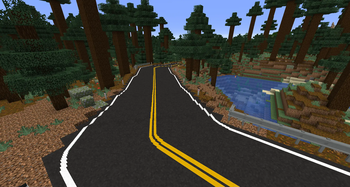
Screenshots
About this Mod
Announcement
Mod updated for 1.19.2. 1.20 and 1.21 may come at some point, but no timeline is known.
Note: 1.15.2 versions and above now require Mapper Base to be installed
- Latest version: 7.0.1 for MC 1.19.2.
- Latest MC 1.18.2 version: 6.0.2. 1.18.2 will not receive updates anymore.
- Latest MC 1.17.1 version: 5.0.0. 1.17.1 will not receive updates anymore, it was just a first step for 1.18.
- Latest MC 1.16.5 version: 4.3.0. 1.16.5 will not receive updates anymore.
- Latest MC 1.15.2 version: 3.2.0. 1.15.2 will not receive updates anymore.
- Latest MC 1.14.4 version: 2.1.1. 1.14.4 will not receive updates anymore.
- Latest MC 1.7.10 version: 1.0.2. 1.7.10 is now outdated and completely different from newer versions.
All requests for any version will be ignored. Fabric support is also not planned at this moment. Asking for a backport is useless and will only show how dumb you are for not reading before posting.
Please only download this mod on Modrinth or CurseForge. Other sources like the mod rehost websites may host malicious contents in the provided files, along with wrong or mislabeled versions. They must be avoided for your safety.
Road Stuff currently adds road blocks and a paintbrush to paint hundreds of different line patterns on the road blocks.
Contents
Explore the world and gather some bitumen from ore deposits (Bitumen is generated by Mapper Base for 1.15 and 1.16 versions).
Craft some asphalt block with sand, gravel and bitumen or concrete blocks with sand and gravel. Place those blocks to build your roads (Those blocks are provided by Mapper Base in 1.15 / 1.16 versions).
Craft "slope" blocks with two asphalt or concrete blocks to make roads with smooth gradient.
Craft a paintbrush with sticks and wool (and upgrade them in 1.17+ versions), and paint buckets with iron. Place the bucket where you want but not in the water! Don't worry, you can move it with its contents later.
Fill a paint bucket with a right click while holding yellow or white dye (a bucket can only contain one color) and get some paint on your brush by interacting with it on a filled bucket.
Right click with the paintbrush to select a line pattern, and left click on a road block to paint!
You can also sneak + right click on a painted road block to copy the existing pattern in your brush, and sneak + left click on a painted block to erase the line.
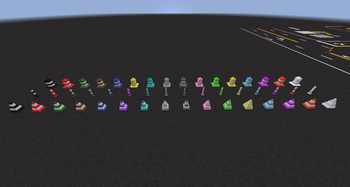
Traffic cones are available! Useful to warn people about something dangerous...
To light up your roads, use reflectors! Come in two variants: basic and luminescent, with two colors (white and yellow).
For more safety on your roads, put some guardrails and bollards! They come in various colors for more customization.
In trouble against ennemies? Hit them with your paintbrush to throw paint on their eyes, turning your target blind for a short time!
How to find bitumen
Bitumen comes in rarer but bigger pockets compared to regular ores. However they can only be found at sea level, in biomes that are not too hilly or mountainous.
The best way is to look around rivers or coasts, or search for caves close to the surface. Otherwise simply dig near the surface around sea level to find pockets.
Available Versions
How to Install Road Stuff on Your Server
Order Server
Order a Minecraft Java server with at least 3 GB RAM (4 GB recommended).
Set forge Loader
In the panel under "Egg", select the forge loader and matching Minecraft version (1.19.2).
Install Mod
Open the mod browser in the dashboard and search for "Road Stuff". Click "Install" – done! Alternatively, upload the .jar via SFTP to the /mods folder.
Compatibility
Mod Loaders
Minecraft Versions
1.19.2, 1.18.2, 1.18.1 (+9 more)
Server-side
✓ RequiredRecommended RAM
4 GB(min. 3 GB)Frequently Asked Questions
Road Stuff server crashes on startup – what to do?
Most common cause: wrong forge version or insufficient RAM. Check the server log (latest.log) for "OutOfMemoryError" or "Mixin" errors. With Mado Hosting: ensure at least 3 GB RAM is allocated and the loader matches the mod version (1.19.2). You can switch loaders with one click in the panel.
Is Road Stuff compatible with forge?
Road Stuff officially supports forge for Minecraft 1.19.2, 1.18.2, 1.18.1. The Mado dashboard automatically detects incompatible loader combinations.
Server lagging with Road Stuff – how to optimize performance?
Recommended RAM: 4 GB (per 8 players). Use /spark profiler to check if Road Stuff consumes the most tick time. Common fixes: reduce server view-distance to 8-10, install "performant" or "starlight" as supplementary mods on Forge. With Mado Hosting, your server runs on NVMe SSDs with dedicated CPU cores for minimal latency.
Similar Mods

![[ETF] Entity Texture Features](https://cdn.modrinth.com/data/BVzZfTc1/af683d206d50b05258d865b0d6e4aa2f2cee12f2_96.webp)
![[EMF] Entity Model Features](https://cdn.modrinth.com/data/4I1XuqiY/6e5bbd0d06b1741bfdab6c0cfab6de8fdaf0064c_96.webp)



Rent Modded Server
Install Road Stuff with just one click on your server.