
Rubi
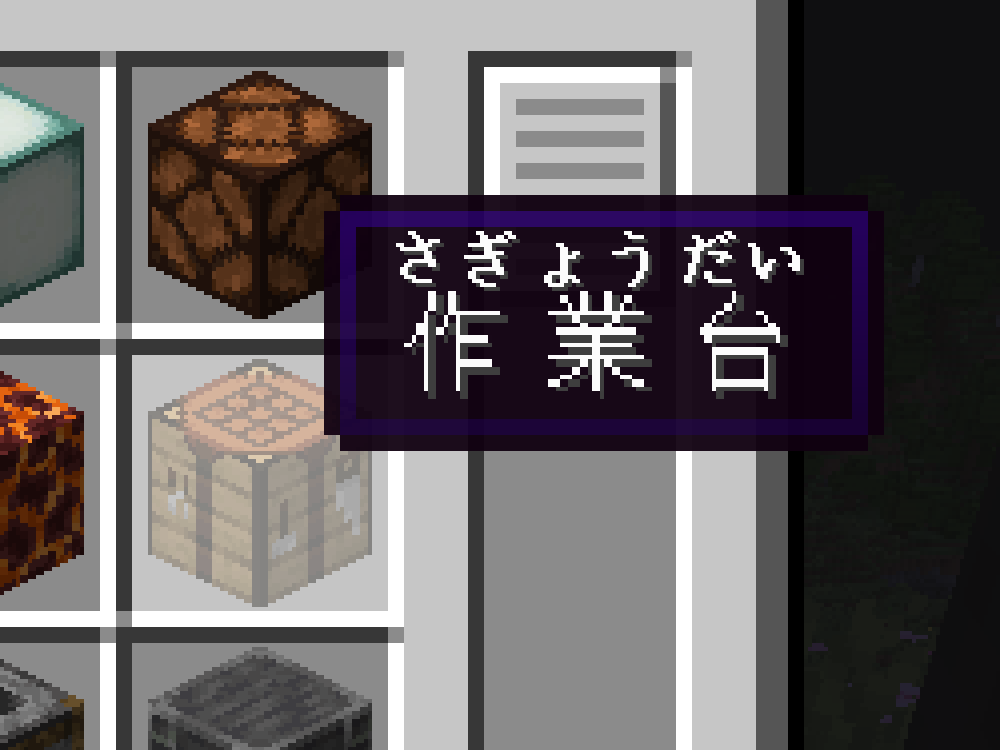
Enables the display of furigana/ruby annotations in Minecraft.
Screenshots
About this Mod
Rubi
Rubi is a utility mod for Minecraft that, hopefully, will enable you to more easily learn (for example) Japanese words through gameplay by allowing the display of furigana/ruby annotations within the game itself. Additionally, I created/generated a dedicated resource pack to provide compatible ruby annotations for the Japanese language. While the resource pack is fairly comprehensive, please note that I haven't thoroughly verified every annotation (there are a lot of them), so I should expect there to be some inaccuracies.
NOTE: This mod does basically nothing without a compatible language resource pack.
How do I make my own annotations?
See the section "For resource pack creators". The same notation can be copy-pasted into books and signs.
Options
By default, ruby annotations are displayed above the annotated text. This can be changed in the game's accessibility settings. There are four options:
- Above Text (Default): The ruby annotations are displayed above the annotated text.
- Below Text: The ruby annotations are displayed below the annotated text.
- Replace Text: The annotated text is replaced with the ruby annotations.
- Hidden: Self explanatory.
Compatible resource packs
Japanese
For resource pack creators
Due to Modrinth not supporting rubies, this section is best viewed on Github. See the README.
Available Versions
How to Install Rubi on Your Server
Order Server
Order a Minecraft Java server with at least 3 GB RAM (4 GB recommended).
Set fabric Loader
In the panel under "Egg", select the fabric loader and matching Minecraft version (1.21.1).
Install Mod
Open the mod browser in the dashboard and search for "Rubi". Click "Install" – done! Alternatively, upload the .jar via SFTP to the /mods folder.
Compatibility
Mod Loaders
Minecraft Versions
1.21.1, 1.21, 1.20.6 (+6 more)
Server-side
✗ UnsupportedRecommended RAM
4 GB(min. 3 GB)Frequently Asked Questions
Rubi server crashes on startup – what to do?
Most common cause: wrong fabric version or insufficient RAM. Check the server log (latest.log) for "OutOfMemoryError" or "Mixin" errors. With Mado Hosting: ensure at least 3 GB RAM is allocated and the loader matches the mod version (1.21.1). You can switch loaders with one click in the panel.
Is Rubi compatible with fabric?
Rubi officially supports fabric for Minecraft 1.21.1, 1.21, 1.20.6. The Mado dashboard automatically detects incompatible loader combinations.
Server lagging with Rubi – how to optimize performance?
Recommended RAM: 4 GB (per 8 players). Use /spark profiler to check if Rubi consumes the most tick time. Common fixes: reduce server view-distance to 8-10, install "performant" or "starlight" as supplementary mods on Forge. With Mado Hosting, your server runs on NVMe SSDs with dedicated CPU cores for minimal latency.
Similar Mods




![[ETF] Entity Texture Features](https://cdn.modrinth.com/data/BVzZfTc1/af683d206d50b05258d865b0d6e4aa2f2cee12f2_96.webp)
![[EMF] Entity Model Features](https://cdn.modrinth.com/data/4I1XuqiY/6e5bbd0d06b1741bfdab6c0cfab6de8fdaf0064c_96.webp)
Rent Modded Server
Install Rubi with just one click on your server.