
Rubix' Mod
Assorted toys from RubixTheSlime
Screenshots
About this Mod
Contains various toys, all of which can be optionally enabled or disabled. The default is that they are all disabled. More to come! (note: these would absolutely be separate mods, if my entire lifetime track record gave any indication i was capable of maintaining multiple mods)
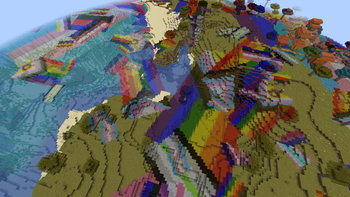
Gay Grass
Covers the world in pride flags using the biome tint for grass, water, etc. Fully data-driven so you can add your own pride flags (or other images) and change the configurations for existing ones. Also quite optimized to ensure you can drive the settings way up without getting bad performance.
Also contains video support, allowing you to even play videos on the grass! ...with limitations.
Redfile
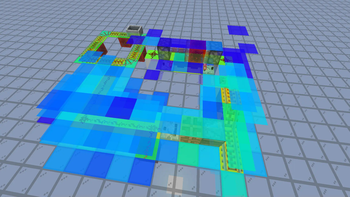
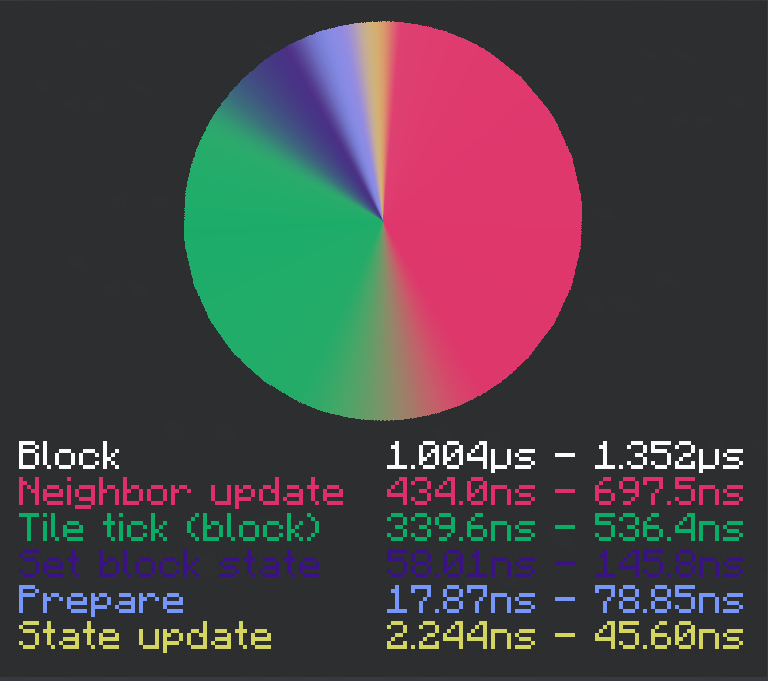
A redstone profiler. Measures the lag caused by a redstone contraption, but isolates the measurement to just that one contraption, allowing for as good as sub-microsecond precision in some cases. More than that, it is very informative, as it can break down the lag by block using a heatmap, and by the type of processing (neighbor update, tile tick, etc). It also includes measures against common pitfalls, for example it automatically accounts for the potential error in all of its measurements. Simple for simple tasks, and complex for complex ones.
Suppression Blocks
Blocks that disable various mechanics on each of their surrounding blocks. Great for learning how the game works through experimentation, or for teaching how it works.
Available Versions
How to Install Rubix' Mod on Your Server
Order Server
Order a Minecraft Java server with at least 3 GB RAM (4 GB recommended).
Set fabric Loader
In the panel under "Egg", select the fabric loader and matching Minecraft version (1.21.5).
Install Mod
Open the mod browser in the dashboard and search for "Rubix' Mod". Click "Install" – done! Alternatively, upload the .jar via SFTP to the /mods folder.
Compatibility
Mod Loaders
Minecraft Versions
1.21.5
Server-side
✓ RequiredRecommended RAM
4 GB(min. 3 GB)Frequently Asked Questions
Rubix' Mod server crashes on startup – what to do?
Most common cause: wrong fabric version or insufficient RAM. Check the server log (latest.log) for "OutOfMemoryError" or "Mixin" errors. With Mado Hosting: ensure at least 3 GB RAM is allocated and the loader matches the mod version (1.21.5). You can switch loaders with one click in the panel.
Is Rubix' Mod compatible with fabric?
Rubix' Mod officially supports fabric for Minecraft 1.21.5. The Mado dashboard automatically detects incompatible loader combinations.
Server lagging with Rubix' Mod – how to optimize performance?
Recommended RAM: 4 GB (per 8 players). Use /spark profiler to check if Rubix' Mod consumes the most tick time. Common fixes: reduce server view-distance to 8-10, install "performant" or "starlight" as supplementary mods on Forge. With Mado Hosting, your server runs on NVMe SSDs with dedicated CPU cores for minimal latency.
Similar Mods

![[ETF] Entity Texture Features](https://cdn.modrinth.com/data/BVzZfTc1/af683d206d50b05258d865b0d6e4aa2f2cee12f2_96.webp)
![[EMF] Entity Model Features](https://cdn.modrinth.com/data/4I1XuqiY/6e5bbd0d06b1741bfdab6c0cfab6de8fdaf0064c_96.webp)



Rent Modded Server
Install Rubix' Mod with just one click on your server.