
RulerMod
A lightweight holographic selection and measurement tool — mark two positions, instantly see dimensions, distance, area and volume.
Screenshots
About this Mod
Ruler
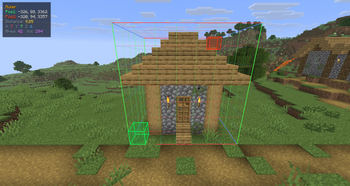
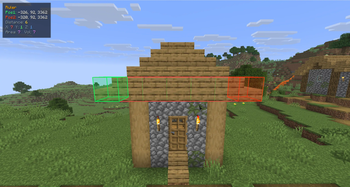
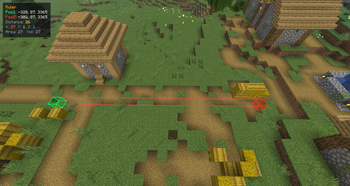
Ruler is a lightweight, client-side selection and measurement tool for Minecraft 1.21.1 (Fabric). It lets you mark two positions in the world and instantly see a clean holographic 3D visualization of the selected area — along with all relevant measurements in a HUD overlay.
Inspired by WorldEdit CUI, but completely standalone. No server plugin or WorldEdit installation required.
How it works
Press R to activate the ruler (rebindable under Controls → Ruler).
- Left-click a block to set Pos1
- Right-click a block to set Pos2
That's it. The selection renders immediately.
Press R again to deactivate and clear the selection.
3D Visualization
The selection is rendered as a holographic wireframe box directly in the world:
- XYZ color-coded edges — X red, Y green, Z blue
- Subtle inner grid for spatial orientation
- Transparent block highlights at Pos1 (green) and Pos2 (red)
- Single positions are shown before the second is placed
- Clean, modern look — no chunky vanilla-style boxes
HUD Overlay
A small panel in the top-left corner shows:
| Field | Description |
|---|---|
| Pos1 / Pos2 | Block coordinates |
| Distance | Direct 3D diagonal (air-line) |
| X / Y / Z | Dimensions of the selection |
| Area | Footprint (X × Z) |
| Volume | Total blocks (X × Y × Z) |
Languages
Ruler ships with 37 languages out of the box:
Standard: English, Deutsch, Français, Español, Italiano, Português, Русский, Українська, Polski, Nederlands, Svenska, Dansk, Norsk, Suomi, Čeština, Slovenčina, Magyar, Română, Türkçe, Ελληνικά, 简体中文, 繁體中文, 日本語, 한국어, العربية, עברית, Tiếng Việt, ภาษาไทย
Compatibility
- ✅ Client-side only — works on any server, no server mod needed
- ✅ ModMenu — appears correctly in the mod list
- ✅ Fabric API required
Requirements
- Minecraft 1.21.1
- Fabric Loader ≥ 0.17.3
- Fabric API
Available Versions
How to Install RulerMod on Your Server
Order Server
Order a Minecraft Java server with at least 3 GB RAM (4 GB recommended).
Set fabric Loader
In the panel under "Egg", select the fabric loader and matching Minecraft version (1.21.11).
Install Mod
Open the mod browser in the dashboard and search for "RulerMod". Click "Install" – done! Alternatively, upload the .jar via SFTP to the /mods folder.
Compatibility
Mod Loaders
Minecraft Versions
1.21.11
Server-side
✗ UnsupportedRecommended RAM
4 GB(min. 3 GB)Frequently Asked Questions
RulerMod server crashes on startup – what to do?
Most common cause: wrong fabric version or insufficient RAM. Check the server log (latest.log) for "OutOfMemoryError" or "Mixin" errors. With Mado Hosting: ensure at least 3 GB RAM is allocated and the loader matches the mod version (1.21.11). You can switch loaders with one click in the panel.
Is RulerMod compatible with fabric?
RulerMod officially supports fabric for Minecraft 1.21.11. The Mado dashboard automatically detects incompatible loader combinations.
Server lagging with RulerMod – how to optimize performance?
Recommended RAM: 4 GB (per 8 players). Use /spark profiler to check if RulerMod consumes the most tick time. Common fixes: reduce server view-distance to 8-10, install "performant" or "starlight" as supplementary mods on Forge. With Mado Hosting, your server runs on NVMe SSDs with dedicated CPU cores for minimal latency.
Similar Mods




![[ETF] Entity Texture Features](https://cdn.modrinth.com/data/BVzZfTc1/af683d206d50b05258d865b0d6e4aa2f2cee12f2_96.webp)
![[EMF] Entity Model Features](https://cdn.modrinth.com/data/4I1XuqiY/6e5bbd0d06b1741bfdab6c0cfab6de8fdaf0064c_96.webp)
Rent Modded Server
Install RulerMod with just one click on your server.