
RunChallenge
A mod for streamers and challenges in Minecraft! Create distance running challenges with progress tracking.
Screenshots
About this Mod
Run Challenge 🏃
A mod for streamers and challenges in Minecraft! Create distance running challenges with progress tracking.
📋 Description
Run Challenge adds a challenge system with running for a set distance. The mod is perfect for streamers who want to create interactive challenges for themselves or their viewers.
✨ Features
- 🎯 Distance Challenges - set any distance for the run
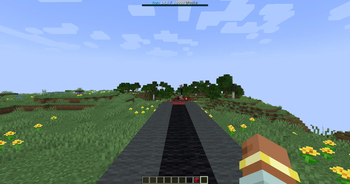
- 📊 BossBar - visual progress bar with distance covered
- ↩️ Reverse Count - counter decreases when moving backwards
- 🎆 Fireworks - 5 volleys of colorful fireworks upon challenge completion
- 👥 Multiplayer - support for multiple players, can manage other players' challenges
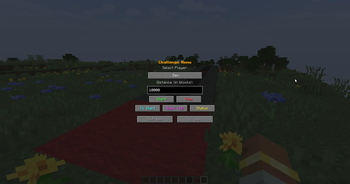
- 🖥️ Convenient GUI - graphical interface for management (R key)
- 📝 Commands - full control via commands
- 🌍 Localization - Russian and English language
🎮 How to Use
GUI (R key):
- Select a player from the dropdown list
- Specify the distance in blocks
- Press "Start" to begin the challenge
- Use buttons for management (teleport to start, push back)
Commands:
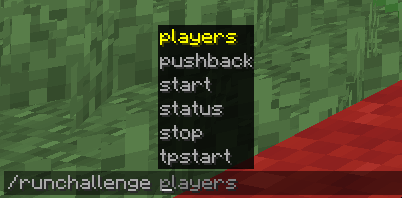
/runchallenge start <distance> [player]- start challenge/runchallenge stop [player]- stop challenge/runchallenge status [player]- show progress/runchallenge tpstart [player]- teleport to start/runchallenge pushback [player]- push back 10 blocks/runchallenge players- online players list
🎥 For Streamers
The mod is great for:
- Interactive streams with viewers
- Speed/endurance challenges
- Viewer punishments/rewards on a server
- Player competitions
📦 Installation
- Install Minecraft Forge 1.20.1
- Download the mod and place it in the
modsfolder - Launch the game
🔧 Requirements
- Minecraft 1.20.1
- Forge 47.3.0 or higher
Author: EdvardCode
License: MIT
Available Versions
How to Install RunChallenge on Your Server
Order Server
Order a Minecraft Java server with at least 3 GB RAM (4 GB recommended).
Set fabric Loader
In the panel under "Egg", select the fabric loader and matching Minecraft version (1.20.1).
Install Mod
Open the mod browser in the dashboard and search for "RunChallenge". Click "Install" – done! Alternatively, upload the .jar via SFTP to the /mods folder.
Compatibility
Mod Loaders
Minecraft Versions
1.20.1
Server-side
✓ RequiredRecommended RAM
4 GB(min. 3 GB)Frequently Asked Questions
RunChallenge server crashes on startup – what to do?
Most common cause: wrong fabric version or insufficient RAM. Check the server log (latest.log) for "OutOfMemoryError" or "Mixin" errors. With Mado Hosting: ensure at least 3 GB RAM is allocated and the loader matches the mod version (1.20.1). You can switch loaders with one click in the panel.
Is RunChallenge compatible with fabric and forge?
RunChallenge officially supports fabric, forge for Minecraft 1.20.1. Note: Forge and Fabric mods are NOT cross-compatible – pick one loader and stick with it. The Mado dashboard automatically detects incompatible loader combinations.
Server lagging with RunChallenge – how to optimize performance?
Recommended RAM: 4 GB (per 8 players). Use /spark profiler to check if RunChallenge consumes the most tick time. Common fixes: reduce server view-distance to 8-10, install "performant" or "starlight" as supplementary mods on Forge. With Mado Hosting, your server runs on NVMe SSDs with dedicated CPU cores for minimal latency.
Similar Mods




Rent Modded Server
Install RunChallenge with just one click on your server.