
Runorama Next
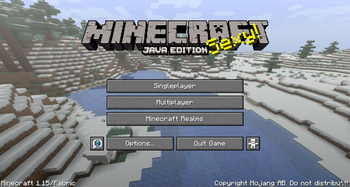
A mod allowing you to capture panoramic screenshots to modify the appearance of your main menu.
Screenshots
About this Mod
Runorama Next
Runorama Next is a Minecraft mod for Fabric that continues the work of
the Runorama mod by Liachmodded. The mod lets you
take panoramic screenshots that replaces the normal start screen background with an image from your own world. It also
allows you to easily create a resource pack with your own custom screenshots.
Installation
- Download and install Fabric Loader following the instructions on
the Fabric website. - Download the Runorama Next mod JAR file from the releases page.
- Move the JAR file to the mods folder in your Minecraft installation directory.
- Launch Minecraft with the Fabric profile.
Usage
The H button is bound to take a panoramic screenshot that will replace the normal start screen background with a
randomized image from your collection of panoramic screenshots. The default keybind can be changed in the controls. See
the commands section for more information.
Commands
The following commands can be used to configure the mod:
/runoramanext config setpanoramafov [fov]: Sets the field of view (FOV) for the panoramic screenshot. FOV must be a number between 30 and 110. Default is set to 82, but it can be adjusted for better results if you're taking panoramas very close to the ground or high up in the sky./runoramanext config rotationspeed [speed]: Sets the rotation speed for the panoramic screenshot. The default value
is 1, which is a multiplier of the standard minecraft rotation speed./runoramanext config poolsize [size]: Sets the pool size for the panoramic screenshot./runoramanext config includevanillapanorama [true/false]: Sets whether to include vanilla Minecraft panorama images
in the pool of images used for the start screen background./runoramanext config replacetitlescreen [true/false]: Sets whether to replace the vanilla Minecraft title screen
with the modded version.
Additionally, the following command can be used to create a resource pack with your custom panoramic screenshots:
/runoramanext createresourcepack [name] [description]: Creates a resource pack with your custom panoramic
screenshots. You can provide a name and description for the resource pack.
Source Code
The source code can be found on GitHub under the MPL-2.0
License. More information about the license can be found under the License section.
License
The Runorama Next mod is released under the MPL-2.0 license. This allows you to, modify and redistribute the mod
as long as it adheres to the license terms. The license requires that any modifications to the code are made
publicly available. It also requires that any original or modified code that is distributed must be released under the
same license.
Bugs and Feedback
Bug reports can be submitted either through
the GitHub Issues page of the Runorama Next mod repository or by
contacting me
personally over Discord (WinterWolfSV#9577). Please provide as much information as
possible, including steps to reproduce the issue, error messages, and any relevant screenshots or log files. Your
feedback is greatly appreciated and will help improve the mod for all users.
Credits
The Runorama Next mod is a continuation of the original Runorama mod, created
by liachmodded.
Here are some other mod links you may be interested in:
- Runorama equivalent for Forge created by
suppergerrie2: Panorama Creator - Runorama for versions below 1.15 created by
liachmodded: Runorama
Available Versions
How to Install Runorama Next on Your Server
Order Server
Order a Minecraft Java server with at least 3 GB RAM (4 GB recommended).
Set fabric Loader
In the panel under "Egg", select the fabric loader and matching Minecraft version (1.16.5).
Install Mod
Open the mod browser in the dashboard and search for "Runorama Next". Click "Install" – done! Alternatively, upload the .jar via SFTP to the /mods folder.
Compatibility
Mod Loaders
Minecraft Versions
1.16.5, 1.16.4, 1.16.3 (+5 more)
Server-side
✗ UnsupportedRecommended RAM
4 GB(min. 3 GB)Frequently Asked Questions
Runorama Next server crashes on startup – what to do?
Most common cause: wrong fabric version or insufficient RAM. Check the server log (latest.log) for "OutOfMemoryError" or "Mixin" errors. With Mado Hosting: ensure at least 3 GB RAM is allocated and the loader matches the mod version (1.16.5). You can switch loaders with one click in the panel.
Is Runorama Next compatible with fabric?
Runorama Next officially supports fabric for Minecraft 1.16.5, 1.16.4, 1.16.3. The Mado dashboard automatically detects incompatible loader combinations.
Server lagging with Runorama Next – how to optimize performance?
Recommended RAM: 4 GB (per 8 players). Use /spark profiler to check if Runorama Next consumes the most tick time. Common fixes: reduce server view-distance to 8-10, install "performant" or "starlight" as supplementary mods on Forge. With Mado Hosting, your server runs on NVMe SSDs with dedicated CPU cores for minimal latency.
Similar Mods




![[ETF] Entity Texture Features](https://cdn.modrinth.com/data/BVzZfTc1/af683d206d50b05258d865b0d6e4aa2f2cee12f2_96.webp)
![[EMF] Entity Model Features](https://cdn.modrinth.com/data/4I1XuqiY/6e5bbd0d06b1741bfdab6c0cfab6de8fdaf0064c_96.webp)
Rent Modded Server
Install Runorama Next with just one click on your server.