
The BTA Russifier
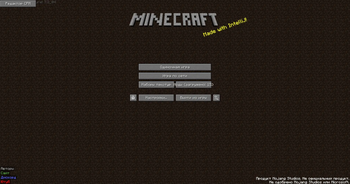
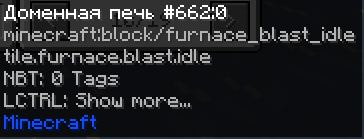
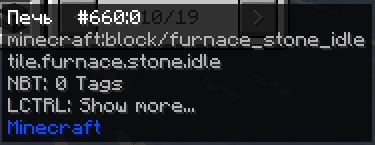
This project fully translates (except for moments where the game itself does not allow it) BTA into Russian.
Screenshots
About this Mod
Eng
This Russian localization provides full localization of the interface, text elements and hints for Minecraft BTA - an authentic build of beta versions. The translation is made using artificial intelligence, after which the author personally checked each fragment: approved suitable options or rejected and refined unsuitable. The result is an accurate, natural Russian language that preserves the original style of the game.
Installation
Unzip the archive to the languages folder.
Ru
Данный русификатор обеспечивает полную локализацию интерфейса, текстовых элементов и подсказок для Minecraft BTA — аутентичной сборки бета-версий. Перевод выполнен с использованием искусственного интеллекта, после чего автор лично проверил каждый фрагмент: одобрил подходящие варианты или отклонил и доработал неподходящие. Результат — точный, естественный русский язык, сохраняющий оригинальный стиль игры.
Установка
Разархивируйте архив в папку languages.
Available Versions
How to Install The BTA Russifier on Your Server
Order Server
Order a Minecraft Java server with at least 3 GB RAM (4 GB recommended).
Set babric Loader
In the panel under "Egg", select the babric loader and matching Minecraft version (b1.7.3).
Install Mod
Open the mod browser in the dashboard and search for "The BTA Russifier". Click "Install" – done! Alternatively, upload the .jar via SFTP to the /mods folder.
Compatibility
Mod Loaders
Minecraft Versions
b1.7.3
Server-side
✗ UnsupportedRecommended RAM
4 GB(min. 3 GB)Frequently Asked Questions
The BTA Russifier server crashes on startup – what to do?
Most common cause: wrong babric version or insufficient RAM. Check the server log (latest.log) for "OutOfMemoryError" or "Mixin" errors. With Mado Hosting: ensure at least 3 GB RAM is allocated and the loader matches the mod version (b1.7.3). You can switch loaders with one click in the panel.
Is The BTA Russifier compatible with babric and bta-babric?
The BTA Russifier officially supports babric, bta-babric for Minecraft b1.7.3. The Mado dashboard automatically detects incompatible loader combinations.
Server lagging with The BTA Russifier – how to optimize performance?
Recommended RAM: 4 GB (per 8 players). Use /spark profiler to check if The BTA Russifier consumes the most tick time. Common fixes: reduce server view-distance to 8-10, install "performant" or "starlight" as supplementary mods on Forge. With Mado Hosting, your server runs on NVMe SSDs with dedicated CPU cores for minimal latency.
Similar Mods




![[ETF] Entity Texture Features](https://cdn.modrinth.com/data/BVzZfTc1/af683d206d50b05258d865b0d6e4aa2f2cee12f2_96.webp)
![[EMF] Entity Model Features](https://cdn.modrinth.com/data/4I1XuqiY/6e5bbd0d06b1741bfdab6c0cfab6de8fdaf0064c_96.webp)
Rent Modded Server
Install The BTA Russifier with just one click on your server.