
Rusted
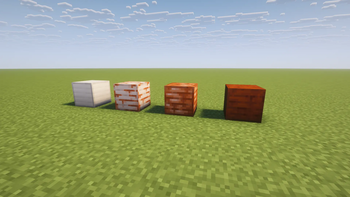
Rusted is an immersive modification that expands the copper oxidation mechanic (introduced in vanilla Minecraft) to Iron Blocks. Add realism and depth to your world by watching iron structures and blocks gradually succumb to corrosion, progressing through
Screenshots


About this Mod
✨ RUSTED MOD ✨

Corrosion Takes Hold of Your World
Rusted is a mod that extends the copper oxidation mechanic to iron blocks. Add realism and depth to your world by watching iron structures corrode through four realistic rust states. Your metal structures will never look the same again.
Dynamic Iron Rusting
All Iron Blocks and their variants oxidize over time, passing through four distinct rust stages. This process is synchronized with the game's natural cycle.
Environmental Impact
Rust doesn't develop evenly. The corrosion process is significantly accelerated when a block comes into contact with water or is exposed to rain, providing a strategic element of structural protection.
Complete Control Over Maintenance
You have complete control over the rusting process of your buildings:
Use the Honeycomb to apply a layer of wax to any block, permanently stopping the rusting process at that stage. Dewaxing and Scraping: Use the Axe to remove the wax layer. Scrape away the rust layer, restoring the block to its previous, cleaner state.
planned: integration with create mod
📜 License
This mod uses modified resources from the Rusted Iron mod, which is licensed under the MIT License.Original Texture Credit: Lemon
License: MIT License.
Full attribution and licensing information can be found in the CREDITS.txt file included with the mod file.
Available Versions
How to Install Rusted on Your Server
Order Server
Order a Minecraft Java server with at least 3 GB RAM (4 GB recommended).
Set neoforge Loader
In the panel under "Egg", select the neoforge loader and matching Minecraft version (1.21.1).
Install Mod
Open the mod browser in the dashboard and search for "Rusted". Click "Install" – done! Alternatively, upload the .jar via SFTP to the /mods folder.
Compatibility
Mod Loaders
Minecraft Versions
1.21.1
Server-side
✓ RequiredRecommended RAM
4 GB(min. 3 GB)Frequently Asked Questions
Rusted server crashes on startup – what to do?
Most common cause: wrong neoforge version or insufficient RAM. Check the server log (latest.log) for "OutOfMemoryError" or "Mixin" errors. With Mado Hosting: ensure at least 3 GB RAM is allocated and the loader matches the mod version (1.21.1). You can switch loaders with one click in the panel.
Is Rusted compatible with neoforge?
Rusted officially supports neoforge for Minecraft 1.21.1. The Mado dashboard automatically detects incompatible loader combinations.
Server lagging with Rusted – how to optimize performance?
Recommended RAM: 4 GB (per 8 players). Use /spark profiler to check if Rusted consumes the most tick time. Common fixes: reduce server view-distance to 8-10, install "performant" or "starlight" as supplementary mods on Forge. With Mado Hosting, your server runs on NVMe SSDs with dedicated CPU cores for minimal latency.
Similar Mods

![[ETF] Entity Texture Features](https://cdn.modrinth.com/data/BVzZfTc1/af683d206d50b05258d865b0d6e4aa2f2cee12f2_96.webp)
![[EMF] Entity Model Features](https://cdn.modrinth.com/data/4I1XuqiY/6e5bbd0d06b1741bfdab6c0cfab6de8fdaf0064c_96.webp)



Rent Modded Server
Install Rusted with just one click on your server.