
S33R Iris Azalea
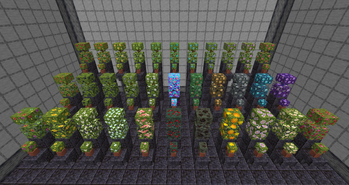
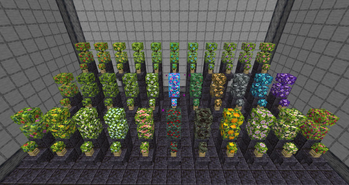
Adds 33 new flowering azalea bushes and leaves.
Screenshots
About this Mod
The S33R Iris Azalea Mod for Forge adds 33 new flowering azalea bushes and leaves to the game. Bushes or leaves can be right clicked with the following 26 items to change their appearance:
- All 16 dyes
- Sweet berries
- Dragon's breath
- Prismarine shard
- Oxeye daisy
- Wither rose
- White tulip
- Redstone dust
- Dandelion
- Honey comb
- Popped chorus fruit
Dyed bushes can be washed off by right clicking with a water bottle and shears can be used to snip the other 10 bushes back to a flowering azalea bush (you won't get the dye nor item back in this exchange).
The remaining 7 azalea bushes can be crafted. 4 diamonds, amethyst shards, gold, copper, or iron ingots can be placed around a flowering azalea bush to craft 1 bush. The rainbow iris azalea can be crafted using red, orange, yellow, lime, cyan, blue, purple, and magenta dye in any order around a flowering azalea bush. Lastly, my easter egg S33R themed bush can be crafted by placing four flowering azalea bushes around 1 nether star to make 4 bushes.
Placed iris bushes can be right clicked using an axe to obtain the corresponding leaves.
In addition to this mod I've made a texture pack to make the leaves and bushes match those in the Mizunos 16Craft texture pack, as well as two texture packs which use Optifine to achieve a Vanilla and Mizunos version without needing to use the mod. Those are available for download via the links above or on my PlanetMinecraft page.
Hope you enjoy using this mod, I've had some ideas on how to expand it with new woods and tree models. Maybe I could be convinced to do that if people want to support a goal on my Buy Me a Coffee page, let me know if that's something ya'll would be interested in ^-^
~ Seer

Available Versions
How to Install S33R Iris Azalea on Your Server
Order Server
Order a Minecraft Java server with at least 3 GB RAM (4 GB recommended).
Set forge Loader
In the panel under "Egg", select the forge loader and matching Minecraft version (1.19.2).
Install Mod
Open the mod browser in the dashboard and search for "S33R Iris Azalea". Click "Install" – done! Alternatively, upload the .jar via SFTP to the /mods folder.
Compatibility
Mod Loaders
Minecraft Versions
1.19.2, 1.18.2
Server-side
✓ RequiredRecommended RAM
4 GB(min. 3 GB)Frequently Asked Questions
S33R Iris Azalea server crashes on startup – what to do?
Most common cause: wrong forge version or insufficient RAM. Check the server log (latest.log) for "OutOfMemoryError" or "Mixin" errors. With Mado Hosting: ensure at least 3 GB RAM is allocated and the loader matches the mod version (1.19.2). You can switch loaders with one click in the panel.
Is S33R Iris Azalea compatible with forge?
S33R Iris Azalea officially supports forge for Minecraft 1.19.2, 1.18.2. The Mado dashboard automatically detects incompatible loader combinations.
Server lagging with S33R Iris Azalea – how to optimize performance?
Recommended RAM: 4 GB (per 8 players). Use /spark profiler to check if S33R Iris Azalea consumes the most tick time. Common fixes: reduce server view-distance to 8-10, install "performant" or "starlight" as supplementary mods on Forge. With Mado Hosting, your server runs on NVMe SSDs with dedicated CPU cores for minimal latency.
Similar Mods

![[ETF] Entity Texture Features](https://cdn.modrinth.com/data/BVzZfTc1/af683d206d50b05258d865b0d6e4aa2f2cee12f2_96.webp)
![[EMF] Entity Model Features](https://cdn.modrinth.com/data/4I1XuqiY/6e5bbd0d06b1741bfdab6c0cfab6de8fdaf0064c_96.webp)



Rent Modded Server
Install S33R Iris Azalea with just one click on your server.