
Screenshots
About this Mod
!NOT!: modu anlayamayanlar için modun amacı yakınına bir oyuncu geldiğinde ondan kaçabilmek örneğin bir towny sunucusunda pvp açık yerde maden yapıyorsun bu mod biri gelir mi acaba derdine son veriyor
[EN]
Safe Zone Mode
This mode is designed to protect the player from players who are not on the whitelist.
Features
🛡️ Automatic Protection System
When a player who is not on the whitelist is detected within a specified distance, the mode automatically executes a pre-set command. This allows you to react instantly in unexpected situations (set snatching attempts, etc.).
⚙️ Easy Configuration (GUI)
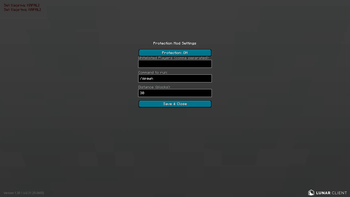
The settings screen, accessible by pressing the ‘P’ key (default) in-game, includes:
Protection (On/Off): Quickly change the mode's operating status.
Whitelist: Add the names of your trusted friends here, separated by commas.
Command: Specify which command will run when protection is triggered (e.g., quit, hub, tp spawn).
Distance: Set the block distance that will trigger protection.
🚀 Fast and Lightweight
The mod only checks once per second (20 ticks) to avoid affecting game performance.
TIP
You can change the key used to open the Settings menu from Minecraft's normal Controls menu.
[TR]
Güvenli Alan Modu
Bu mod, oyuncuyu çevredeki beyaz listede (whitelist) bulunmayan oyunculara karşı korumak için tasarlanmıştır.
Özellikler
🛡️ Otomatik Koruma Sistemi
Belirlenen bir mesafe içinde beyaz listede olmayan bir oyuncu tespit edildiğinde, mod otomatik olarak önceden ayarlanmış bir komutu çalıştırır. Bu sayede beklenmedik durumlarda (set kaçırma girişimleri vb.) anında tepki vermenizi sağlar.
⚙️ Kolay Yapılandırma (GUI)
Oyun içinde 'P' tuşuna (varsayılan) basarak erişebileceğiniz ayarlar ekranı şunları içerir:
Protection (Açık/Kapalı): Modun çalışma durumunu hızlıca değiştirin.
Beyaz Liste (Whitelisted Players): Güvendiğiniz arkadaşlarınızın isimlerini virgülle ayırarak buraya ekleyin.
Komut (Command): Koruma tetiklendiğinde hangi komutun çalışacağını belirleyin (Örn: quit, hub, tp spawn).
Mesafe (Distance): Korumayı tetikleyecek blok mesafesini ayarlayın.
🚀 Hızlı ve Hafif
Mod, oyun performansını etkilememek için saniyede sadece bir kez kontrol (20 tick) yapar.
İpucu
Ayarlar menüsünü açmak için kullanılan tuşu Minecraft'ın normal Kontroller (Controls) menüsünden değiştirebilirsiniz.
Available Versions
How to Install SafeZone on Your Server
Order Server
Order a Minecraft Java server with at least 3 GB RAM (4 GB recommended).
Set fabric Loader
In the panel under "Egg", select the fabric loader and matching Minecraft version (1.20.6).
Install Mod
Open the mod browser in the dashboard and search for "SafeZone". Click "Install" – done! Alternatively, upload the .jar via SFTP to the /mods folder.
Compatibility
Mod Loaders
Minecraft Versions
1.20.6, 1.20.5, 1.20.4 (+3 more)
Server-side
✗ UnsupportedRecommended RAM
4 GB(min. 3 GB)Frequently Asked Questions
SafeZone server crashes on startup – what to do?
Most common cause: wrong fabric version or insufficient RAM. Check the server log (latest.log) for "OutOfMemoryError" or "Mixin" errors. With Mado Hosting: ensure at least 3 GB RAM is allocated and the loader matches the mod version (1.20.6). You can switch loaders with one click in the panel.
Is SafeZone compatible with fabric?
SafeZone officially supports fabric for Minecraft 1.20.6, 1.20.5, 1.20.4. The Mado dashboard automatically detects incompatible loader combinations.
Server lagging with SafeZone – how to optimize performance?
Recommended RAM: 4 GB (per 8 players). Use /spark profiler to check if SafeZone consumes the most tick time. Common fixes: reduce server view-distance to 8-10, install "performant" or "starlight" as supplementary mods on Forge. With Mado Hosting, your server runs on NVMe SSDs with dedicated CPU cores for minimal latency.
Similar Mods




Rent Modded Server
Install SafeZone with just one click on your server.