
SafePearl
Pearl your way safely through the world.
Screenshots
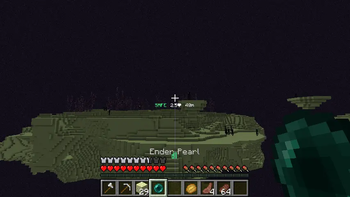
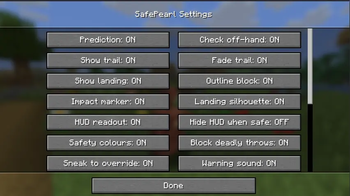
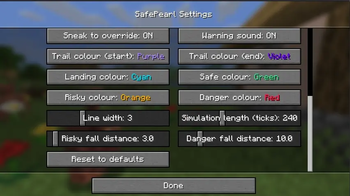

About this Mod
SafePearl



Never die to an ender pearl again.
SafePearl is a lightweight, client-side Fabric mod that shows you exactly where your ender pearl will land — and stops you from throwing one that would get you killed. Works on any server, no server-side install needed.
✨ Features
- 🎯 See where your pearl lands — a live trajectory trail and a marker on the exact block you'll hit, using the game's real pearl physics (it even accounts for running, sprinting, falling, and throwing from water).
- 🛡️ Deadly-throw guard — if a throw would kill you (lava, the void, a lethal fall), SafePearl cancels it before the pearl leaves your hand. No pearl wasted, no cooldown. Hold sneak to override.
- ❤️ Damage prediction — shows the hearts you'll lose before you throw, using your actual health, fall distance, and effects like Slow Falling, Feather Falling, and soft landings (water, slime, hay).
- 📟 Compact HUD under your crosshair: safety status, damage, and distance at a glance.
🚦 Safety verdict
| Verdict | Meaning |
|---|---|
| 🟢 SAFE | Solid ground, negligible fall. |
| 🟠 RISKY | You'll survive, but take some fall damage. |
| 🔴 DEADLY | Lava, the void, or a lethal fall — the throw is blocked by default. |
⚙️ Configuration
Open the settings through Mod Menu — toggle the trail, markers, HUD, and the deadly-throw guard, and tune every colour and threshold. Everything saves to config/safepearl.json.
📦 Install
- Install Fabric Loader and Fabric API.
- Drop SafePearl into your
modsfolder. - (Optional) Add Mod Menu to access the in-game settings.
Supports Minecraft 1.21.6 – 1.21.11.
💚 Enjoying SafePearl? Follow the project and leave feedback — it genuinely helps more players find the mod.
Available Versions
How to Install SafePearl on Your Server
Order Server
Order a Minecraft Java server with at least 3 GB RAM (4 GB recommended).
Set fabric Loader
In the panel under "Egg", select the fabric loader and matching Minecraft version (1.21.11).
Install Mod
Open the mod browser in the dashboard and search for "SafePearl". Click "Install" – done! Alternatively, upload the .jar via SFTP to the /mods folder.
Compatibility
Mod Loaders
Minecraft Versions
1.21.11, 1.21.10, 1.21.8 (+3 more)
Server-side
✗ UnsupportedRecommended RAM
4 GB(min. 3 GB)Frequently Asked Questions
SafePearl server crashes on startup – what to do?
Most common cause: wrong fabric version or insufficient RAM. Check the server log (latest.log) for "OutOfMemoryError" or "Mixin" errors. With Mado Hosting: ensure at least 3 GB RAM is allocated and the loader matches the mod version (1.21.11). You can switch loaders with one click in the panel.
Is SafePearl compatible with fabric and quilt?
SafePearl officially supports fabric, quilt for Minecraft 1.21.11, 1.21.10, 1.21.8. The Mado dashboard automatically detects incompatible loader combinations.
Server lagging with SafePearl – how to optimize performance?
Recommended RAM: 4 GB (per 8 players). Use /spark profiler to check if SafePearl consumes the most tick time. Common fixes: reduce server view-distance to 8-10, install "performant" or "starlight" as supplementary mods on Forge. With Mado Hosting, your server runs on NVMe SSDs with dedicated CPU cores for minimal latency.
Similar Mods




Rent Modded Server
Install SafePearl with just one click on your server.