
Saico's CopperHeart
copper focused mod for 1.20.1, adding more uses like decoration and function to copper
Screenshots
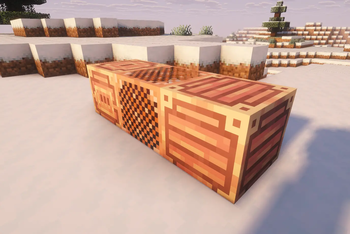

About this Mod

Saico’s CopperHeart
This is the first step in a planned modpack of six mods, all designed for Minecraft version 1.20.1 using Forge. This project serves as the starting point for a modular and technically focused vision, with plans to eventually migrate to Fabric and NeoForge.
The main goal of the mod is to enhance the role of copper in the game, expanding its utility with new blocks, tools, and mechanics. Unlike other approaches, CopperHeart avoids common clichés like full armor or tool sets, and instead offers a more refined and functional experience.
From custom smelting systems to decorative and utility blocks, this is a reimagining of copper designed to integrate with style and purpose into your world.
Upcoming Update: Version 1.1 – Texture Rebuild
This update introduces a foundational visual overhaul for Saico’s CopperHeart, focusing on texture continuity and aesthetic refinement. It lays the groundwork for future modular expansions by implementing connected texture logic and reworking key visual assets.
Planned Features:
- Connected Texture Mapping for select blocks:
- Copper Grate
- Reinforced Copper Block
- Copper Panel Block
- Shared texture atlas system to reduce file count and improve visual cohesion.
- Retexturing of Copper Alloy for better material distinction.
- Color adjustments across Reinforced Copper blocks and items to unify the palette.
This version is currently in development. Feedback is welcome as the visual identity of the mod continues to evolve.
Available Versions
How to Install Saico's CopperHeart on Your Server
Order Server
Order a Minecraft Java server with at least 3 GB RAM (4 GB recommended).
Set forge Loader
In the panel under "Egg", select the forge loader and matching Minecraft version (1.20.1).
Install Mod
Open the mod browser in the dashboard and search for "Saico's CopperHeart". Click "Install" – done! Alternatively, upload the .jar via SFTP to the /mods folder.
Compatibility
Mod Loaders
Minecraft Versions
1.20.1
Server-side
✓ RequiredRecommended RAM
4 GB(min. 3 GB)Frequently Asked Questions
Saico's CopperHeart server crashes on startup – what to do?
Most common cause: wrong forge version or insufficient RAM. Check the server log (latest.log) for "OutOfMemoryError" or "Mixin" errors. With Mado Hosting: ensure at least 3 GB RAM is allocated and the loader matches the mod version (1.20.1). You can switch loaders with one click in the panel.
Is Saico's CopperHeart compatible with forge?
Saico's CopperHeart officially supports forge for Minecraft 1.20.1. The Mado dashboard automatically detects incompatible loader combinations.
Server lagging with Saico's CopperHeart – how to optimize performance?
Recommended RAM: 4 GB (per 8 players). Use /spark profiler to check if Saico's CopperHeart consumes the most tick time. Common fixes: reduce server view-distance to 8-10, install "performant" or "starlight" as supplementary mods on Forge. With Mado Hosting, your server runs on NVMe SSDs with dedicated CPU cores for minimal latency.
Similar Mods

![[ETF] Entity Texture Features](https://cdn.modrinth.com/data/BVzZfTc1/af683d206d50b05258d865b0d6e4aa2f2cee12f2_96.webp)
![[EMF] Entity Model Features](https://cdn.modrinth.com/data/4I1XuqiY/6e5bbd0d06b1741bfdab6c0cfab6de8fdaf0064c_96.webp)



Rent Modded Server
Install Saico's CopperHeart with just one click on your server.