
Salvage & Repair
Recover, repair, and profit! Salvage & Repair is an addon for Management Wanted.
Screenshots
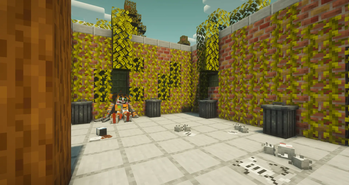
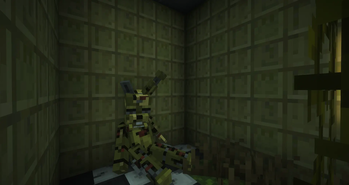
About this Mod
Salvage & Repair is an addon for Management Wanted focused on recovering and restoring abandoned animatronics.
Instead of managing abandoned buildings, players can now search for damaged animatronics, salvage their parts, perform repairs, and return them to operational condition. Every successful restoration rewards the player, creating a new gameplay loop centered around recovery, maintenance, and profit.
Features
🤖 Animatronic Salvaging
Discover damaged and abandoned animatronics.
Recover valuable machines that would otherwise be lost.
🔧 Repair System
Restore animatronics using resources and components.
Bring broken units back to full functionality.
💰 Earn Rewards
Receive payments and rewards for every successful repair.
Turn restoration work into a profitable business.
⚙️ New Gameplay Loop
Search → Salvage → Repair → Profit.
Adds a fresh management-focused experience to the game.
🌎 Enhanced World Interaction
Gives players new objectives beyond building and management.
Encourages exploration and resource gathering.
Perfect For
Management Wanted players looking for new activities.
Roleplay and economy servers.
Fans of animatronics and restoration gameplay.
Players who enjoy progression-based mechanics.
Whether you're a skilled technician or an ambitious entrepreneur, Salvage & Repair lets you build a thriving business by giving damaged animatronics a second chance.
Available Versions
How to Install Salvage & Repair on Your Server
Order Server
Order a Minecraft Java server with at least 3 GB RAM (4 GB recommended).
Set forge Loader
In the panel under "Egg", select the forge loader and matching Minecraft version (1.20.1).
Install Mod
Open the mod browser in the dashboard and search for "Salvage & Repair". Click "Install" – done! Alternatively, upload the .jar via SFTP to the /mods folder.
Compatibility
Mod Loaders
Minecraft Versions
1.20.1
Server-side
✓ RequiredRecommended RAM
4 GB(min. 3 GB)Frequently Asked Questions
Salvage & Repair server crashes on startup – what to do?
Most common cause: wrong forge version or insufficient RAM. Check the server log (latest.log) for "OutOfMemoryError" or "Mixin" errors. With Mado Hosting: ensure at least 3 GB RAM is allocated and the loader matches the mod version (1.20.1). You can switch loaders with one click in the panel.
Is Salvage & Repair compatible with forge?
Salvage & Repair officially supports forge for Minecraft 1.20.1. The Mado dashboard automatically detects incompatible loader combinations.
Server lagging with Salvage & Repair – how to optimize performance?
Recommended RAM: 4 GB (per 8 players). Use /spark profiler to check if Salvage & Repair consumes the most tick time. Common fixes: reduce server view-distance to 8-10, install "performant" or "starlight" as supplementary mods on Forge. With Mado Hosting, your server runs on NVMe SSDs with dedicated CPU cores for minimal latency.
Similar Mods




Rent Modded Server
Install Salvage & Repair with just one click on your server.