
Saro´s Road Signs
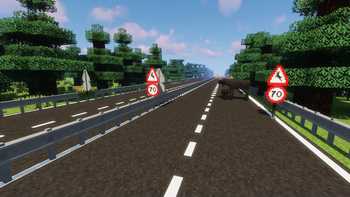
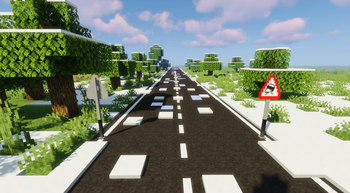
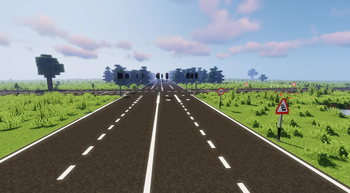
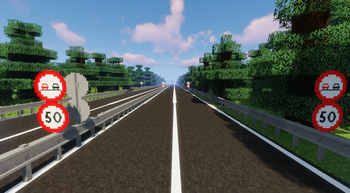
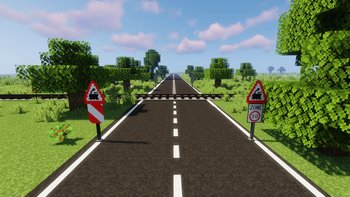
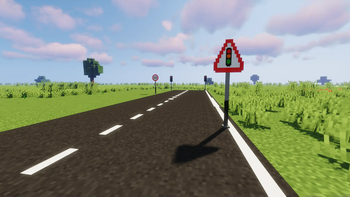
Adds functional traffic lights, speed signs, stop signs, and custom sign packs with 3D models and sounds. Pairs with Saro's Road Blocks for complete road infrastructure.
Screenshots
About this Mod
!
!
Saro's Road Signs adds a complete set of functional traffic lights, speed signs, stop signs, yield signs, directional markers, and custom sign packs to Minecraft — each with realistic 3D models and sounds. Traffic lights cycle automatically. Pairs perfectly with Saro's Road Blocks for full road infrastructure. Supports Forge, Fabric, and NeoForge for Minecraft 1.12.2 through 1.21+
!
Variety of Road Signs 🛑
- Includes stop signs, speed limits, and more, perfect for your road construction projects.
Custom User Sign Packs (New!) 🎨🆕
- Introduced in version 4.0.
- Players can create and load their own sign packs using
/saros_roadsigns reload. - This feature is experimental, so please report any bugs on our Discord.
- An
examplepack is created in the .minecraft folder, where you can view it and see how a pack is created.
New Traffic Light System 🚦 (Redesigned in 4.6!)
- Single Traffic Light block with 6 states (Off, Red, Red-Yellow, Green, Yellow, Flashing-Yellow).
- Traffic Light Controller block manages up to unlimited linked lights with configurable timing for each phase.
- Use the Tuner to link/unlink lights to a controller (click light → click controller).
- Supports two-direction mode (A/B) — perfect for crossroad setups.
- Controller GUI lets you configure each timing value independently.
- Activate with Redstone (can be toggled in config). Without power: all lights flash yellow.
Multiplayer and Survival Compatibility 🌐
- Seamlessly integrates into both multiplayer and survival environments.
Custom Content 🎨
- Features custom sounds, models, and textures for a unique gameplay experience.
Mod Compatibility 🔄
- Pairs well with Saro's Road Blocks to complete your road construction projects.
!
Currently Supported✅
- Forge/NeoForge/Fabric 26.1
- Forge 1.21.11
- Forge 1.21.10
- Forge 1.21.9
- Forge 1.21.8
- Forge 1.21.7
- Forge 1.21.6
- Forge 1.21.5
- Forge 1.21.3
- Forge/NeoForge/Fabric 1.21.1
- Forge 1.20.6
- Forge 1.20.4
- Forge/NeoForge/Fabric 1.20.1
Discontinued❌
- Forge 1.19.4
- Forge 1.19.2
- Forge 1.18.2
- Forge 1.16.5
!
For requests, suggestions, or bug reports, join our Discord and become part of the Saro's Mod community. We look forward to your feedback!
Texture Credits: Traffic control
Project Support & Usage
Hosting: For the best performance, I recommend using BisectHosting linked in the banner.
Modpacks: You are free to include my work in any modpack. Please ensure proper credit is given by providing a link to this project page.
Available Versions
How to Install Saro´s Road Signs on Your Server
Order Server
Order a Minecraft Java server with at least 3 GB RAM (4 GB recommended).
Set fabric Loader
In the panel under "Egg", select the fabric loader and matching Minecraft version (26.1.2).
Install Mod
Open the mod browser in the dashboard and search for "Saro´s Road Signs". Click "Install" – done! Alternatively, upload the .jar via SFTP to the /mods folder.
Compatibility
Mod Loaders
Minecraft Versions
26.1.2, 26.1.1, 26.1 (+17 more)
Server-side
✓ RequiredRecommended RAM
4 GB(min. 3 GB)Frequently Asked Questions
Saro´s Road Signs server crashes on startup – what to do?
Most common cause: wrong fabric version or insufficient RAM. Check the server log (latest.log) for "OutOfMemoryError" or "Mixin" errors. With Mado Hosting: ensure at least 3 GB RAM is allocated and the loader matches the mod version (26.1.2). You can switch loaders with one click in the panel.
Is Saro´s Road Signs compatible with fabric and forge and neoforge and quilt?
Saro´s Road Signs officially supports fabric, forge, neoforge, quilt for Minecraft 26.1.2, 26.1.1, 26.1. Note: Forge and Fabric mods are NOT cross-compatible – pick one loader and stick with it. The Mado dashboard automatically detects incompatible loader combinations.
Server lagging with Saro´s Road Signs – how to optimize performance?
Recommended RAM: 4 GB (per 8 players). Use /spark profiler to check if Saro´s Road Signs consumes the most tick time. Common fixes: reduce server view-distance to 8-10, install "performant" or "starlight" as supplementary mods on Forge. With Mado Hosting, your server runs on NVMe SSDs with dedicated CPU cores for minimal latency.
Similar Mods

![[ETF] Entity Texture Features](https://cdn.modrinth.com/data/BVzZfTc1/af683d206d50b05258d865b0d6e4aa2f2cee12f2_96.webp)
![[EMF] Entity Model Features](https://cdn.modrinth.com/data/4I1XuqiY/6e5bbd0d06b1741bfdab6c0cfab6de8fdaf0064c_96.webp)



Rent Modded Server
Install Saro´s Road Signs with just one click on your server.