
Saros Worldborder Customizer
Fully customize your world border with RGB colors, opacity settings, and animated pulse effects. Works instantly in multiplayer and saves all settings automatically.
Screenshots
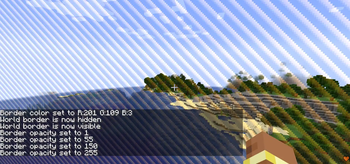
About this Mod
!
Saros Worldborder Customizer gives server admins and singleplayer users full control over the look of the Minecraft world border. Change its color, make it invisible, adjust transparency, set a custom warning color, or let it pulse with animated flair — all in real time, synced instantly to every connected player, and saved across server restarts.
!
Custom Border Color 🎨
- Set any color using RGB values (0–255 per channel).
/saros_worldborder color <r> <g> <b>- Example:
/saros_worldborder color 255 128 0→ orange border.
Hide / Show 👻
- Make the world border completely invisible with a single command.
/saros_worldborder hide— border disappears entirely./saros_worldborder show— border becomes visible again.
Opacity Control 🔆
- Adjust the transparency of the border independently of its color.
/saros_worldborder opacity <0-255>— 0 = fully transparent, 255 = fully opaque.
Warning Color ⚠️
- Define a separate color that activates automatically when a player steps inside the border's warning distance.
/saros_worldborder warningcolor <r> <g> <b>- Works alongside Minecraft's built-in warning distance setting.
Pulse Animation 💫
- Animate the border so it smoothly pulses between the main color and a secondary color.
/saros_worldborder pulse <r> <g> <b> <speed 1-10>— speed 1 is slow, 10 is fast./saros_worldborder pulse off— disables the animation.
Instant Multiplayer Sync 🌐
- Every change is broadcast to all online players the moment the command is executed.
- Newly joining players automatically receive the current state.
Persistent Storage 🔄
- All settings are saved to the world folder (
wbcustomizer_state.json) and restored after every server restart. - Per-world: different worlds can have different border configurations.
- All settings are saved to the world folder (
Permission System 🔒
- On multiplayer servers: OP level 2 required.
- In singleplayer: all commands are available by default.
!
| Command | Description |
|---|---|
/saros_worldborder |
Show all available commands (EN + DE) |
/saros_worldborder color <r> <g> <b> |
Set border color (RGB 0–255 each) |
/saros_worldborder opacity <0-255> |
Set border transparency |
/saros_worldborder warningcolor <r> <g> <b> |
Set color shown near border edge |
/saros_worldborder pulse <r> <g> <b> <speed> |
Enable pulsing animation (speed 1–10) |
/saros_worldborder pulse off |
Disable pulsing animation |
/saros_worldborder hide |
Make border completely invisible |
/saros_worldborder show |
Restore border visibility |
/saros_worldborder reset |
Reset everything to default blue |
!
Currently Supported ✅
- Forge 1.20.1
- Fabric 1.20.1
- Forge 1.21.1
- NeoForge 1.21.1
- Fabric 1.21.1
- Forge 26.1
- NeoForge 26.1
- Fabric 26.1
- Forge 26.1.2
- NeoForge 26.1.2
- Fabric 26.1.2
!
For requests, suggestions, or bug reports, join the Discord and become part of the Saro's Mod community!
Available Versions
How to Install Saros Worldborder Customizer on Your Server
Order Server
Order a Minecraft Java server with at least 3 GB RAM (4 GB recommended).
Set fabric Loader
In the panel under "Egg", select the fabric loader and matching Minecraft version (26.1.2).
Install Mod
Open the mod browser in the dashboard and search for "Saros Worldborder Customizer". Click "Install" – done! Alternatively, upload the .jar via SFTP to the /mods folder.
Compatibility
Mod Loaders
Minecraft Versions
26.1.2, 26.1.1, 26.1 (+7 more)
Server-side
✓ RequiredRecommended RAM
4 GB(min. 3 GB)Frequently Asked Questions
Saros Worldborder Customizer server crashes on startup – what to do?
Most common cause: wrong fabric version or insufficient RAM. Check the server log (latest.log) for "OutOfMemoryError" or "Mixin" errors. With Mado Hosting: ensure at least 3 GB RAM is allocated and the loader matches the mod version (26.1.2). You can switch loaders with one click in the panel.
Is Saros Worldborder Customizer compatible with fabric and forge and neoforge?
Saros Worldborder Customizer officially supports fabric, forge, neoforge for Minecraft 26.1.2, 26.1.1, 26.1. Note: Forge and Fabric mods are NOT cross-compatible – pick one loader and stick with it. The Mado dashboard automatically detects incompatible loader combinations.
Server lagging with Saros Worldborder Customizer – how to optimize performance?
Recommended RAM: 4 GB (per 8 players). Use /spark profiler to check if Saros Worldborder Customizer consumes the most tick time. Common fixes: reduce server view-distance to 8-10, install "performant" or "starlight" as supplementary mods on Forge. With Mado Hosting, your server runs on NVMe SSDs with dedicated CPU cores for minimal latency.
Similar Mods

![[ETF] Entity Texture Features](https://cdn.modrinth.com/data/BVzZfTc1/af683d206d50b05258d865b0d6e4aa2f2cee12f2_96.webp)
![[EMF] Entity Model Features](https://cdn.modrinth.com/data/4I1XuqiY/6e5bbd0d06b1741bfdab6c0cfab6de8fdaf0064c_96.webp)



Rent Modded Server
Install Saros Worldborder Customizer with just one click on your server.