
SatuHud
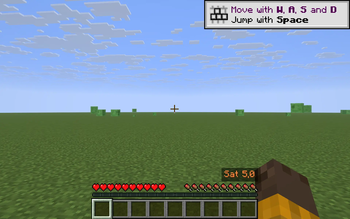
Tiny HUD showing your current saturation (the hidden food stat vanilla never displays) as a number with a red-to-green color gradient - next to the hunger bar. See exactly when saturation runs out and hunger starts ticking.
Screenshots
About this Mod
SatuHud adds a tiny HUD overlay next to the vanilla hunger bar that shows your current saturation -- the hidden food stat that Minecraft tracks but never displays. While saturation is above zero, your hunger bar doesn't decrease; once it hits zero, every action starts draining hunger. SatuHud lets you see exactly when that transition is about to happen.
Features
- Shows current saturation as a single number (e.g. Sat 12.4) above the right end of the hunger bar.
- Color gradient from red (empty) through orange/yellow (low) to green (full) so you can read the state at a glance without looking at the digits.
- Saturation is shown as a float and updates every frame -- no smoothing, no lag.
- Toggle on/off with U (configurable in code).
- Pure client overlay. Works on every server, no server mod needed.
- Respects the vanilla F1 hide-HUD toggle.
How it differs from existing food mods
Mods like AppleSkin show the predicted food/saturation a held item would restore if you eat it. SatuHud shows the current saturation value you already have. The two are complementary: AppleSkin tells you what to eat, SatuHud tells you when you actually need to.
Compatibility
- Minecraft 1.21.8, 1.21.9, 1.21.10, 1.21.11 (Fabric)
- Requires Fabric API
- Client-side only -- safe on any server, including vanilla.
Controls
- U -- toggle the saturation HUD on/off
Available Versions
How to Install SatuHud on Your Server
Order Server
Order a Minecraft Java server with at least 3 GB RAM (4 GB recommended).
Set fabric Loader
In the panel under "Egg", select the fabric loader and matching Minecraft version (1.21.11).
Install Mod
Open the mod browser in the dashboard and search for "SatuHud". Click "Install" – done! Alternatively, upload the .jar via SFTP to the /mods folder.
Compatibility
Mod Loaders
Minecraft Versions
1.21.11, 1.21.10, 1.21.9 (+1 more)
Server-side
✗ UnsupportedRecommended RAM
4 GB(min. 3 GB)Frequently Asked Questions
SatuHud server crashes on startup – what to do?
Most common cause: wrong fabric version or insufficient RAM. Check the server log (latest.log) for "OutOfMemoryError" or "Mixin" errors. With Mado Hosting: ensure at least 3 GB RAM is allocated and the loader matches the mod version (1.21.11). You can switch loaders with one click in the panel.
Is SatuHud compatible with fabric?
SatuHud officially supports fabric for Minecraft 1.21.11, 1.21.10, 1.21.9. The Mado dashboard automatically detects incompatible loader combinations.
Server lagging with SatuHud – how to optimize performance?
Recommended RAM: 4 GB (per 8 players). Use /spark profiler to check if SatuHud consumes the most tick time. Common fixes: reduce server view-distance to 8-10, install "performant" or "starlight" as supplementary mods on Forge. With Mado Hosting, your server runs on NVMe SSDs with dedicated CPU cores for minimal latency.
Similar Mods




![[ETF] Entity Texture Features](https://cdn.modrinth.com/data/BVzZfTc1/af683d206d50b05258d865b0d6e4aa2f2cee12f2_96.webp)
![[EMF] Entity Model Features](https://cdn.modrinth.com/data/4I1XuqiY/6e5bbd0d06b1741bfdab6c0cfab6de8fdaf0064c_96.webp)
Rent Modded Server
Install SatuHud with just one click on your server.