
Scam Reports
A mod for DonutSMP that marks if they are a scammer or not in game.
Screenshots
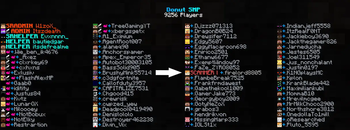


About this Mod
A Scammers Worst Nightmare
In the vast world of DonutSMP, player interactions are key to the game's enjoyment. Unfortunately, some individuals exploit this by engaging in scams, tarnishing the trust within the community to keep up on their end of the deal.
That's where Scam Reports comes in. Created by the amazing developer Dery, this mod is your ultimate tool to combat scammers by providing a clear indicator for any reported player within minecraft itself! If a player has been reported in our database, the word "SCAMMER" will appear next to their nametag in-game.
With Scam Reports, you can trade with confidence, knowing who to avoid without having to continuously tab out!
IMPORTANT NOTE!!
Scam Reports and it's creators are in no way affiliated with DonutSMP and its creators. We are a separate community driven to create a better experience for the players of DonutSMP. Along with that scamming is allowed on DonutSMP and in no way banned on the server.
How It Works
This mod is directly integrated with our database containing all reported scammers. Placing a red tag beside any reported players nametag.
Join the Fight Against Scammers
Connect with us on the official DonutSMP Scam Reports Discord server! Recieve updates on new scammers and collaborate with other players to create a safer, scam-free environment.
Found a Scammer? No Problem!
If you have found someone who scammed you that isnt reported, feel free to join our Discord and report them!
Issues?
If you recieve any issues or bugs with the mod, please inform us on Discord by opening a General Support ticket.
Start Protecting Yourself Today
Scam Reports isn't just a mod, it's a community committed to integrity and fairness. Equip yourself with this essential tool and help make DonutSMP a better place for everyone!
Available Versions
How to Install Scam Reports on Your Server
Order Server
Order a Minecraft Java server with at least 3 GB RAM (4 GB recommended).
Set fabric Loader
In the panel under "Egg", select the fabric loader and matching Minecraft version (1.21.4).
Install Mod
Open the mod browser in the dashboard and search for "Scam Reports". Click "Install" – done! Alternatively, upload the .jar via SFTP to the /mods folder.
Compatibility
Mod Loaders
Minecraft Versions
1.21.4, 1.21.3, 1.21.2 (+12 more)
Server-side
✗ UnsupportedRecommended RAM
4 GB(min. 3 GB)Frequently Asked Questions
Scam Reports server crashes on startup – what to do?
Most common cause: wrong fabric version or insufficient RAM. Check the server log (latest.log) for "OutOfMemoryError" or "Mixin" errors. With Mado Hosting: ensure at least 3 GB RAM is allocated and the loader matches the mod version (1.21.4). You can switch loaders with one click in the panel.
Is Scam Reports compatible with fabric?
Scam Reports officially supports fabric for Minecraft 1.21.4, 1.21.3, 1.21.2. The Mado dashboard automatically detects incompatible loader combinations.
Server lagging with Scam Reports – how to optimize performance?
Recommended RAM: 4 GB (per 8 players). Use /spark profiler to check if Scam Reports consumes the most tick time. Common fixes: reduce server view-distance to 8-10, install "performant" or "starlight" as supplementary mods on Forge. With Mado Hosting, your server runs on NVMe SSDs with dedicated CPU cores for minimal latency.
Similar Mods

![[ETF] Entity Texture Features](https://cdn.modrinth.com/data/BVzZfTc1/af683d206d50b05258d865b0d6e4aa2f2cee12f2_96.webp)
![[EMF] Entity Model Features](https://cdn.modrinth.com/data/4I1XuqiY/6e5bbd0d06b1741bfdab6c0cfab6de8fdaf0064c_96.webp)



Rent Modded Server
Install Scam Reports with just one click on your server.