
Scarecrows
Adds scarecrows that keep monsters (and animals if you want) off your lawn.
Screenshots
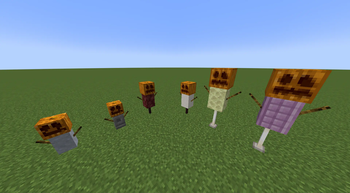
About this Mod
This mod was made during the MMD SpookyJam 2018!
Functionality
Scarecrows adds, as the name suggests, scarecrows. There are 3 tiers of scarecrows, each having 2 variants. Every tier will scare monsters in an increasingly larger area given that monster can see the scarecrow (details below). The first variant of each tier will only scare monsters, the second one of each tier will additionally scare animals. The respective mobs are also unable to spawn in the area affected by a scarecrow.
When a mob is scared by a scarecrow, it will run away from the scarecrow, crying for help by making tons of noise (except for creepers, because they're super quiet). Sometimes, if you lure them into the scarecrow's area, mobs will be too fixated on a player to notice the scarecrow, but they will eventually run away.
Scarecrows are built in a similar manner to iron or snow golems, placing a (carved) pumpkin last. Placing a Jack o' Lantern last will make the scarecrow emit light. You'll also notice, that every scarecrow has arms (the sticky things on their side). Those arms are placed by rightclicking a block with a stick. Arms can only be placed on the side of a block. How exactly you build each type is shown in the images below.
To remove a scarecrow, break the block it's placed on. You'll get back all the blocks and items the scarecrow was made of.
1.13+ only: If you do not place the pumpkin last, rightclick it to build the scarecrow. Only Carved Pumpkins and Jack o' Lanterns work.
Types
Tier 1
Size: 2 blocks tall
Affected Area: 10 blocks
Variant 1 Name: Spoopy Scarecrow
Blocks (from top to bottom): Pumpkin/Jack o' Lantern, Clay, Sticks on the sides.
Variant 2 Name: Super Spoopy Scarecrow
Blocks (from top to bottom): Pumpkin/Jack o' Lantern, Chiseled Stone Bricks, Sticks on the sides.
Note: This mod is balanced, because it has clay in it.
Tier 2
Size: 3 blocks tall
Affected Area: 25 blocks
Variant 1 Name: Spooky Scarecrow
Blocks (from top to bottom): Pumpkin/Jack o' Lantern, Netherrack, Sticks on the sides, Nether Brick Fence.
(Hey, you know this guy from the logo!)
Variant 2 Name: Super Spooky Scarecrow
Blocks (from top to bottom): Pumpkin/Jack o' Lantern, Quartz Pillar, Sticks on the sides, Nether Brick Fence.
Note: The Spooky Scarecrow is pretty full of himself because he's featured in the logo.
Note: That's a Nether Brick Fence, no other fence works.
Tier 3
Size: 4 blocks tall
Affected Area: 50 blocks
Variant 1 Name: Scary Scarecrow
Blocks (from top to bottom): Pumpkin/Jack o' Lantern, End Stone, Sticks on the sides, End Rod (facing down), End Rod (facing up).
Variant 2 Name: Super Scary Scarecrow
Blocks (from top to bottom): Pumpkin/Jack o' Lantern, Purpur Pillar, Sticks on the sides, End Rod (facing down), End Rod (facing up).
Note: The placing of the end rods matters.
Config
This mod has a configuration file, in which you can define the ranges of each scarecrow type as well as whether it scares animals or not. The options are sorted into sections based on the scarecrow name, which you can find above each picture.
You are allowed to use this mod in any modpack.
Available Versions
How to Install Scarecrows on Your Server
Order Server
Order a Minecraft Java server with at least 3 GB RAM (4 GB recommended).
Set fabric Loader
In the panel under "Egg", select the fabric loader and matching Minecraft version (26.1.2).
Install Mod
Open the mod browser in the dashboard and search for "Scarecrows". Click "Install" – done! Alternatively, upload the .jar via SFTP to the /mods folder.
Compatibility
Mod Loaders
Minecraft Versions
26.1.2, 26.1.1, 26.1 (+32 more)
Server-side
✓ RequiredRecommended RAM
4 GB(min. 3 GB)Frequently Asked Questions
Scarecrows server crashes on startup – what to do?
Most common cause: wrong fabric version or insufficient RAM. Check the server log (latest.log) for "OutOfMemoryError" or "Mixin" errors. With Mado Hosting: ensure at least 3 GB RAM is allocated and the loader matches the mod version (26.1.2). You can switch loaders with one click in the panel.
Is Scarecrows compatible with fabric and forge and neoforge and quilt?
Scarecrows officially supports fabric, forge, neoforge, quilt for Minecraft 26.1.2, 26.1.1, 26.1. Note: Forge and Fabric mods are NOT cross-compatible – pick one loader and stick with it. The Mado dashboard automatically detects incompatible loader combinations.
Server lagging with Scarecrows – how to optimize performance?
Recommended RAM: 4 GB (per 8 players). Use /spark profiler to check if Scarecrows consumes the most tick time. Common fixes: reduce server view-distance to 8-10, install "performant" or "starlight" as supplementary mods on Forge. With Mado Hosting, your server runs on NVMe SSDs with dedicated CPU cores for minimal latency.
Similar Mods




Rent Modded Server
Install Scarecrows with just one click on your server.