
Scavenger-Host
A Fabric item speedrun mod for Minecraft 1.21-1.21.11 with server, LAN, solo, duo, trio, teams, custom nicknames, synced timers, and victory screens.
Screenshots
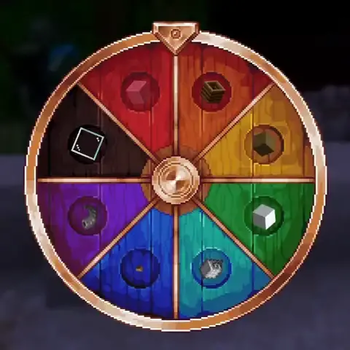
About this Mod
Scavenger Host
Scavenger Host is a modified GPL-3.0 fork of Scavenger for Minecraft Fabric item speedruns. It lets a server admin, moderator, or single-player/LAN host roll or choose a target block or item, choose an extra challenge modifier, select solo/duo/trio mode, and then start a timed race with /scavenger startgame.
This fork is designed for dedicated servers, LAN worlds, Radmin VPN play, and single-player worlds.
What It Adds
- Server-ready Scavenger runs with synchronized item, modifier, timer, winner, and victory screen data.
- A control menu for admins, moderators, server operators, and single-player/LAN hosts.
- A separate preparation step and start step, so choosing teams or rolling the wheels does not start the timer.
/scavenger startgameto begin the prepared run.- Solo, duo, and trio race modes.
- Team management commands for duo/trio runs.
- Custom Scavenger nicknames for chat, victory messages, and team display.
- Shared win announcements when a player or team finds the target item.
- Solo win flow that shows the winner and then disconnects players so the host can recreate the world.
- Support for Minecraft 1.21 through 1.21.11 with version-specific dependency requirements.
- Safer handling for world-generation modifiers: server/LAN runs reject modifiers that require a new world, while single-player can recreate the world when needed.
Installation
Install Fabric Loader 0.18.4 or newer, Fabric API, Architectury API, and the correct OctoLib or ShatterLib build for your Minecraft version.
Use exactly one Scavenger jar for your Minecraft version. For example, use the 1.21.1 Scavenger jar only on Minecraft 1.21.1.
On Modrinth, each Minecraft version should be uploaded as its own project version with one primary Scavenger jar. Do not upload jars for other Minecraft versions as additional files. Additional files should only be used for things such as sources.jar or Javadocs.
Version Dependencies
| Minecraft | Fabric API | Architectury | Library |
|---|---|---|---|
| 1.21 | 0.102.0+1.21 | 13.0.8+ | OctoLib 0.6.2+1.21 |
| 1.21.1 | 0.116.12+1.21.1 | 13.0.8+ | OctoLib 0.6.2+1.21 |
| 1.21.2 | 0.106.1+1.21.2 | 14.0.4+ | OctoLib 0.6.2+1.21 |
| 1.21.3 | 0.114.1+1.21.3 | 14.0.4+ | OctoLib 0.6.2+1.21 |
| 1.21.4 | 0.119.4+1.21.4 | 15.0.3+ | OctoLib 0.6.2+1.21 |
| 1.21.5 | 0.128.2+1.21.5 | 16.1.4+ | OctoLib 0.6.2+1.21 |
| 1.21.6 | 0.128.2+1.21.6 | 17.0.6+ | OctoLib 0.6.2+1.21 |
| 1.21.7 | 0.129.0+1.21.7 | 17.0.8+ | OctoLib 0.6.2+1.21 |
| 1.21.8 | 0.136.1+1.21.8 | 17.0.8+ | ShatterLib 0.6.0.4+1.21.8 |
| 1.21.9 | 0.134.1+1.21.9 | 18.0.5+ | ShatterLib 0.6.0.5+1.21.9 |
| 1.21.10 | 0.138.4+1.21.10 | 18.0.8+ | ShatterLib 0.6.0.5+1.21.9 |
| 1.21.11 | 0.141.4+1.21.11 | 19.0.1+ | ShatterLib 0.6.0.8+1.21.11 |
Do not mix dependencies from different Minecraft versions. For example, Architectury 19.0.1 is for Minecraft 1.21.11 and should not be installed on a Minecraft 1.21.1 profile.
How To Start A Run
- Join the dedicated server, LAN world, or single-player world.
- An admin, operator, moderator, or host opens the Scavenger menu or uses commands.
- Roll or choose the target block/item.
- Roll or choose the modifier.
- Choose
solo,duo, ortrio. - Set up teams if the mode is
duoortrio. - Run
/scavenger startgamewhen everyone is ready.
Preparing a run does not start the timer. The timer starts only after /scavenger startgame.
Modes
solo: every player races alone. The first player to obtain the target item wins.duo: teams can have up to 2 players. If one team member obtains the target item, the whole team wins.trio: teams can have up to 3 players. If one team member obtains the target item, the whole team wins.
Players without a team in duo or trio mode race as solo players. Oversized teams are blocked when the game starts.
Commands
Run management commands require server operator/admin permissions, or single-player/LAN host access.
/scavenger
/scavenger help
/scavenger menu
/scavenger random
/scavenger random <solo|duo|trio>
/scavenger start <item> <modifier>
/scavenger start <item> <modifier> <solo|duo|trio>
/scavenger startgame
/scavenger stop
/scavenger clear
Team commands:
/scavenger addteam <leader> add <player>
/scavenger addteam <leader> remove <player>
/scavenger addteam <leader> list
/scavenger addteam <leader> delete
/scavenger addteam <leader> clear
/scavenger team <leader> add <player>
/scavenger teams
/scavenger teamlist
/scavenger teams clear
/scavenger unteam <player>
Nickname commands:
/scavenger nick
/scavenger nick <nickname>
/scavenger nick clear
/scavenger nick set <player> <nickname>
/scavenger nick clearplayer <player>
/scavenger nick list
Examples:
/scavenger random duo
/scavenger addteam minesgames11 add vanya228
/scavenger nick SpeedRunner
/scavenger start minecraft:diamond scavenger:none trio
/scavenger startgame
Configuration
The config file is saved at:
config/scavenger.yaml
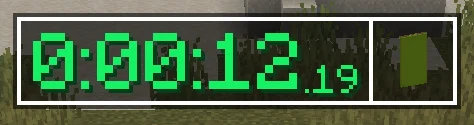
You can configure timer display, wheel behavior, rollable items, modifier blacklist entries, item blacklist/whitelist behavior, and victory screen colors.
License And Attribution
This project is a modified fork of Scavenger by catboybinary.
- Original project: https://github.com/catboybinary/scavenger
- Fork source repository: https://github.com/nrxzwq/scavenger-host
- License: GNU General Public License v3.0
This fork keeps the GPL-3.0 license, includes the original license text, and marks the project as modified. See NOTICE.md for attribution and a summary of the major fork changes.
Available Versions
How to Install Scavenger-Host on Your Server
Order Server
Order a Minecraft Java server with at least 3 GB RAM (4 GB recommended).
Set fabric Loader
In the panel under "Egg", select the fabric loader and matching Minecraft version (1.21.11).
Install Mod
Open the mod browser in the dashboard and search for "Scavenger-Host". Click "Install" – done! Alternatively, upload the .jar via SFTP to the /mods folder.
Compatibility
Mod Loaders
Minecraft Versions
1.21.11, 1.21.10, 1.21.9 (+9 more)
Server-side
✓ RequiredRecommended RAM
4 GB(min. 3 GB)Frequently Asked Questions
Scavenger-Host server crashes on startup – what to do?
Most common cause: wrong fabric version or insufficient RAM. Check the server log (latest.log) for "OutOfMemoryError" or "Mixin" errors. With Mado Hosting: ensure at least 3 GB RAM is allocated and the loader matches the mod version (1.21.11). You can switch loaders with one click in the panel.
Is Scavenger-Host compatible with fabric?
Scavenger-Host officially supports fabric for Minecraft 1.21.11, 1.21.10, 1.21.9. The Mado dashboard automatically detects incompatible loader combinations.
Server lagging with Scavenger-Host – how to optimize performance?
Recommended RAM: 4 GB (per 8 players). Use /spark profiler to check if Scavenger-Host consumes the most tick time. Common fixes: reduce server view-distance to 8-10, install "performant" or "starlight" as supplementary mods on Forge. With Mado Hosting, your server runs on NVMe SSDs with dedicated CPU cores for minimal latency.
Similar Mods




Rent Modded Server
Install Scavenger-Host with just one click on your server.