
ScreenTextMod
Display custom text anywhere on your HUD via /stext
Screenshots

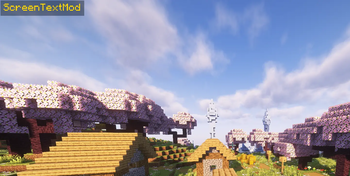
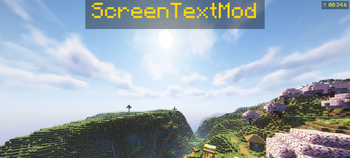
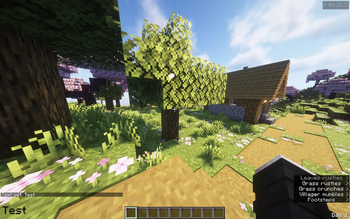
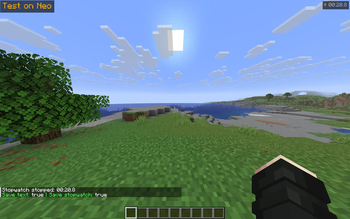
About this Mod
ScreenTextMod
Display custom text anywhere on your HUD — with colors, timers, and a stopwatch.
Features
- Display any text on screen with /stext
- 6 screen positions — top/bottom, left/center/right
- Custom colors via name (red, green, blue, gold...) or HEX code
- Adjustable text scale from 0.5x to 5x
- Chat-style background for always-readable text
- Auto-hide timer with optional countdown display
- Built-in stopwatch with pause support — freezes on ESC, resumes when unpaused
- Per-world text and stopwatch — each world and server saves its own state
- Worlds with the same name share the same text (useful for linked worlds)
- Settings persist between game sessions with configurable save behavior
- Full localization — English and Russian supported out of the box
- Saving properties —
/ssave
Commands
| Command | Description |
|---|---|
/stext <text> |
Show text on screen |
/stext |
Clear text |
/stimer <sec> |
Auto-hide after N seconds |
/stimer <sec> countdown |
Show countdown next to text |
/stimer off |
Disable timer |
/scolor <name|hex> |
Set color (red, green, ff0000...) |
/scolor reset |
Reset to white |
/spos <position> |
Set position (top_center, bottom_left...) |
/ssize <scale> |
Set scale (0.5 – 5.0) |
/ssize reset |
Reset scale |
/sbg on|off |
Toggle background |
/swatch start|stop|reset |
Stopwatch |
/ssave text true|false |
Save text between sessions |
/ssave stopwatch true|false |
Save stopwatch between sessions |
/ssave |
Show current save settings |
Positions
top_left · top_center · top_rightbottom_left · bottom_center · bottom_right
Requirements
- Minecraft 1.21.11
- Fabric Loader + Fabric API or NeoForge
Tested on
- Fabric 1.21.11
- NeoForge 1.21.11
Available Versions
How to Install ScreenTextMod on Your Server
Order Server
Order a Minecraft Java server with at least 3 GB RAM (4 GB recommended).
Set fabric Loader
In the panel under "Egg", select the fabric loader and matching Minecraft version (1.21.11).
Install Mod
Open the mod browser in the dashboard and search for "ScreenTextMod". Click "Install" – done! Alternatively, upload the .jar via SFTP to the /mods folder.
Compatibility
Mod Loaders
Minecraft Versions
1.21.11
Server-side
✗ UnsupportedRecommended RAM
4 GB(min. 3 GB)Frequently Asked Questions
ScreenTextMod server crashes on startup – what to do?
Most common cause: wrong fabric version or insufficient RAM. Check the server log (latest.log) for "OutOfMemoryError" or "Mixin" errors. With Mado Hosting: ensure at least 3 GB RAM is allocated and the loader matches the mod version (1.21.11). You can switch loaders with one click in the panel.
Is ScreenTextMod compatible with fabric and neoforge?
ScreenTextMod officially supports fabric, neoforge for Minecraft 1.21.11. The Mado dashboard automatically detects incompatible loader combinations.
Server lagging with ScreenTextMod – how to optimize performance?
Recommended RAM: 4 GB (per 8 players). Use /spark profiler to check if ScreenTextMod consumes the most tick time. Common fixes: reduce server view-distance to 8-10, install "performant" or "starlight" as supplementary mods on Forge. With Mado Hosting, your server runs on NVMe SSDs with dedicated CPU cores for minimal latency.
Similar Mods




![[ETF] Entity Texture Features](https://cdn.modrinth.com/data/BVzZfTc1/af683d206d50b05258d865b0d6e4aa2f2cee12f2_96.webp)
![[EMF] Entity Model Features](https://cdn.modrinth.com/data/4I1XuqiY/6e5bbd0d06b1741bfdab6c0cfab6de8fdaf0064c_96.webp)
Rent Modded Server
Install ScreenTextMod with just one click on your server.