
ScreenTime
Set limits on game play time, protected with a password
Screenshots
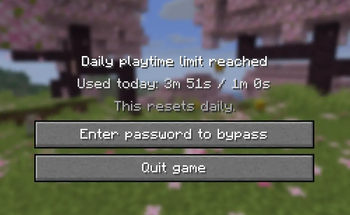
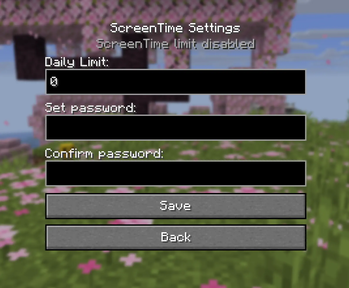
About this Mod
Easily set up a playtime limit for an entire Minecraft instance. Once a limit and password is set the mod will start keeping track of your playtime. Once the limit expires, you will be locked out of the game (worlds will be saved don't worry!) unless you enter the password to bypass the limit.
Why?
I've been trying to use macOS' built in screentime features to accomplish the same thing, but they are rather finnicky around Minecraft Java Edition. Sometimes the limit works, other times it lets you sail right past it without a peep. Even when the limit does work, the "Limit Reached" popup doesn't actually pause the game so your mouse remains captured making it basically impossible to interact with.
How?
A new button has been added to the homescreen to allow you to configure settings. You can also press the ';' key by default to access the same page in game.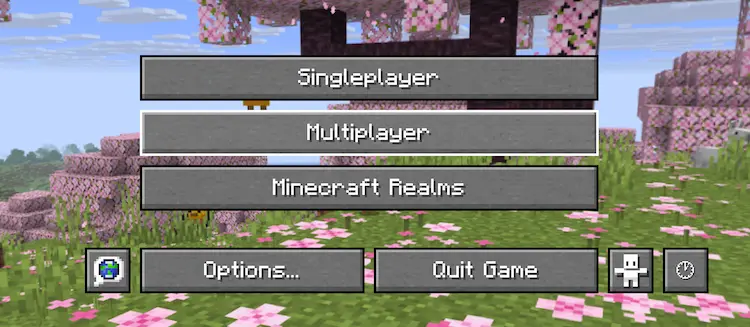
Recovery
If you don't remember your password, or something else goes wrong, settings are stored in a simple JSON file in your config directory which can easily be deleted to reset everything. This does also mean that bypass is... very possible without the password so don't rely on this for everything.
Hopefully you find this helpful!
Available Versions
How to Install ScreenTime on Your Server
Order Server
Order a Minecraft Java server with at least 3 GB RAM (4 GB recommended).
Set fabric Loader
In the panel under "Egg", select the fabric loader and matching Minecraft version (26.1.2).
Install Mod
Open the mod browser in the dashboard and search for "ScreenTime". Click "Install" – done! Alternatively, upload the .jar via SFTP to the /mods folder.
Compatibility
Mod Loaders
Minecraft Versions
26.1.2
Server-side
✗ UnsupportedRecommended RAM
4 GB(min. 3 GB)Frequently Asked Questions
ScreenTime server crashes on startup – what to do?
Most common cause: wrong fabric version or insufficient RAM. Check the server log (latest.log) for "OutOfMemoryError" or "Mixin" errors. With Mado Hosting: ensure at least 3 GB RAM is allocated and the loader matches the mod version (26.1.2). You can switch loaders with one click in the panel.
Is ScreenTime compatible with fabric?
ScreenTime officially supports fabric for Minecraft 26.1.2. The Mado dashboard automatically detects incompatible loader combinations.
Server lagging with ScreenTime – how to optimize performance?
Recommended RAM: 4 GB (per 8 players). Use /spark profiler to check if ScreenTime consumes the most tick time. Common fixes: reduce server view-distance to 8-10, install "performant" or "starlight" as supplementary mods on Forge. With Mado Hosting, your server runs on NVMe SSDs with dedicated CPU cores for minimal latency.
Similar Mods




![[ETF] Entity Texture Features](https://cdn.modrinth.com/data/BVzZfTc1/af683d206d50b05258d865b0d6e4aa2f2cee12f2_96.webp)
![[EMF] Entity Model Features](https://cdn.modrinth.com/data/4I1XuqiY/6e5bbd0d06b1741bfdab6c0cfab6de8fdaf0064c_96.webp)
Rent Modded Server
Install ScreenTime with just one click on your server.