
Scroll of harvests
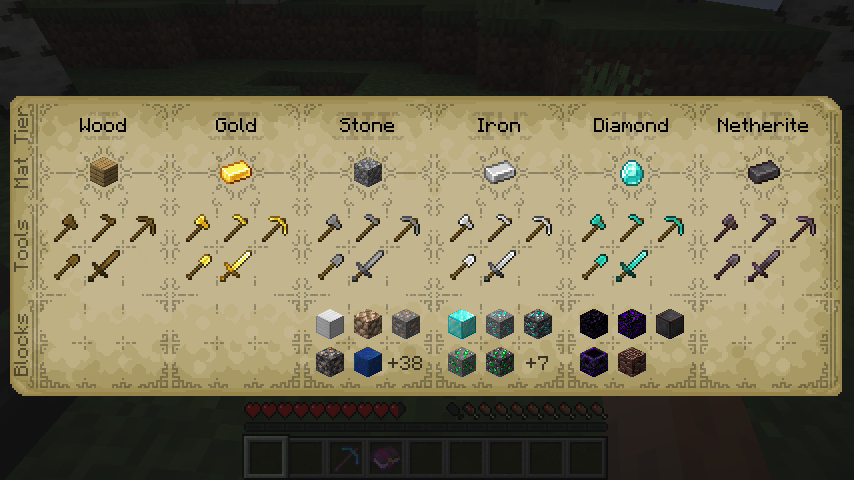
Displays detailed information about the tool tiers available in the game, useful when running mods that adds or re-orders tool tiers along with mods that interact those tiers in other ways.
Screenshots
About this Mod
Description
Displays detailed information about the tool tiers available in the game, useful when running mods that adds or re-orders tool tiers along with mods that interact those tiers in other ways.
Note: Scroll of Harvests uses the mutil library, remember to grab that if you're installing manually.
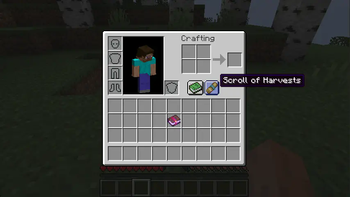
The tier list can be opened using a button in the player inventory.
Forge mods for 1.18 have a lot of control over tool tiers, how they're ordered and which blocks requires which tiers of tools. It's a powerful system that allows mods a lot of control over how blocks can be harvested, but it can be difficult to understand what's going on without being able to see how things are laid out.
Modpacks & use
Feel free to use this in modpacks or compilations, but please don't rehost it on other platforms.
Discord
I've got a discord server over here: https://discord.gg/MyjK4Fx, jump on if you have questions, need some help or to get sneak-peeks at upcoming features.
Support and Contributions
Links to the issue tracker and the source is available in the tab bar at the top, feel free to submit bug reports or feature requests over there. PRs are welcome, create an issue first or poke me on discord so we can align before you get started.
I develop and maintain my mods in my spare time, if you enjoy what you've seen so far and want to help me to create more experiences please consider supporting me on patreon.
Available Versions
How to Install Scroll of harvests on Your Server
Order Server
Order a Minecraft Java server with at least 3 GB RAM (4 GB recommended).
Set forge Loader
In the panel under "Egg", select the forge loader and matching Minecraft version (1.20.1).
Install Mod
Open the mod browser in the dashboard and search for "Scroll of harvests". Click "Install" – done! Alternatively, upload the .jar via SFTP to the /mods folder.
Compatibility
Mod Loaders
Minecraft Versions
1.20.1, 1.19.2, 1.18.2 (+1 more)
Server-side
✓ RequiredRecommended RAM
4 GB(min. 3 GB)Frequently Asked Questions
Scroll of harvests server crashes on startup – what to do?
Most common cause: wrong forge version or insufficient RAM. Check the server log (latest.log) for "OutOfMemoryError" or "Mixin" errors. With Mado Hosting: ensure at least 3 GB RAM is allocated and the loader matches the mod version (1.20.1). You can switch loaders with one click in the panel.
Is Scroll of harvests compatible with forge?
Scroll of harvests officially supports forge for Minecraft 1.20.1, 1.19.2, 1.18.2. The Mado dashboard automatically detects incompatible loader combinations.
Server lagging with Scroll of harvests – how to optimize performance?
Recommended RAM: 4 GB (per 8 players). Use /spark profiler to check if Scroll of harvests consumes the most tick time. Common fixes: reduce server view-distance to 8-10, install "performant" or "starlight" as supplementary mods on Forge. With Mado Hosting, your server runs on NVMe SSDs with dedicated CPU cores for minimal latency.
Similar Mods




![[ETF] Entity Texture Features](https://cdn.modrinth.com/data/BVzZfTc1/af683d206d50b05258d865b0d6e4aa2f2cee12f2_96.webp)
![[EMF] Entity Model Features](https://cdn.modrinth.com/data/4I1XuqiY/6e5bbd0d06b1741bfdab6c0cfab6de8fdaf0064c_96.webp)
Rent Modded Server
Install Scroll of harvests with just one click on your server.