
Sculpture
Capture creatures from the game and turn them into beautiful statues forever!
Screenshots
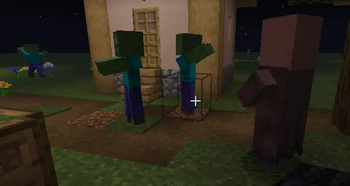
About this Mod
🎨 Sculpture - Creature Statue Mod
Capture creatures from the game and turn them into beautiful statues forever!
✨ Mod Overview
Sculpture is an innovative Minecraft mod that allows you to use professional camera tools to capture creatures in the game and transform them into placeable decorative statue blocks. Whether it's your beloved pets, rare creatures, or powerful bosses, they can all become eternal artworks in your building creations!
🎯 Core Features
📷 Smart Camera System
- Precise Targeting: When holding the camera, the HUD displays real-time information about creatures in your crosshairs
- Permission Check: Automatically identifies which creatures can be photographed and which are protected
- Distance Detection: Intelligently determines shooting distance to ensure optimal photography results
- Cooldown Mechanism: Prevents overuse and adds game balance
🗿 Statue Generation System
- Perfect Replication: Precisely captures the appearance, posture, and characteristics of creatures
- Decorative Blocks: Generated statues can be placed as decorative blocks anywhere
- Persistent Storage: Statues permanently preserve all visual information of creatures
⚙️ Highly Configurable
- Entity Whitelist/Blacklist: Customize which creatures can be photographed
- Detection Range Adjustment: Adjust camera detection distance as needed
- HUD Display Control: Choose whether to show heads-up display information
🎮 How to Use
- Get Camera: Find the camera item in the Tools tab of Creative Mode
- Aim at Creature: Hold the camera and point your crosshairs at the creature you want to photograph
- View Information: The HUD will display the creature's name and whether photography is allowed
- Take Photo: Right-click on the creature to generate the corresponding statue block
Download now and start your statue art journey! Turn every precious gaming moment into eternal artwork!
Available Versions
How to Install Sculpture on Your Server
Order Server
Order a Minecraft Java server with at least 3 GB RAM (4 GB recommended).
Set forge Loader
In the panel under "Egg", select the forge loader and matching Minecraft version (1.20.1).
Install Mod
Open the mod browser in the dashboard and search for "Sculpture". Click "Install" – done! Alternatively, upload the .jar via SFTP to the /mods folder.
Compatibility
Mod Loaders
Minecraft Versions
1.20.1
Server-side
✓ RequiredRecommended RAM
4 GB(min. 3 GB)Frequently Asked Questions
Sculpture server crashes on startup – what to do?
Most common cause: wrong forge version or insufficient RAM. Check the server log (latest.log) for "OutOfMemoryError" or "Mixin" errors. With Mado Hosting: ensure at least 3 GB RAM is allocated and the loader matches the mod version (1.20.1). You can switch loaders with one click in the panel.
Is Sculpture compatible with forge?
Sculpture officially supports forge for Minecraft 1.20.1. The Mado dashboard automatically detects incompatible loader combinations.
Server lagging with Sculpture – how to optimize performance?
Recommended RAM: 4 GB (per 8 players). Use /spark profiler to check if Sculpture consumes the most tick time. Common fixes: reduce server view-distance to 8-10, install "performant" or "starlight" as supplementary mods on Forge. With Mado Hosting, your server runs on NVMe SSDs with dedicated CPU cores for minimal latency.
Similar Mods

![[ETF] Entity Texture Features](https://cdn.modrinth.com/data/BVzZfTc1/af683d206d50b05258d865b0d6e4aa2f2cee12f2_96.webp)
![[EMF] Entity Model Features](https://cdn.modrinth.com/data/4I1XuqiY/6e5bbd0d06b1741bfdab6c0cfab6de8fdaf0064c_96.webp)



Rent Modded Server
Install Sculpture with just one click on your server.