
Secure Trade
Player Trade from anywhere: exchange items and XP across distance and dimensions with a custom GUI and configurable server-side limits.
Screenshots
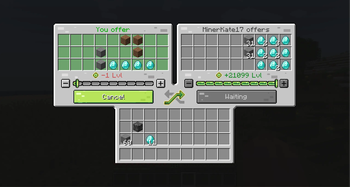
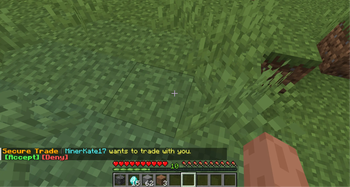
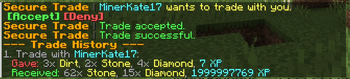
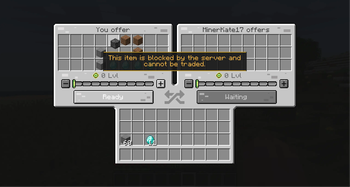
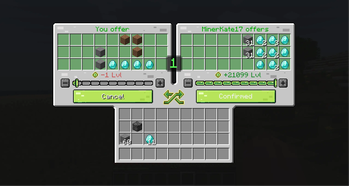
About this Mod
Secure Trade
Secure Trade is a player trade mod for multiplayer worlds, co-op servers, and modpacks.
Trade items and experience with another player from anywhere: across a base, across the map, or even across dimensions. No more running back home just to hand over ores, tools, drops, or XP.
Why Use It?
Minecraft multiplayer often splits players across different jobs and locations. One player may be mining, another crafting at base, and someone else exploring the Nether or a modded dimension.
Secure Trade keeps that flow intact: send a trade request, confirm the exchange, and keep playing.
By default, trades are not limited by distance or dimension. Server owners can keep that freedom or configure stricter rules for local-only trading, dimension restrictions, item blacklists, cooldowns, logging, and trade history.
How It Works
- Run
/trade <player>. - The other player accepts the request from chat.
- Both players get a shared trade screen.
- Each side adds items and/or XP.
- Both players confirm.
- A short countdown starts, then the exchange completes.
If either player changes their offer after confirming, the ready state is reset so both sides can review the updated trade.
Features
- Player trading from anywhere by default
- Cross-dimension trading between the Overworld, Nether, End, and modded dimensions
- Item and XP exchange in the same trade session
- Shared trade GUI with 27 offer slots per player
- Clickable chat requests with accept and deny actions
- Clear confirmation states and countdown before completion
- Custom trade sounds for requests, countdown, blocked items, cancellation, and successful trades
- Automatic readiness reset when items or XP change
- Optional distance limit for servers that want local-only trading
- Optional dimension allowlist or blocklist
- Optional item blacklist, including protected items inside supported containers
- In-GUI warning when an item is blocked by the server blacklist
- One active trade or pending request per player
- Request cooldowns to reduce spam
- Trade history command with grouped items, XP, and item hover tooltips
- Optional async transaction logging to
logs/securetrade.log - Disconnect-safe item return or drop handling
- Localization for 23 languages
- Fabric, Forge, and NeoForge support across supported Minecraft versions
Supported Versions
| Minecraft | Loaders |
|---|---|
| 26.2 | Fabric, NeoForge |
| 26.1.x | Fabric, NeoForge |
| 1.21.1 | Fabric, NeoForge |
| 1.20.1 | Fabric, Forge |
| 1.19.2 | Fabric, Forge |
| 1.18.2 | Fabric, Forge |
| 1.16.5 | Fabric, Forge |
Use the file that matches your Minecraft version and mod loader.
Commands
| Command | Description |
|---|---|
/trade <player> |
Sends a trade request. If both players request each other, the trade opens immediately. |
/trade accept |
Accepts the current pending trade request. |
/trade deny |
Denies the current pending trade request. |
/trade history |
Shows recent trades for the player, including items and XP. |
Configuration
The server configuration file is created at:
config/securetrade-server.toml
Available Versions
How to Install Secure Trade on Your Server
Order Server
Order a Minecraft Java server with at least 3 GB RAM (4 GB recommended).
Set fabric Loader
In the panel under "Egg", select the fabric loader and matching Minecraft version (26.2).
Install Mod
Open the mod browser in the dashboard and search for "Secure Trade". Click "Install" – done! Alternatively, upload the .jar via SFTP to the /mods folder.
Compatibility
Mod Loaders
Minecraft Versions
26.2, 26.1.2, 26.1.1 (+6 more)
Server-side
✓ RequiredRecommended RAM
4 GB(min. 3 GB)Frequently Asked Questions
Secure Trade server crashes on startup – what to do?
Most common cause: wrong fabric version or insufficient RAM. Check the server log (latest.log) for "OutOfMemoryError" or "Mixin" errors. With Mado Hosting: ensure at least 3 GB RAM is allocated and the loader matches the mod version (26.2). You can switch loaders with one click in the panel.
Is Secure Trade compatible with fabric and forge and neoforge?
Secure Trade officially supports fabric, forge, neoforge for Minecraft 26.2, 26.1.2, 26.1.1. Note: Forge and Fabric mods are NOT cross-compatible – pick one loader and stick with it. The Mado dashboard automatically detects incompatible loader combinations.
Server lagging with Secure Trade – how to optimize performance?
Recommended RAM: 4 GB (per 8 players). Use /spark profiler to check if Secure Trade consumes the most tick time. Common fixes: reduce server view-distance to 8-10, install "performant" or "starlight" as supplementary mods on Forge. With Mado Hosting, your server runs on NVMe SSDs with dedicated CPU cores for minimal latency.
Similar Mods




Rent Modded Server
Install Secure Trade with just one click on your server.