
Selection GUI Crafting - Continued
Modpack tool that allows crafting with the items you hold in your hands. All possible recipes are shown in a neat GUI, where multiple crafts can be queued at once. Comes with GroovyScript and CraftTweaker support.
Screenshots
About this Mod
This is a fork of Selection GUI Crafting by Gliese_832_c.
Fork? Rewrite! (Version 2.0.0+)
What started as a fork of the original mod, quickly turned into a rewrite. The original crafting system felt way to clunky and not user-friendly. The new system is much more intuitive and user-friendly. It also allows much more customization and is more flexible to benefit the needs of modpack developers. An added bonus is the support for GroovyScript. The old CraftTweaker support was rewritten as well to reflect the new system.
Re-Rewrite! (Version 3.0.0+)
Yep another rewrite. Now I finally took the time to transform the mod into something much more modular. So now GUIs can be opened either by items or blocks, each 'trigger' can tweaks the overall stats of the recipes. Additionally there are now ways to restrict recipes, for example you can now lock recipes behind Game Stages, Reskillable skill levels and even advancements. Furthermore I added the possibility to execute a set of commands if the general recipe builder wasn't powerful enough. This update also comes with an overhauled JEI integration and various other quality of life improvements!
What even is this?
SelectionGUI Crafting gives modpack authors the ability to add crafting recipes into a selection GUI that is triggered by right-clicking while holding the right items. This could, for example, be used for clay recipes. Instead of manually arranging clay balls in a different way in a crafting table, it would be possible to make it so that you right-click with a spatula in one hand, clay in the other, and just select the clay item you want to make. Another use example would be forging. Right-click with a hammer in one hand, an ingot in the other, and select your desired toolhead.
CraftTweaker & GroovyScript Integration (Version 3.0.0+)
I tried to make them as similar as possible. I'll publish additional documentation to the GroovyScript wiki as well as the CraftTweaker wiki. Below are a few examples, while I'll setup proper documentation.
CraftTweaker
val test = mods.selectionguicrafting.category.categoryBuilder();
test.id("test");
test.trigger(<minecraft:apple>);
test.trigger(<minecraft:diamond_pickaxe>, 10.0, 0.1, 10.0);
test.trigger(<minecraft:grass>.asBlock(), 2.0, 2.0, 2.0);
test.register();

val myRecipe = mods.selectionguicrafting.recipe.recipeBuilder();
myRecipe.category("test");
myRecipe.output(<minecraft:sand> * 2);
myRecipe.input(<minecraft:snow> * 3);
myRecipe.input(<ore:blockGlass>);
myRecipe.input(<minecraft:diamond_pickaxe>, 10);
myRecipe.register();
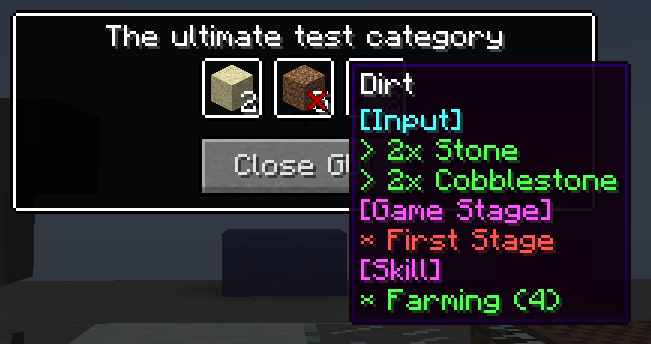
mods.selectionguicrafting.recipe.recipeBuilder().category("test").output(<minecraft:dirt> * 5).input(<minecraft:stone> * 2).input(<minecraft:cobblestone> * 2).gamestage(["my_first_stage"]).skill("reskillable.farming", 4).register();
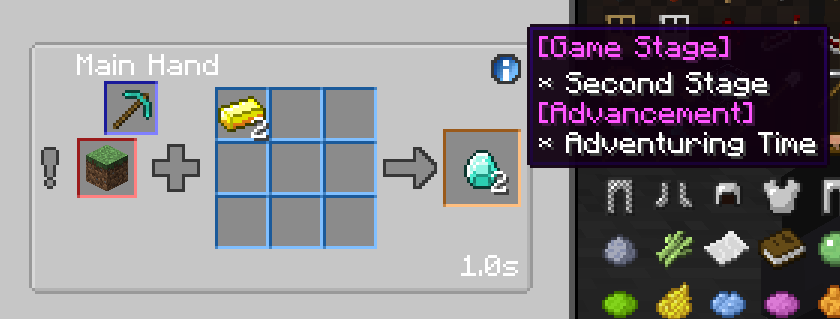
mods.selectionguicrafting.recipe.recipeBuilder().category("test").output(<minecraft:diamond> * 2).input(<minecraft:gold_ingot> * 2).mainHand(<minecraft:diamond_pickaxe>, 5).gamestage(["my_second_stage"]).advancement(["minecraft:adventure/adventuring_time"]).register();
GroovyScript
Crafting Category:
All recipes in the mod are divided into categories. Each category has its own set of recipes. Each category can have its own texture for the background, border, frame, decoration, and progress bar. The category can also have its own sounds, particles, can specify how the sounds are played, if recipes in the category can be added to the crafting queue, and how the output items are handed to the player.

mods.selectionguicrafting.category.removeByName('dummy_category_1')
// mods.selectionguicrafting.category.removeAll()
mods.selectionguicrafting.category.categoryBuilder()
    .id('dummy_category')
    .trigger(item('minecraft:diamond'))
    .background('selectionguicrafting:textures/gui/background/wood.png')
    .register()
mods.selectionguicrafting.category.categoryBuilder()
    .id('blub')
    .trigger(item('minecraft:stone_shovel'))
    .background('selectionguicrafting:textures/gui/background/lake.png')
    .backgroundType('SINGLE_CUT')
    .register()
mods.selectionguicrafting.category.categoryBuilder()
    .id('dead')
    .trigger(block('minecraft:snow'))
    .background('selectionguicrafting:textures/gui/background/deadlands.png')
    .decoration('selectionguicrafting:textures/gui/decor/gold.png')
    .border('selectionguicrafting:textures/gui/background/wood.png')
    .backgroundType('SINGLE_CUT')
    .register()
Crafting Recipe:
Creates a recipe that is shown in the specified category. Each recipe requires at least an input and output. There can also be an optional input for either hand. The recipe can have its own frame, sounds, particles, progress bar, can specify how the sounds are played, if the recipe can be added to the crafting queue, how the output items are handed to the player, how much durability is consumed if the tool is a damageable item, the crafting time, and how much XP is rewarded. Most of these have a fallback to the category settings.
// mods.selectionguicrafting.recipe.removeByCategory('dummy_category')
mods.selectionguicrafting.recipe.removeByInput(item('minecraft:cobblestone'))
mods.selectionguicrafting.recipe.removeByOutput(item('minecraft:stone'))
// mods.selectionguicrafting.recipe.removeAll()
mods.selectionguicrafting.recipe.recipeBuilder()
    .category('dummy_category')
    .input(item('minecraft:stone') * 3)
    .output(item('minecraft:cobblestone') * 2, 0.5f)
    .time(200)
    .xp(1)
    .sound('minecraft:block.anvil.land', 1.0f, 1.0f)
    .register()
mods.selectionguicrafting.recipe.recipeBuilder()
    .category('blub')
    .input(item('minecraft:diamond'))
    .output(item('minecraft:wheat_seeds') * 5, 0.5f)
    .register()
mods.selectionguicrafting.recipe.recipeBuilder()
    .category('dummy_category')
    .input(item('minecraft:stone') * 32)
    .output(item('minecraft:diamond') * 50, 0.5f)
    .output(item('minecraft:clay') * 2, 0.1f)
    .time(200)
    .xp(1)
    .sound('minecraft:block.anvil.land', 1.0f, 1.0f)
    .register()
mods.selectionguicrafting.recipe.recipeBuilder()
    .category('dead')
    .input(item('minecraft:wheat_seeds') * 3)
    .output(item('minecraft:sand') * 2)
    .time(40)
    .queueable(false)
    .outputType('DROP')
    .xp(1)
    .register()
mods.selectionguicrafting.recipe.recipeBuilder()
    .category('dead')
    .input(item('minecraft:stick') * 3)
    .output(item('minecraft:sand') * 2)
    .frame('selectionguicrafting:textures/gui/frame/iron.png')
    .time(40)
    .queueable(false)
    .command('kill @p')
    .register()
Available Versions
How to Install Selection GUI Crafting - Continued on Your Server
Order Server
Order a Minecraft Java server with at least 3 GB RAM (4 GB recommended).
Set forge Loader
In the panel under "Egg", select the forge loader and matching Minecraft version (1.12.2).
Install Mod
Open the mod browser in the dashboard and search for "Selection GUI Crafting - Continued". Click "Install" – done! Alternatively, upload the .jar via SFTP to the /mods folder.
Compatibility
Mod Loaders
Minecraft Versions
1.12.2
Server-side
✓ RequiredRecommended RAM
4 GB(min. 3 GB)Frequently Asked Questions
Selection GUI Crafting - Continued server crashes on startup – what to do?
Most common cause: wrong forge version or insufficient RAM. Check the server log (latest.log) for "OutOfMemoryError" or "Mixin" errors. With Mado Hosting: ensure at least 3 GB RAM is allocated and the loader matches the mod version (1.12.2). You can switch loaders with one click in the panel.
Is Selection GUI Crafting - Continued compatible with forge?
Selection GUI Crafting - Continued officially supports forge for Minecraft 1.12.2. The Mado dashboard automatically detects incompatible loader combinations.
Server lagging with Selection GUI Crafting - Continued – how to optimize performance?
Recommended RAM: 4 GB (per 8 players). Use /spark profiler to check if Selection GUI Crafting - Continued consumes the most tick time. Common fixes: reduce server view-distance to 8-10, install "performant" or "starlight" as supplementary mods on Forge. With Mado Hosting, your server runs on NVMe SSDs with dedicated CPU cores for minimal latency.
Similar Mods




![[ETF] Entity Texture Features](https://cdn.modrinth.com/data/BVzZfTc1/af683d206d50b05258d865b0d6e4aa2f2cee12f2_96.webp)
![[EMF] Entity Model Features](https://cdn.modrinth.com/data/4I1XuqiY/6e5bbd0d06b1741bfdab6c0cfab6de8fdaf0064c_96.webp)
Rent Modded Server
Install Selection GUI Crafting - Continued with just one click on your server.