
Sessility
AFK utilities for servers: Recolor AFK players in tab list, exclude AFK players from the sleeping requirement, broadcast messages when players go AFK, and more.
Screenshots

About this Mod
Sessility is a Minecraft Fabric utility mod that keeps track of sessile creatures, more often known as "AFK players".
sessile
adjective
- (of an organism) permanently rooted in place; lacking mobility
- (of a plant) attached without a stalk
Feature summary
- Change the color of sessile players in the player tab list
- Exclude sessile players from the player sleeping requirement
- Configure the amount of idle time before a player is considered sessile
- Broadcast a chat message when a player becomes either sessile or motile
- Hide sessile players in the player tab list, server player list, or server player count
- Choose if player rotation should be used to determine motility

By default, any player idling for more than 120 seconds is considered sessile. Sessile players are given a distinct color in the player tab overlay to distinguish them from other players. The sessile idle time and tab display color are both configurable.

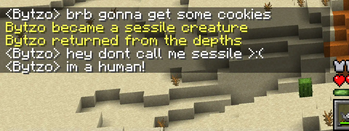
You can also configure custom messages when a player changes their sessility. These messages are disabled by default and will only display if a configured message is present.

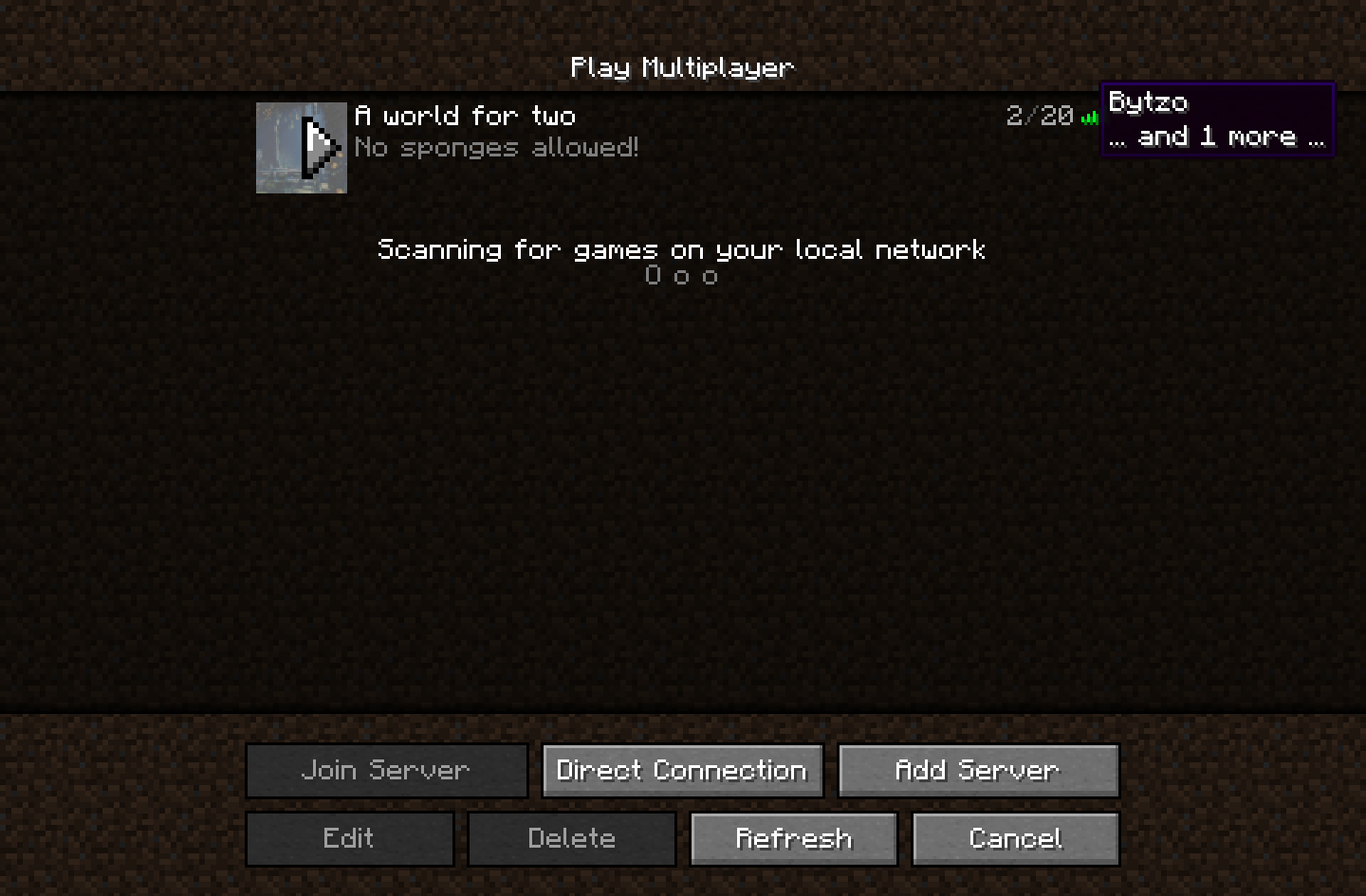
Sessility also allows you to configure whether or not sessile players are displayed in the server player list (shown above), the server player count, and the player tab list. Each one of these properties can be toggled individually.
Configuration file
# Detect player actions (attacking, using, etc.) as motility.
# Default: true
detect-action=true

# Detect player rotation as motility.
# Default: true
detect-rotation=true

# Hide sessile players in the server player list.
# Default: false
hide-sessile-in-server-list=false

# Hide sessile players in the player tab list.
# Default: false
hide-sessile-in-tab-list=false

# The message to broadcast when a player becomes motile (the opposite of sessile),
# formatted as raw JSON text. The arguments of all translatable components will contain
# one entry for the player name. See https://minecraft.wiki/w/Raw_JSON_text_format.
# (note: leave empty to disable motile messages)
# Default: (empty)
message-motile={"translate"\:"%s returned from the depths","color"\:"yellow"}

# The message to broadcast when a player becomes sessile, formatted as raw JSON text.
# The arguments of all translatable components will contain one entry for the player name.
# See https://minecraft.wiki/w/Raw_JSON_text_format.
# Default: (empty)
message-sessile={"translate"\:"%s became a sessile creature","color"\:"yellow"}

# The color of the sessile display name. This can be either a color name or a six-digit hex code.
# Default: gray
sessile-display-color=\#aaaaaa

# The idle time (in seconds) before a player is considered sessile.
# Default: 240
sessile-timeout=720

# Exclude sessile players from the server player count.
# Default: false
skip-sessile-in-player-count=false

# Exclude sessile players from the player sleeping requirement.
# Default: true
skip-sessile-in-sleep-count=true
Available Versions
How to Install Sessility on Your Server
Order Server
Order a Minecraft Java server with at least 3 GB RAM (4 GB recommended).
Set fabric Loader
In the panel under "Egg", select the fabric loader and matching Minecraft version (26.1.2).
Install Mod
Open the mod browser in the dashboard and search for "Sessility". Click "Install" – done! Alternatively, upload the .jar via SFTP to the /mods folder.
Compatibility
Mod Loaders
Minecraft Versions
26.1.2, 26.1.1, 26.1 (+23 more)
Server-side
✓ RequiredRecommended RAM
4 GB(min. 3 GB)Frequently Asked Questions
Sessility server crashes on startup – what to do?
Most common cause: wrong fabric version or insufficient RAM. Check the server log (latest.log) for "OutOfMemoryError" or "Mixin" errors. With Mado Hosting: ensure at least 3 GB RAM is allocated and the loader matches the mod version (26.1.2). You can switch loaders with one click in the panel.
Is Sessility compatible with fabric?
Sessility officially supports fabric for Minecraft 26.1.2, 26.1.1, 26.1. The Mado dashboard automatically detects incompatible loader combinations.
Server lagging with Sessility – how to optimize performance?
Recommended RAM: 4 GB (per 8 players). Use /spark profiler to check if Sessility consumes the most tick time. Common fixes: reduce server view-distance to 8-10, install "performant" or "starlight" as supplementary mods on Forge. With Mado Hosting, your server runs on NVMe SSDs with dedicated CPU cores for minimal latency.
Similar Mods




Rent Modded Server
Install Sessility with just one click on your server.